Modifying macros – Contour Design Shuttle-Xpress NLE Multimedia Controller (Black) User Manual
Page 32
6.3 Modifying
macros
This section describes the behavior of the buttons that act on the steps of a macro:
•
New Action button
This button allows you to add an action below the selected action
or group.
If nothing is selected in the Action Sequence sub-window, the new action will be added
after the last action of the last group.
•
New Group button (new Button Press)
This button allows you to add a new group
or to create a group of existing actions, depending on the current selection:
-
if a group is selected, a new group will be created before the existing group;
-
if an action is selected, the selected action and all the actions listed below it will be
grouped under a new Button Press.
•
Remove button
When an
action
is selected the action will be removed.
When a
group
is selected:
-
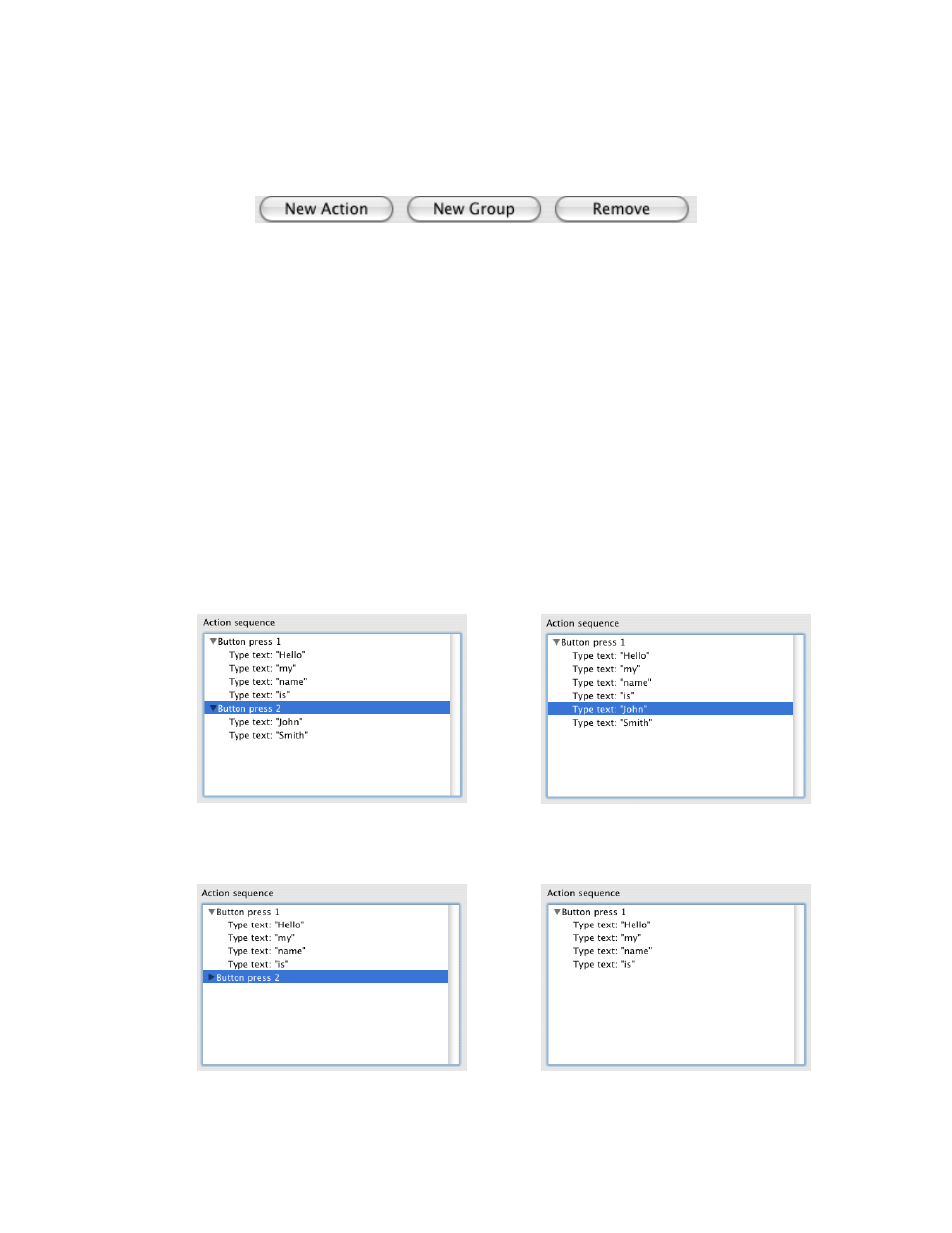
if it’s expanded, the Button Press is deleted and the actions of this group will be
added to the previous group, as shown in Fig. 6-5 and Fig. 6-6.
Fig. 6-5
Fig. 6-6
-
if it’s collapsed, the whole group is deleted (see Fig. 6-7 and Fig. 6-8).
Fig. 6-7
Fig. 6-8
Contour Shuttle Multimedia Controllers
26