Introduction to shuttle devices, 1introduction to shuttle devices – Contour Design Shuttle-Xpress NLE Multimedia Controller (Black) User Manual
Page 7
1
Introduction to Shuttle Devices
Contour’s Shuttle devices have been designed to enhance the productivity of multimedia
content creators, but they also increase productivity in many other types of applications,
including:
•
graphics and photo editing
•
word processing
•
spreadsheet manipulation
•
internet operations
•
medical imaging
•
any application that uses key commands
Contour Shuttle devices consist of two (2) components: the ergonomically designed device itself
and the software that allows you to manage it.
All Contour Shuttle
devices
have a Jog wheel and a Shuttle ring that are programmable.
The ShuttleXpress has five (5) programmable buttons, the ShuttlePRO has thirteen (13)
programmable buttons, and the ShuttlePRO v2 has fifteen (15). The two top rows of buttons on
the ShuttlePRO series have removable caps so the included labels can be inserted for quick
reference as to which functions each button is programmed to perform.
Buttons, Jog wheel and Shuttle ring will be referred to as Shuttle components.
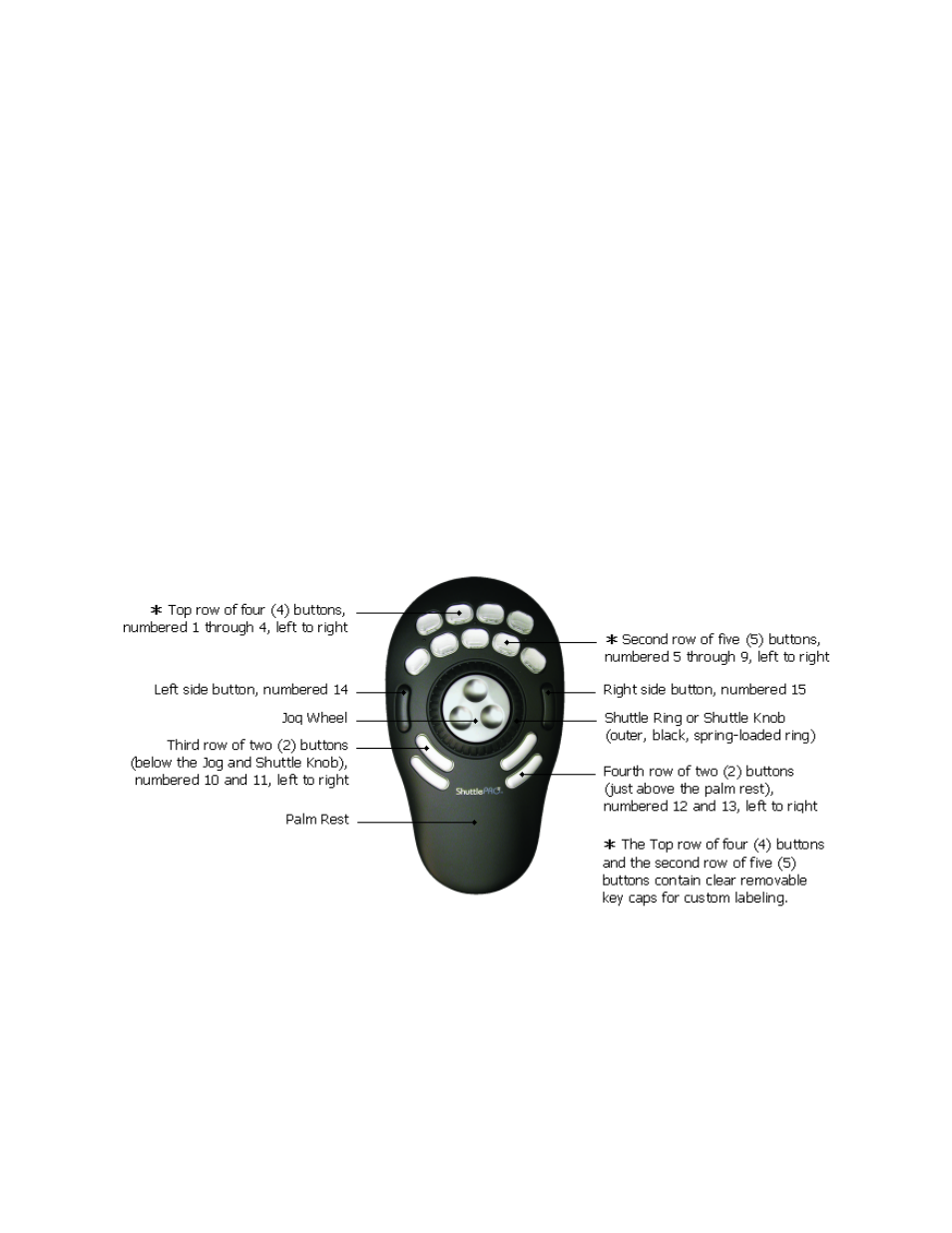
Fig. 1-1
ShuttlePRO v2 Layout
With respect to the central Jog Wheel and Shuttle Ring, the ShuttlePRO v2 has:
- two rows of buttons above,
- two rows of buttons below,
- one left-side button,
- one right-side button.
Buttons are numbered from left to right, from the top row to the bottom row, with the exception of the side buttons that are numbered the last. This leads to the following
layout:
- buttons 1 to 4 are on the top row,
- buttons 5 to 9 are on the second row,
- buttons 10 to 11 are on the third row,
- buttons 12 to 13 are on the fourth row,
- button 14 is the left-side button,
- button 15 is the right-side button.
The ShuttlePRO has the same layout of the ShuttlePRO v2 but it doesn't have the left-side and the right-side buttons.
The ShuttleXpress has one single row of five buttons above the Jog Wheel and Shuttle Ring. Buttons are numbered 1 to 5 from left to right.
Contour Shuttle Multimedia Controllers
1