Installing shuttle device software – Contour Design Shuttle-Xpress NLE Multimedia Controller (Black) User Manual
Page 5
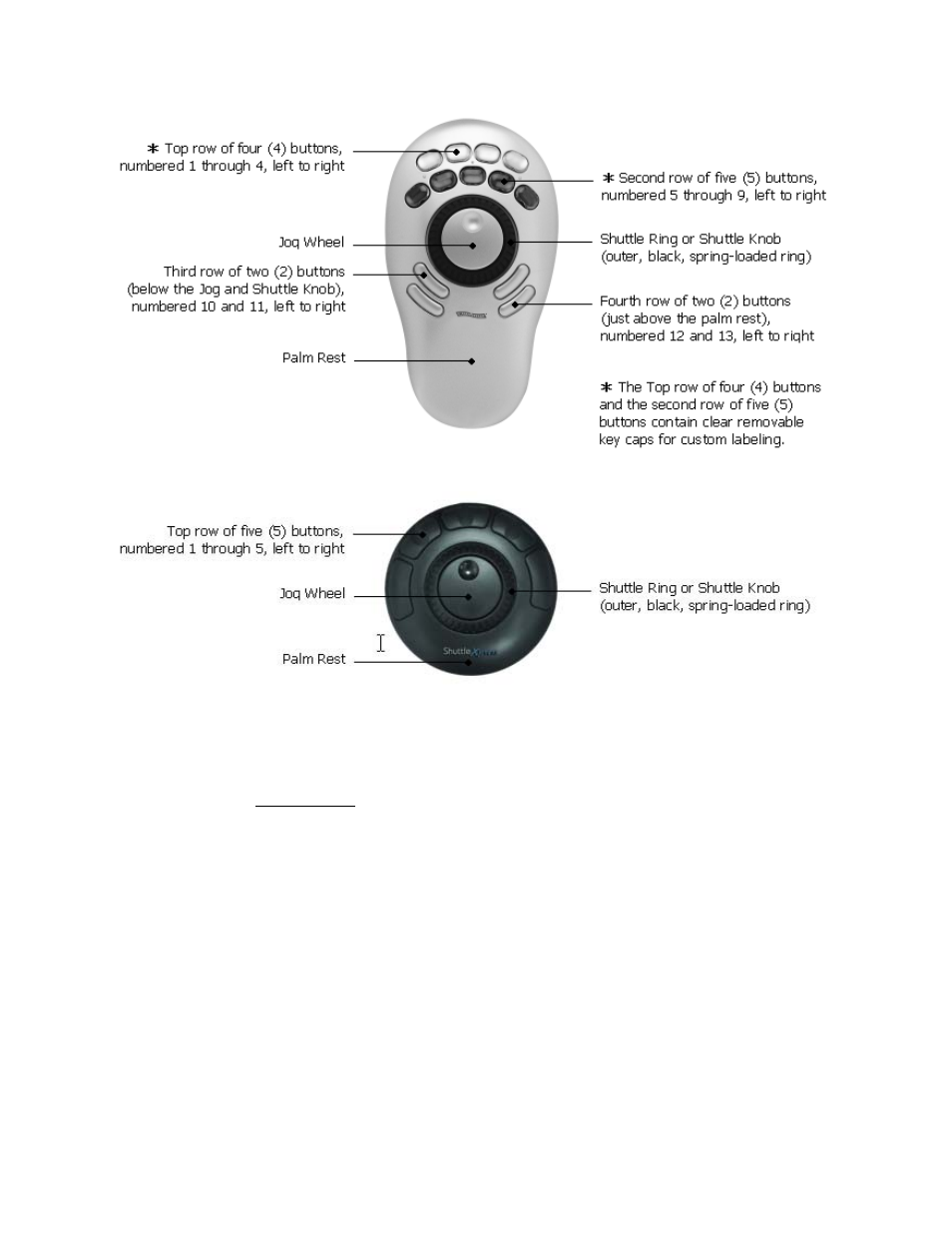
Fig. 1-2
ShuttlePRO Layout
Fig. 1-3
ShuttleXpress Layout
The Shuttle device
software
allows you to manage a specific configuration of your Shuttle
device for every application you have on your computer.
The software will automatically select the appropriate configuration according to the current
active application.
The installation package provides pre-installed settings (factory settings) for many common
applications; you can modify these settings at anytime and/or create new settings for other
applications, through the Shuttle device Control Panel.
1.1 Installing Shuttle Device Software
It is recommended to
install the software before plugging
your Shuttle device into any
available USB port.
Shuttle devices are “plug and play”: there is no need to shutdown and restart your computer
when you plug or unplug the device from a USB port.
Contour Shuttle Multimedia Controllers
2