Shuttle device control panel, Control panel overview, 2shuttle device control panel – Contour Design Shuttle-Xpress NLE Multimedia Controller (Black) User Manual
Page 7
2
Shuttle Device Control Panel
The Shuttle Device Control Panel is the component of the software that allows you to manage
your Shuttle device by defining and/or modifying application settings.
Application settings are the individual sets of actions associated to the Shuttle components for a
pre-determined application. Stated differently, the Control Panel manages application settings.
Changes performed on the application settings are enabled as soon as you click on the Apply or
OK button in the Control Panel.
The Control Panel does
not
need to be open when you use the Shuttle device.
The software automatically detects the program you are using and automatically switches to
the correct application settings associated with the application.
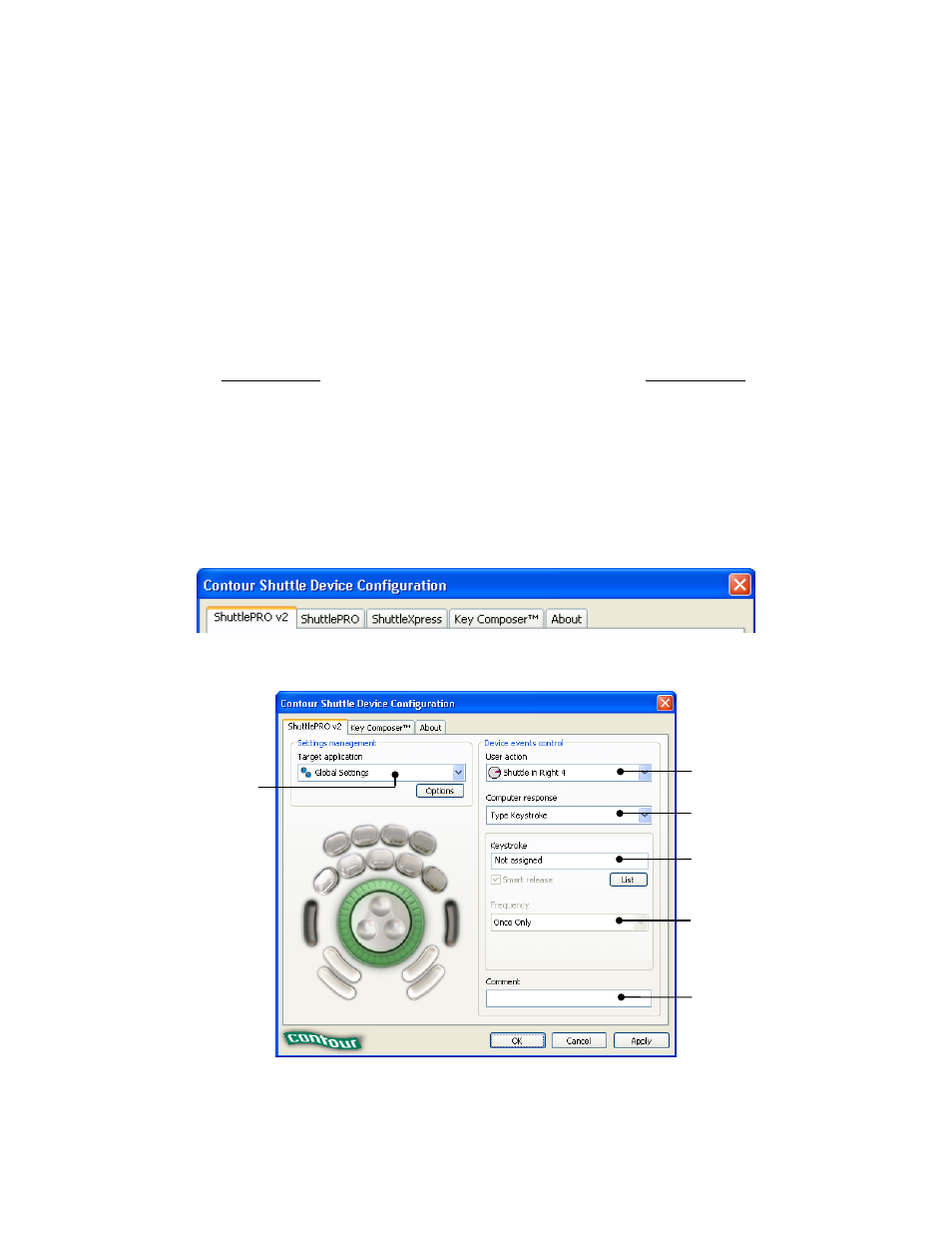
2.1 Control Panel Overview
The Shuttle device Control Panel provides a specific properties page for each type of Contour
Shuttle device. The page related to your Shuttle device will be enabled as soon as you plug the
device into your computer for the first time and will remain even after unplugging the device.
The Key Composer™ tab is enabled together with the ShuttlePRO v2 tab only.
Fig. 2-1
User Action Menu
Target Application
Menu
Computer Response
Menu
Keystroke Field
Frequency Menu
Comment Field
Contour Shuttle Multimedia Controllers
4