Frequently asked questions continued – Contour Design Shuttle-Xpress NLE Multimedia Controller (Black) User Manual
Page 8
7. I want to use the Shuttle with software I am developing but don’t want to use the Shuttle Control Panel/Device
Configuration. Is there a software development kit for the Shuttle?
Yes, please email us your information at
. Someone will contact you with the SDK files.
Frequently Asked Questions Continued
Shuttle PRO v2 and Xpress
/7
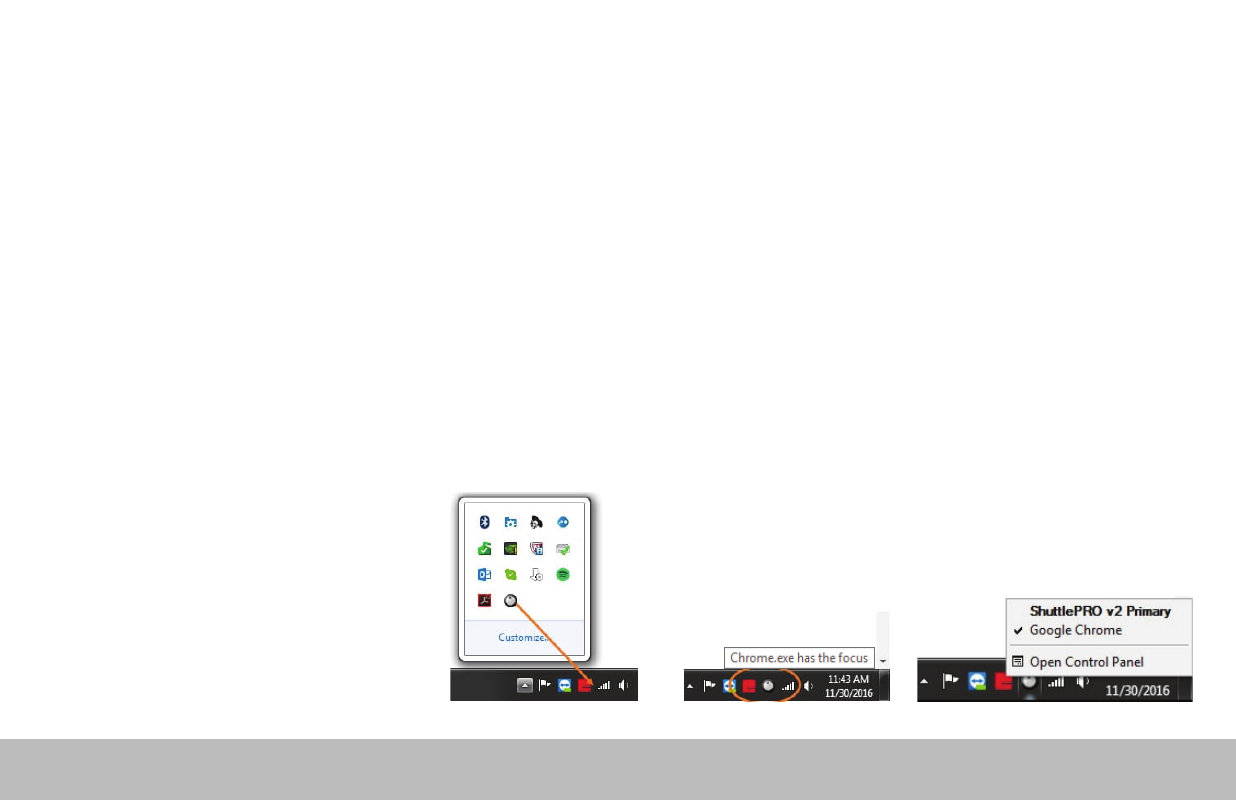
8. Why can’t I leave the Shuttle icon with the hidden icons and what does the term “in focus” mean? (Windows users)
The term “in focus” refers to which program is in the foreground. The Shuttle works much like a keyboard and will respond to the
program that is in the foreground. To use the Shuttle on another program, you will need to click on the program before using the
Shuttle.
Moving the Shuttle icon to the clock area allows you to confirm which settings are being used for the program that is in focus. If you have
more than one setting created for a specific program, this allows you to switch between settings. Also, there are some programs that have
more than one default setting available. This will help prevent any confusion if you are changing the custom settings and not noticing the
changes while using the Shuttle.
To move the Shuttle icon, simply click the
up arrow near the clock area, then drag
the Shuttle icon to any area near the clock.
Once the Shuttle icon is always visible, you
will be able to see which program is in
focus by hovering the cursor over the
Shuttle icon. When you click the icon, the
settings selected by the Shuttle driver will
be displayed with a check mark next to it.