Setting up cubase remote control, Computer settings, Dtx-multi 12 settings – Yamaha DTX-Multi12 Multi-Pad Electronic Percussion Instrument User Manual
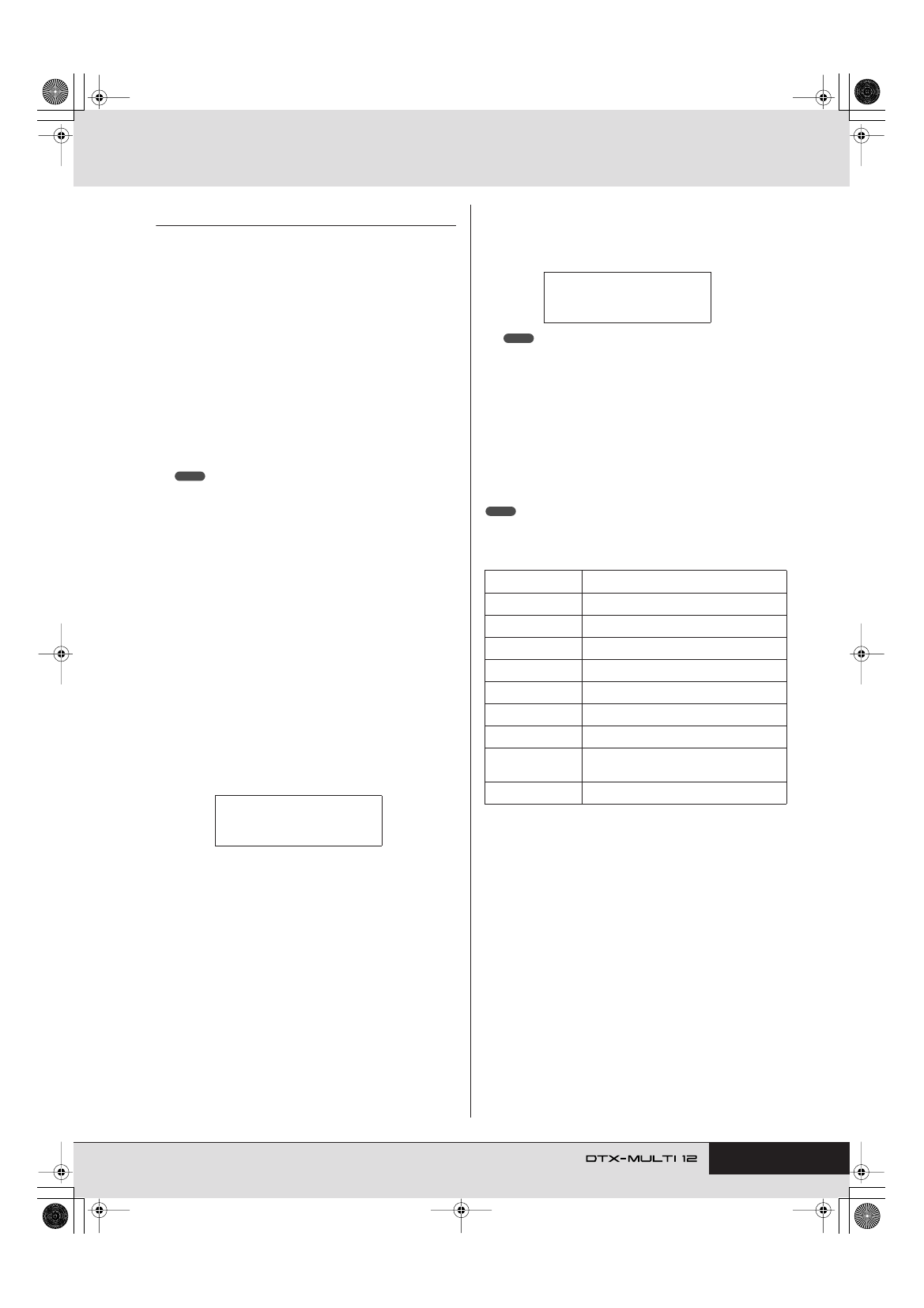
Page 15: Button functions in cubase remote mode, Util6-9≥≥≥<midi> midi≥in/out=usb, Cubase≥≥≥>> <<≥≥≥remote
Setting Up
Owner’s Manual
15
Setting up Cubase Remote Control
Using a special feature, the DTX-MULTI 12 can operate as a
remote controller for Cubase. For example, you can operate the
Cubase transport, turn its metronome on or off, and control vari-
ous other functions from the instrument’s front panel, signifi-
cantly increasing the efficiency of your music production
workflow.
■
Computer settings
When setting up Cubase remote control for the first time, com-
plete the following steps to configure your computer correctly.
1
Download the latest version of the DTX-MULTI 12
Extension from the following web page.
Save the compressed file in a convenient location and then
expand it.
http://dtxdrums.yamaha.com
• Ensure that the latest USB MIDI driver is installed on your computer
• Information on system requirements is also provided on the above web
page.
• The DTX-MULTI 12 Extension may be revised and updated without
prior notice. Before installing, visit the above web page to confirm the
latest related information and ensure that you have the most up-to-
date version.
2
Execute the expanded DTX-MULTI 12 Extension
to carry out the required installation procedure.
For more details, refer to the owner’s manual
included in the downloaded package.
■
DTX-MULTI 12 settings
Whenever the Cubase Remote function is to be used, the follow-
ing steps must be completed on the DTX-MULTI 12.
1
Within the UTILITY setting area, navigate to the
MIDI In/Out page (UTIL6-9) and set MIDI IN/OUT to
“USB”.
2
Ensure that the DTX-MULTI 12 is connected to
your computer in the correct manner, and then
launch Cubase.
For more details regarding connection, see page 13.
3
Hold down the [SHIFT] button and press the
[MIDI] button.
The message “Cubase Remote” will be displayed to confirm
that the function has been activated.
• When Cubase Remote mode has been activated, those front-panel
buttons that can be used will light up.
4
To deactivate Cubase Remote mode, again hold
down the [SHIFT] button and press the [MIDI] but-
ton.
■
Button Functions in Cubase Remote
Mode
• For more details regarding the operation of Cubase Remote mode, refer to
the owner’s manual included in the downloaded package.
NOTE
UTIL6-9≥≥≥<MIDI>
MIDI≥IN/OUT=USB
Button
Operation
[SHIFT] + [MIDI]
Turns the Cubase Remote function on and off.
[KIT]
Opens the VSTi window.
[PTN]
Starts and stops playback.
[SHIFT] + [PTN]
Starts recording.
[-/DEC], [+/INC]
Increases or decreases a preset by 1.
[
B
]
Rewinds the transport (REW).
[
C
]
Fast forwards the transport (FF).
[
D
]
Returns the transport to the start of the song
(TOP).
Turns the click track on and off.
<<≥≥≥Cubase≥≥≥>>
<<≥≥≥Remote≥≥≥>>
NOTE
NOTE
E