Yamaha DTX-Multi12 Multi-Pad Electronic Percussion Instrument User Manual
Page 22
22
Owner’s Manual
Making Your Own Patterns
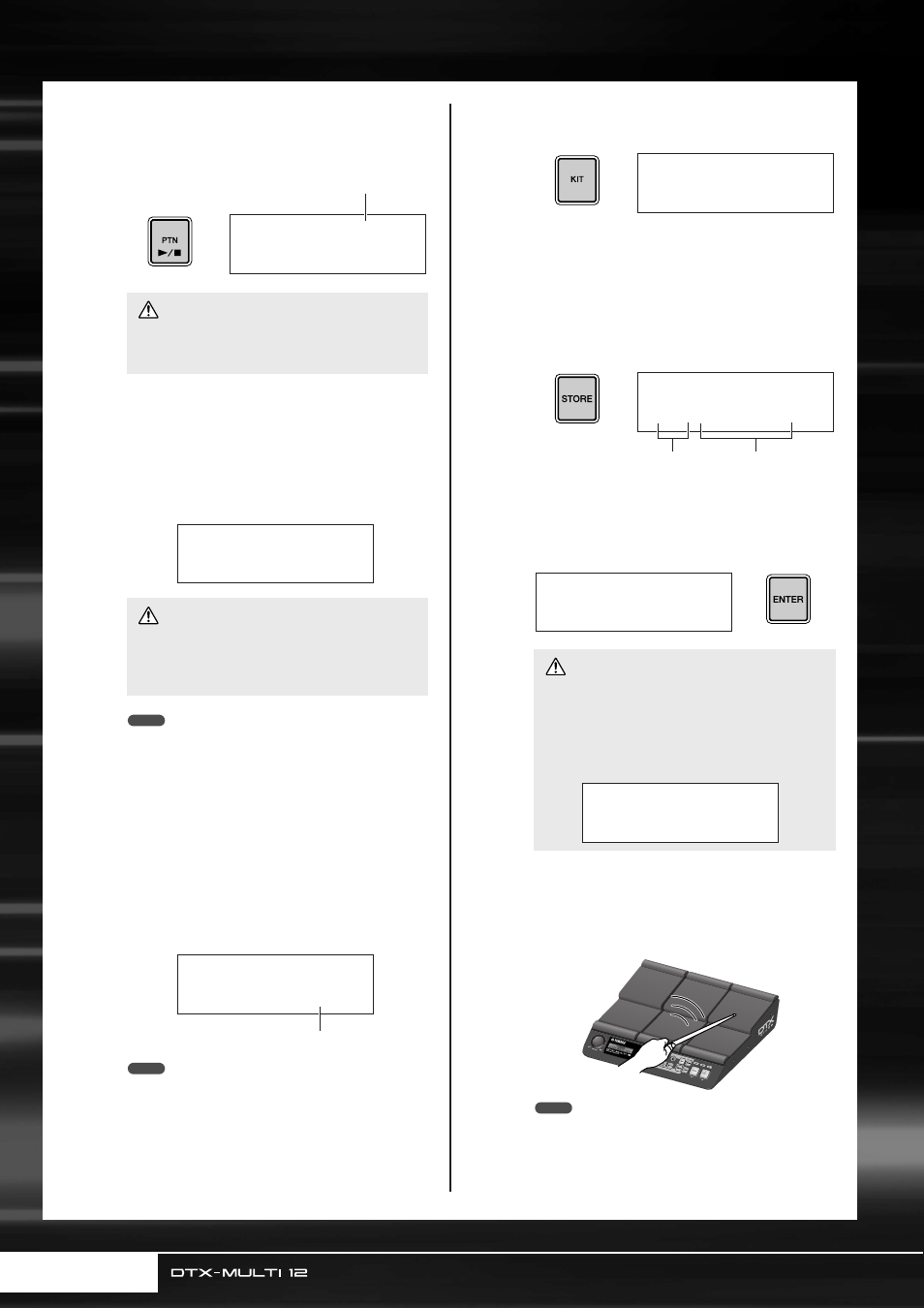
5
Press the [PTN] button to start recording.
The DTX-MULTI 12 will count you in over two mea-
sures. Then, play the pattern you want to record in
time with the click track.
6
Recording will end automatically after the
number of measures set as the pattern
length in Step 4 above.
The message ”Please keep power on...” will be dis-
played for a short period of time as data is being
stored.
• Recording can be stopped at any time by pressing the [PTN]
button. All performance data recorded up to that point will be
stored.
• If looped playback was selected in Step 4 above, recording
can be ended by pressing the [PTN] button.
7
When the Pad Assign page is displayed,
strike Pad 6 to display pad number
,
and then press the [ENTER] button.
Alternatively, you can use the [-/DEC] and [+/INC]
buttons to select
on this page.
• If you set PadAssign to “off”, the recorded pattern will not be
assigned to any pad.
• Although you can freely assign the recorded pattern to a pad
at any time, it is best to use a pad from the drum kit selected
in Step 1 above. If you assign it to a pad from another kit, the
pattern may not play as recorded.
8
Press the [KIT] button to access the KIT
setting area.
9
Press the [STORE] button and store the
current kit and its new pattern assignment
as a User kit.
As shown here, select an empty User kit using the [-/
DEC] and [+/INC] buttons, and then press the
[ENTER] button.
10
When asked to confirm that you want to
store the kit, press the [ENTER] button to
proceed.
11
With the stored drum kit selected, strike
Pad 6 to hear the pattern that you
assigned.
• Up to 50 User patterns can be recorded on your DTX-MULTI
12. If an attempt is made to record more than this number,
the message “Seq data is not empty” will be displayed and
the recording process will end. In such a case, delete
unneeded User patterns (see page 79) and begin recording
again.
• Turning off the DTX-MULTI 12 while recording can
result in data for all User patterns being lost and
must, therefore, be avoided.
• Turning off the DTX-MULTI 12 while the message
”Please keep power on...” is being displayed can
result in all User-pattern data being lost and must,
therefore, be avoided.
REC≥Meas=≥001
Now≥Recording...
Measure currently being recorded
CAUTION
≥Please≥keep≥≥≥
≥power≥on...
CAUTION
NOTE
º§
º§
REC
≥PadAssign=º§
Pad number
NOTE
• The message ”Please keep power on...” will be dis-
played while data is being stored. It is very important
that the DTX-MULTI 12 is not turned off until this
message disappears. If the instrument were to be
turned off at this time, data for all User kits could be
permanently lost.
KIT1
P001:PercsMaster
VCE≥Store≥to
U001:User≥Kit
User kit number
User kit name
≥≥≥KIT≥Store
≥Are≥you≥sure?≥≥
CAUTION
≥≥Please≥keep
≥≥power≥on...
NOTE