Voice tuning, volume & pan, Vce2 voice tuning, volume & pan, Voice tuning page – Yamaha DTX-Multi12 Multi-Pad Electronic Percussion Instrument User Manual
Page 57: Voice volume page, Voice pan page, Vce2-1≥-º¡- ≥transpose=+≥0, Vce2-3≥-º¡-≥≥≥≥ç ≥≥≥≥pan=≥c
TRIGGER
Ref
erence
KIT
MIDI
V
OICE
UTILITY
W
A
VE
PA
TTERN
VOICE Setting Area (VCE)
Owner’s Manual
57
Voice Tuning, Volume & Pan
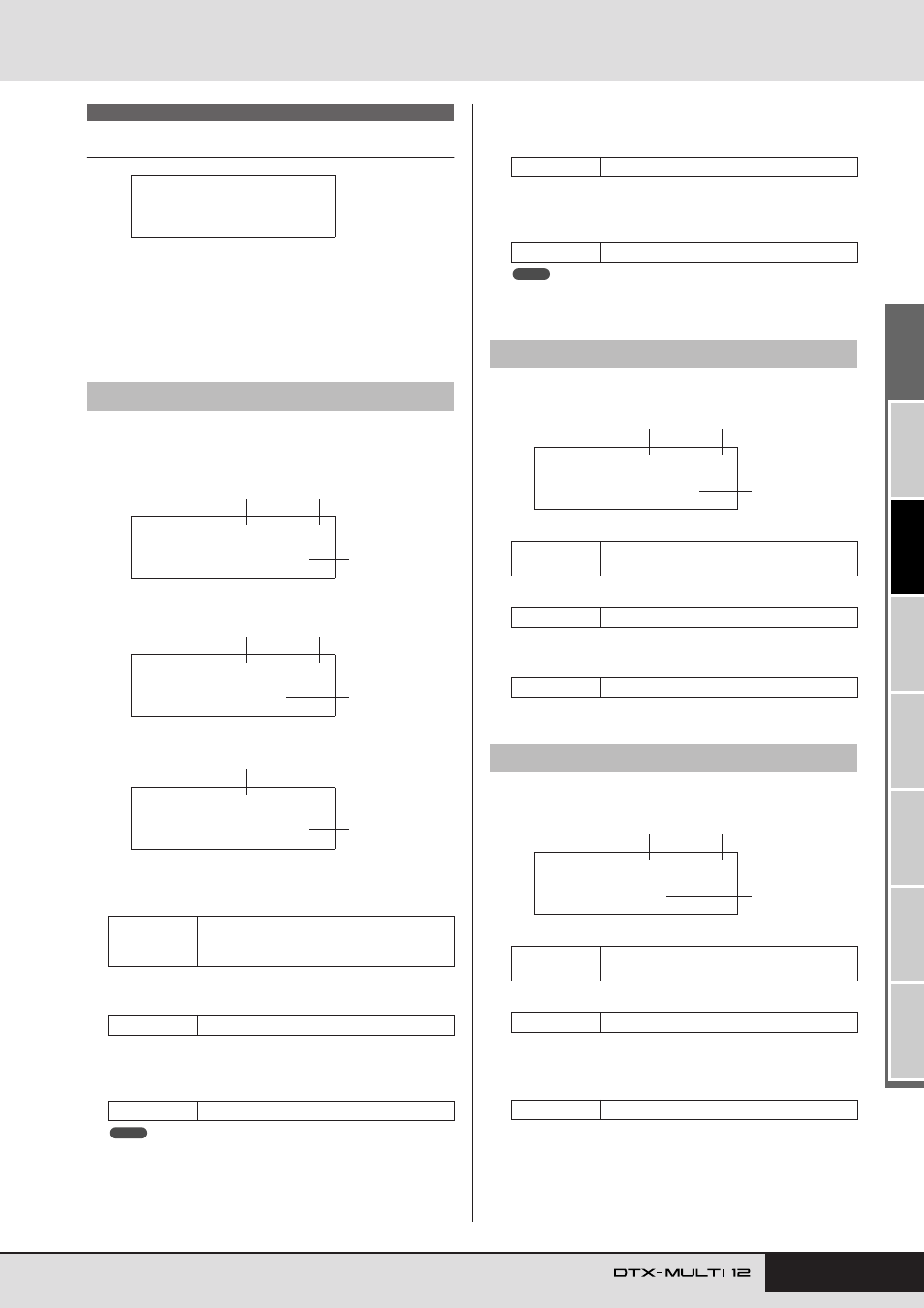
In the TUNE/OUTPUT section, you can set the tuning, volume,
and stereo panning of individual voices. With the TUNE/OUT-
PUT page (VCE2) displayed, press the [ENTER] button to access
its three parameter-setting pages (VCE2-1 to VCE2-3). You can
use the [
B
]/[
C
] buttons to navigate between these pages.
The parameters presented on the Voice Tuning page will depend
on the type of voice assigned to the pad in question.
Drum sounds and waves (i.e., imported audio files):
Instrument sounds (i.e., piano, guitar, etc.):
Patterns:
1
Pad number
Use this parameter to select the number of the pad or MIDI
note to be set.
B
Layer number
Use this parameter to select the layer to be set.
C
Tuning (Tune)
Use this parameter to adjust the tuning of the assigned voice
in one-cent steps.
• The term “cent” refers to one hundredth of a semitone (i.e., 100 cents
= 1 semitone).
D
Note
Use this parameter to set the pitch of the assigned voice as a
MIDI note number.
E
Transpose
Use this parameter to adjust the pitch of the assigned pattern
in one-semitone steps.
• Patterns triggered using MIDI channels 7 to 11 cannot be transposed.
On the Voice Volume page, you can set the volume of the selected
voice.
1
Pad number
B
Layer number
C
Volume
Use this parameter to set the volume of the selected voice.
On the Voice Pan page, you can set the stereo panning of the
selected voice.
1
Pad number
B
Layer number
C
Pan
Use this parameter to set the stereo panning of the selected
voice.
VCE2 TUNE/OUTPUT
VCE2-1
Voice Tuning page
Settings
01 to 12, 13, 13R1, 13R2, 14 to 17, FTSW
(foot switch), HHCL (hi-hat close), HHSP
(hi-hat splash), C#-1, or D-1 to A#5
Settings
A, B, C, or D
Settings
-24.00 to +0.0 to +24.00
VCE2
≥≥≥TUNE/OUTPUT
VCE2-1≥-º¡-≥≥≥≥ç
≥≥≥Tune=+≥0.00
3
1
2
VCE2-1≥-º¡-≥≥≥≥ç
≥≥≥Note=C#-1
4
1
2
VCE2-1≥-º¡-
≥Transpose=+≥0
1
5
NOTE
Settings
C-2 to G8
Settings
-24 to +0 to +24
VCE2-2
Voice Volume page
Settings
01 to 12, 13, 13R1, 13R2, 14 to 17, FTSW,
HHCL, HHSP, C#-1, or D-1 to A#5
Settings
A, B, C, or D
Settings
0 to 127
VCE2-3
Voice Pan page
Settings
01 to 12, 13, 13R1, 13R2, 14 to 17, FTSW,
HHCL, HHSP, C#-1, or D-1 to A#5
Settings
A, B, C, or D
Settings
L63 to C to R63
NOTE
VCE2-2≥-º¡-≥≥≥≥ç
≥≥≥Volume=100
3
1
2
VCE2-3≥-º¡-≥≥≥≥ç
≥≥≥≥Pan=≥C
3
1
2