Voice timbre, Vce3 voice timbre, Attack time page – Yamaha DTX-Multi12 Multi-Pad Electronic Percussion Instrument User Manual
Page 58: Decay time page, Release time page, Filter page, Vce3 ≥≥≥≥≥≥tone, Vce3-1≥-º¡-≥≥≥≥ç ≥≥≥attack=+≥0, Vce3-4≥-º¡-≥≥≥≥ç ≥fc=+≥0≥≥q=+≥0
58
Owner’s Manual
VOICE Setting Area (VCE)
Voice Timbre
In the TONE section, you can adjust the tone (or timbre) of the
preset voice, pattern, or wave assigned to the pad in question.
With the TONE page (VCE3) displayed, press the [ENTER] but-
ton to access its four parameter-setting pages (VCE3-1 to VCE3-
4). You can use the [
B
]/[
C
] buttons to navigate between these
pages.
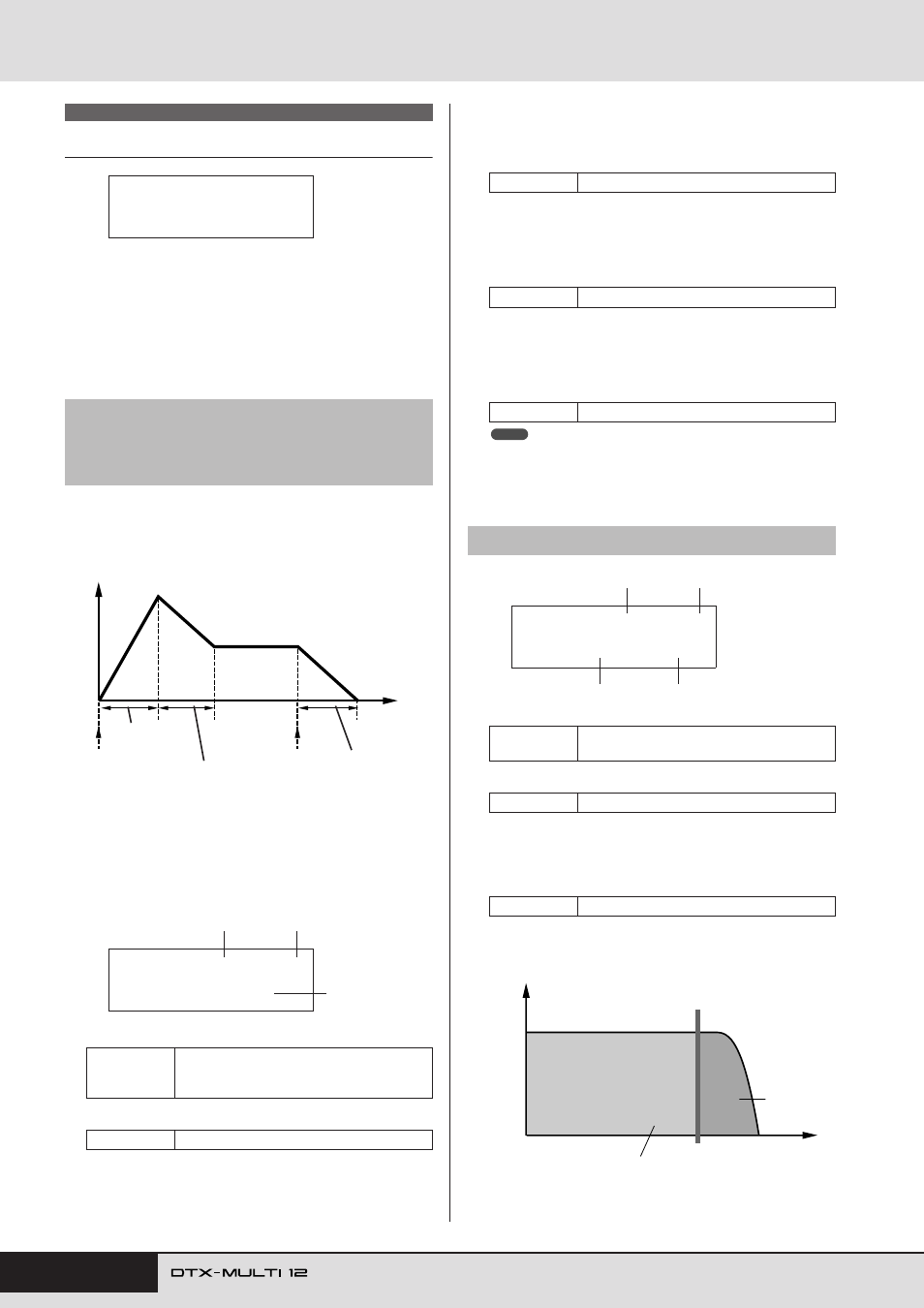
On the Attack Time, Decay Time, and Release Time pages
(VCE3-1 to VCE3-3), you can adjust the envelope of the assigned
voice as shown below.
Parameter
3
from each of the pages is used to adjust a different
part of the envelope. Parameters
1
and
2
below are identical on
all three pages.
Typical Display for Attack Time (VCE3-1)
1
Pad number
B
Layer number
Attack Time (VCE3-1)
C
Attack time
Use this parameter to set the amount of time it takes after the
pad is struck for the assigned voice to reach its peak level.
Decay Time (VCE3-2)
C
Decay time
Use this parameter to set the amount of time it takes the voice
to drop to a steady level after reaching its peak level.
Release Time (VCE3-3)
C
Release time
Use this parameter to set the amount of time it takes for the
voice to fade out after sending a MIDI Note Off message.
• MIDI Note Off messages are not sent for pads and layers for which
“off” is selected on the MIDI area’s Receive Key-Off page (MIDI1-5).
Therefore, the release-time setting has no effect in such a case.
1
Pad number
B
Layer number
C
Filter cutoff frequency (Fc)
Use this parameter to set a cutoff frequency for the low-pass
filter. Frequencies above this level will be removed from the
selected voice.
VCE3 TONE
VCE3-1
Attack Time page
VCE3-2
Decay Time page
VCE3-3
Release Time page
Settings
01 to 12, 13, 13R1, 13R2, 14 to 17, FTSW
(foot switch), HHCL (hi-hat close), HHSP
(hi-hat splash), C#-1, or D-1 to A#5
Settings
A, B, C, or D
VCE3
≥≥≥≥≥≥TONE
Pad is struck
(Note On)
Time
Level
Note Off
Decay time
(VCE3-2)
Release time
(VCE3-3)
Attack time
(VCE3-1)
VCE3-1≥-º¡-≥≥≥≥ç
≥≥≥Attack=+≥0
3
1
2
Settings
-64 to +0 to +63
Settings
-64 to +0 to +63
Settings
-64 to +0 to +63
VCE3-4
Filter page
Settings
01 to 12, 13, 13R1, 13R2, 14 – 17, FTSW,
HHCL, HHSP, C#-1, or D-1 to A#5
Settings
A, B, C, or D
Settings
-64 to +0 to +63
NOTE
VCE3-4≥-º¡-≥≥≥≥ç
≥Fc=+≥0≥≥Q=+≥0
1
2
3
4
Frequency
(or pitch)
Frequencies that pass
through unaffected
Low-pass filter
Frequencies
that are cut
Cutoff frequency (Fc)
Volume