Names of parts – Olympus LS-P5 Linear PCM Recorder User Manual
Page 10
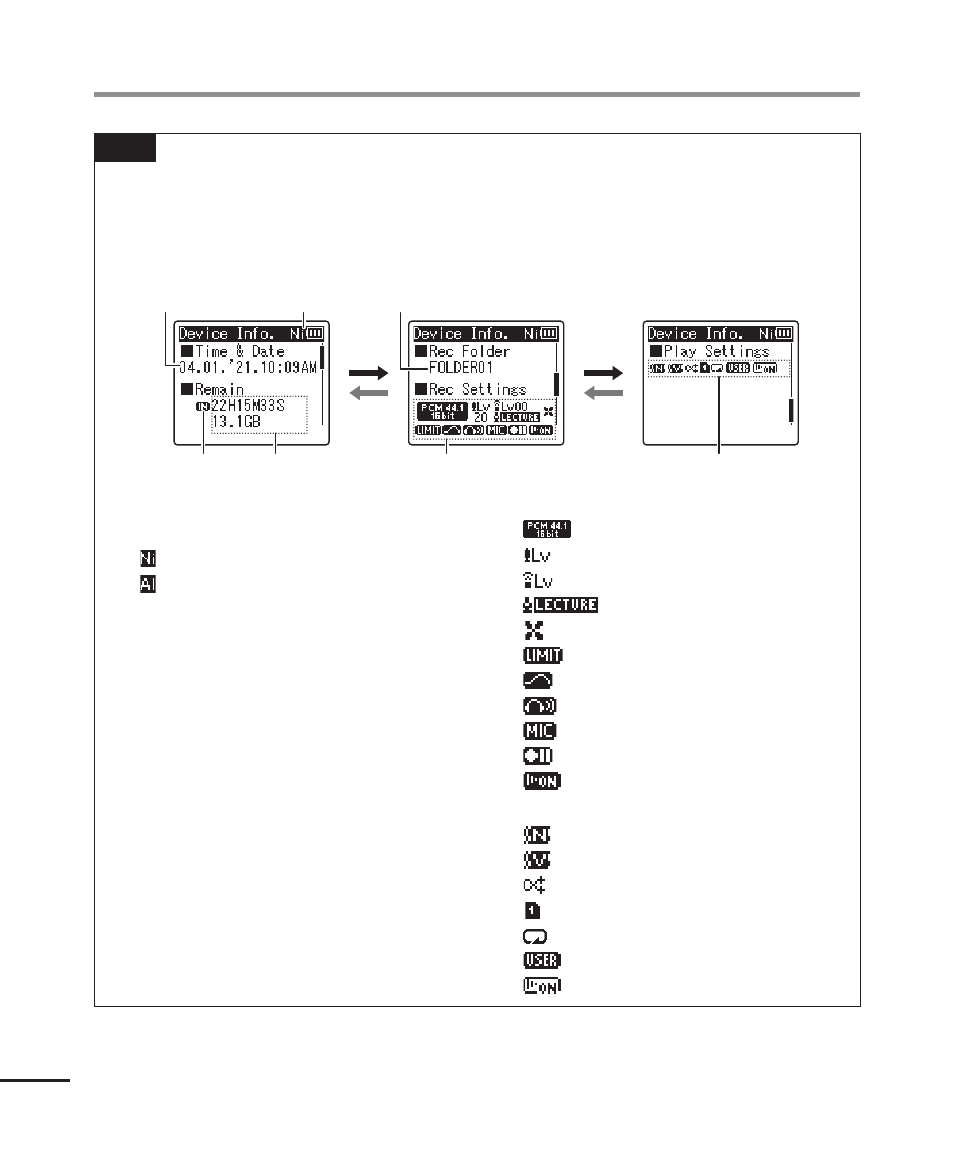
Names of parts
10
EN
TIP
•
To view [
Time & Date
] (
☞
Remain
] (remaining recording time
available), press the
STOP
(
4
) button in the [
Home
] screen or list display or while
recording and playback is paused. Additional information can be viewed by pressing
the
+
or
−
button to cycle the display. The information displayed changes each time
either button is pressed. To exit, press the
STOP
(
4
) button a second time.
−
+
−
+
4
2
3
1
6
5
7
1
Current time & date
2
Battery indicator
[ ]: Ni-MH
[ ]: Alkaline
3
Recording media indicator
4
Remaining memory available
Remaining recording time
available
Remaining memory available on
storage device
5
Recording folder
6
Recording menu
[
]: Recording Mode indicator
[
]: Recording Level indicator
[
]: Zoom Microphone indicator
[
]: Recording Scene indicator
[ ]: Low Cut Filter indicator
[
]: Limitter indicator
[
]: Bright Sound indicator
[
]: Recording Monitor indicator
[
]: External Input indicator
[
]: Recording Standby indicator
[
]: Voice Detect indicator
7
Play menu
[
]: Noise Cancel indicator
[
]: Voice Balancer indicator
[ ]: Random indicator
[ ]: Playback Range indicator
[ ]: Repeat indicator
[
]: Equalizer indicator
[
]: Voice Playback indicator