Setting the time/date [time & date, Setting the time/date [time, Date – Olympus LS-P5 Linear PCM Recorder User Manual
Page 101: P.101, Setting the, Time/date [time & date, Device menu [device menu
101
EN
4
Menu
Device menu [Device Menu]
Setting the time/date
[Time & Date]
If you set the date and time, you will be
able to check when a file was recorded in
the information for each file accessed from
[
Property
] of the menu.
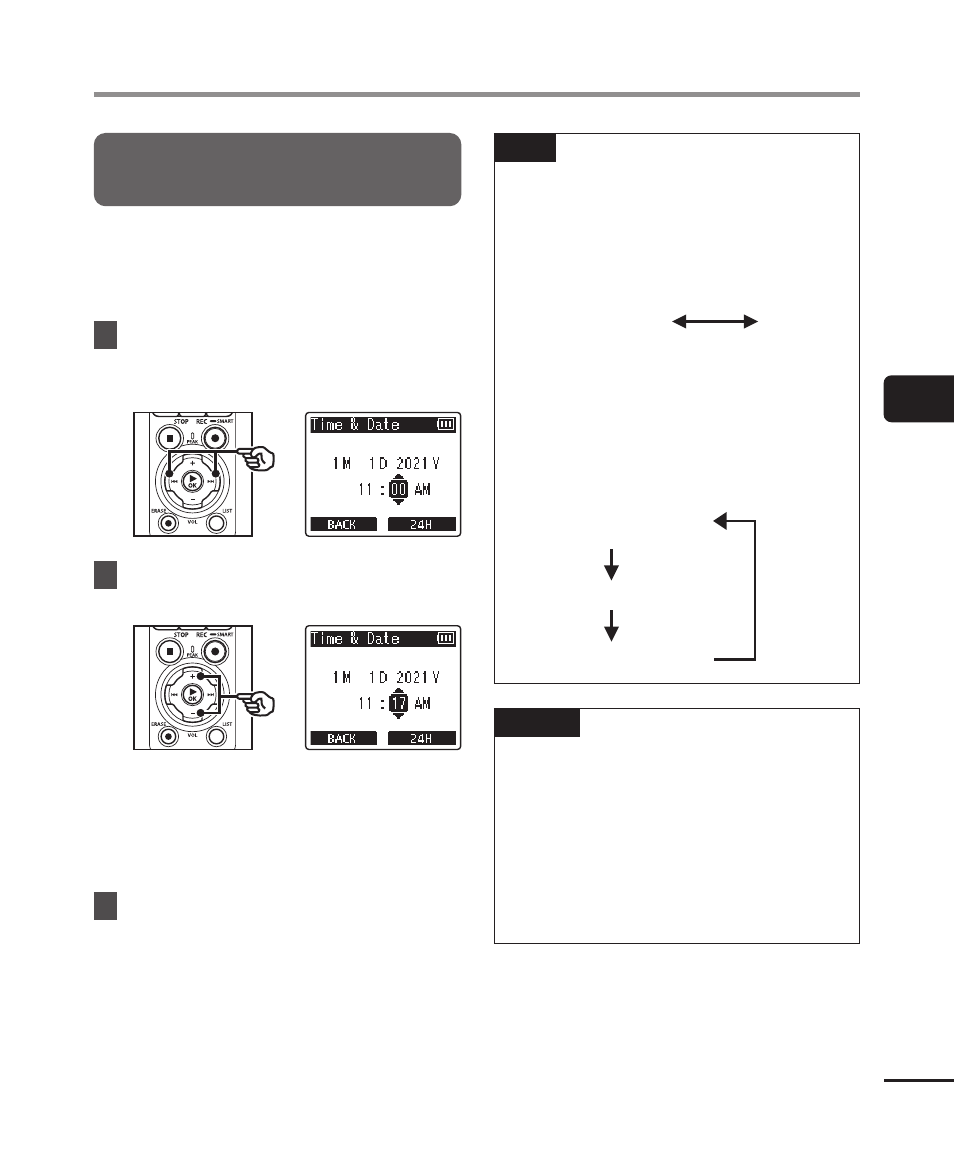
1
Press the
9
or
0
button
to select the desired setting
item.
2
Press the
+
or
−
button to
change the number.
•
To change the setting of another
item, press the
9
or
0
button
to move the blinking cursor, then
press the
+
or
−
button to change
the number.
3
Press the
`
OK
button to
finalize the setting.
TIP
•
When setting the hour or minute,
each time you press the
F2
button
the display changes between the
AM/PM and 24-hour clock formats.
Example: 10:38 PM
10:38 PM
(default format)
22:38
•
When setting the year, month or
date, each time you press the
F2
button the display order used for the
date changes.
Example: January 31, 2021
1M 31D 2021Y
(default format)
31D 1M 2021Y
2021Y 1M 31D
NOTE
•
If the batteries are removed from the
voice recorder, the [
Time & Date
]
screen is displayed automatically
when the power is turned on.
•
Even if the voice recorder is not used
for a long period of time, when the
batteries are used up, the date and
time must be re-entered.