Starting recording before you press record, Pre-recording, Starting recording before – Olympus LS-P5 Linear PCM Recorder User Manual
Page 123: You press record [pre-recording, P.123) for the procedure, P.123), Choosing a recording method [fn rec
123
EN
4
Menu
Choosing a Recording Method [Fn Rec]
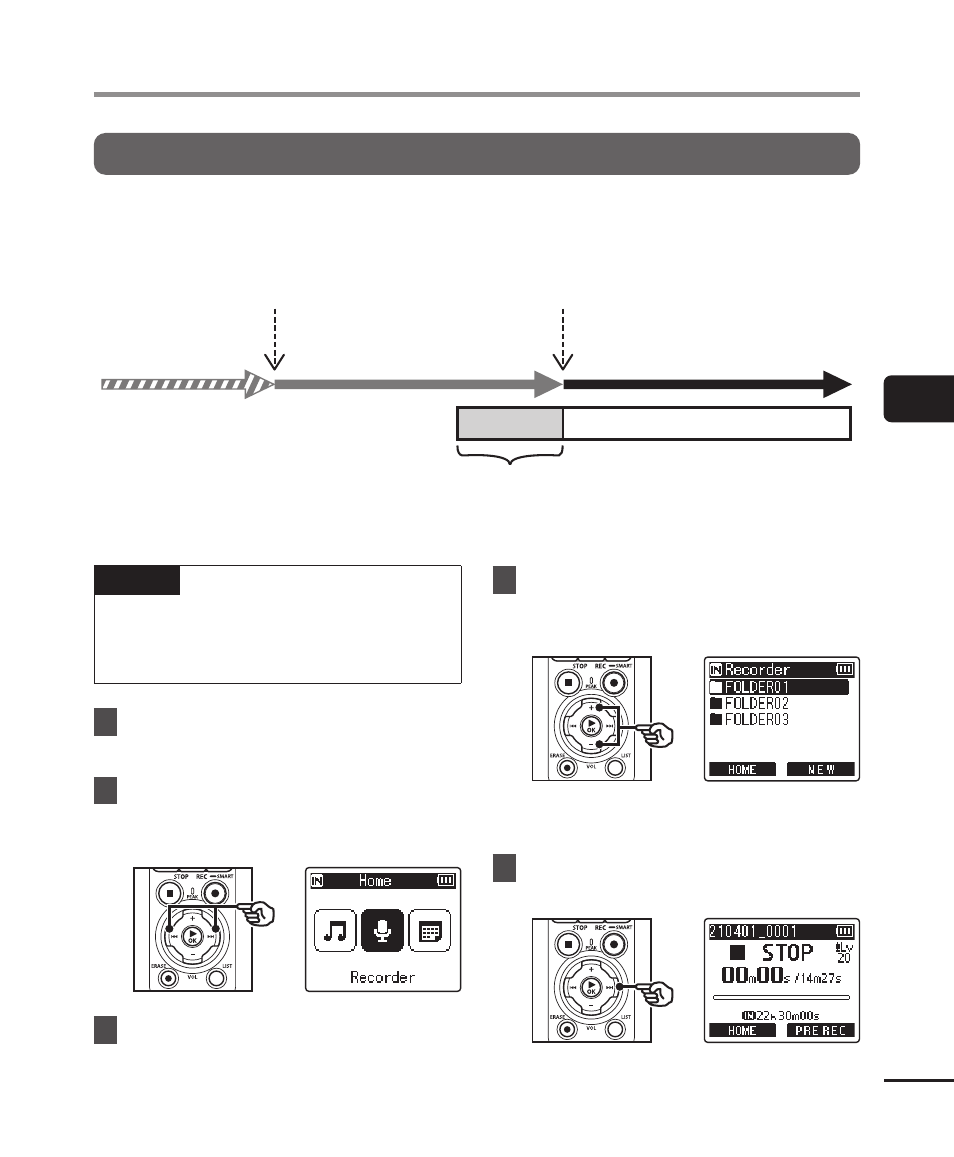
Starting Recording Before You Press Record [Pre-Recording]
With pre-recording, recording starts approximately two seconds before you press the
REC
(
s
) button. If, for example, you were recording bird song and pressed the
REC
(
s
)
button the moment you heard the first note, the recording would actually begin slightly
before the bird started singing.
Fn
button pressed
Standby mode
Pre-recording mode
Recorded audio
Recording mode
Recording starts*
Approx. 2 s
* The recorded audio may include the click made when the
REC
(
s
) button is pressed to start recording.
This can be prevented by starting recording remotely via the “DVR Remote” smartphone app (
☞
NOTE
•
Before using [
Pre-Recording
], select
an option other than [
FLAC
] for [
Rec
Mode
] (
☞
1
Select [Pre-Recording] for [Fn
Rec] (
☞
2
Press the
9
or
0
button
in the [Home] screen and
select [Recorder] (
☞
P.28).
3
Press the
`
OK
button.
4
Press the
+
or
−
button to
select the folder to save the
recording in.
•
Each new voice recording file is
saved in the selected folder.
5
Press the
9
button twice to
select file view.