Olympus LS-P5 Linear PCM Recorder User Manual
Page 127
127
EN
4
Menu
Recording a Reference Tone for Use When Synchronizing Audio and Video [Slate Tone]
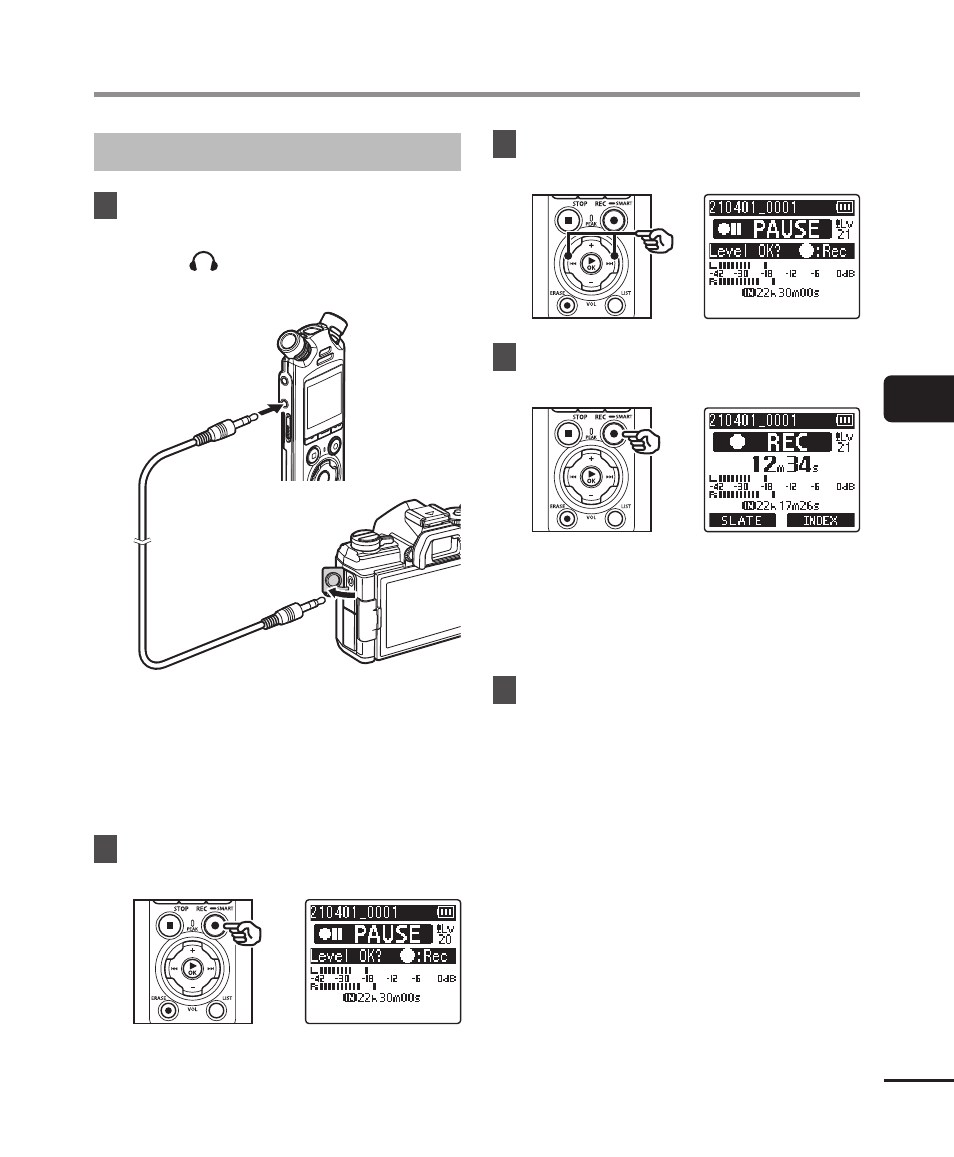
Shooting Videos with a Slate Tone
1
Connect the camera audio
input jack to the earphone
jack ( ) on the voice recorder
(
☞
To earphone
jack
To camera
audio input jack
[Rec Standby] is [On]
:
☞
Go to Step
ø
[Rec Standby] is [Off]
:
☞
Go to Step
[
2
Press the
REC
(
s
) button to
prepare for recording.
3
Press the
9
or
0
button
to adjust the recording level.
4
Press the
REC
(
s
) button to
start recording.
•
During recording, the recording
indicator light (LED) turns on and
[
7
REC
] appears in the display.
•
Press the
9
or
0
button to
adjust the recording level.
5
Start filming on the camera.
• For information on filming videos,
see the user’s manual provided with
the camera.