Computer connection/disconnection, Connecting the voice recorder to a computer – Olympus LS-P5 Linear PCM Recorder User Manual
Page 146
146
EN
6
Use with a computer
Connecting the voice recorder to a computer
1
Start the computer.
2
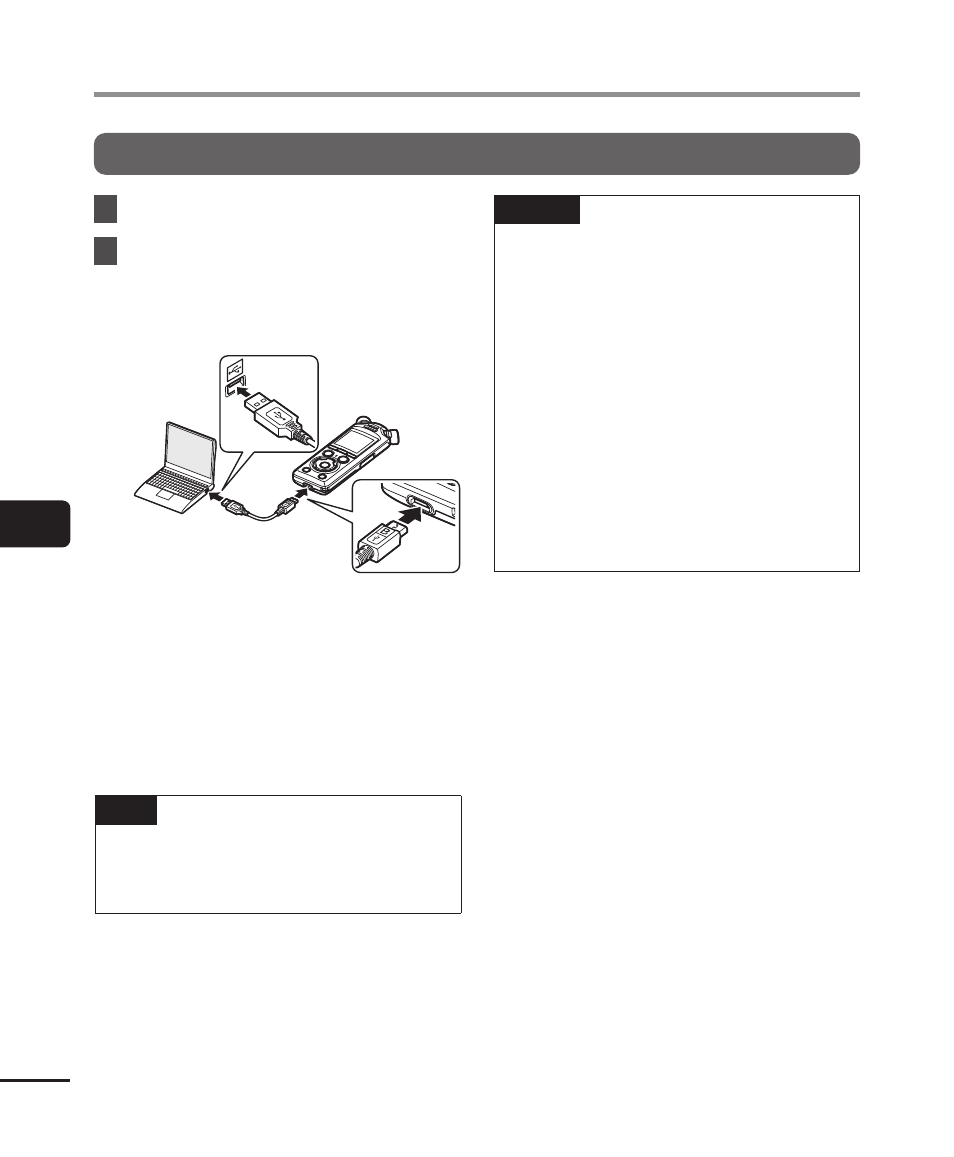
After confirming that the
recorder is stopped or off,
connect it to the computer
using the USB cable.
•
[
Remote (Storage)
] appears in the
recorder display when the recorder
is connected to a computer via USB.
•
Files cannot be transferred when
[
AC adapter
] is selected for [
USB
Connection
] in the [
USB Settings
]
menu. Select [
PC
] for [
USB
Connection
] (
☞
TIP
•
For information on the computer’s
USB port, see the computer’s user
manual.
NOTE
•
Insert the USB connector securely
all the way. Operation will not be
normal if the connection is not made
properly.
•
Connecting the voice recorder
through a USB hub may result in
unstable operation. Do not use a
USB hub if operation is unstable.
•
Use the supplied USB cable only.
Never use a third-party cable, as
this could damage the product. The
supplied cable should similarly never
be used for connections between
third-party devices.
Computer connection/disconnection