Charging the batteries, Charging the batteries from a computer via usb – Olympus LS-P5 Linear PCM Recorder User Manual
Page 16
16
EN
1
Getting started
Charging the batteries
The supplied rechargeable batteries can be charged either by connecting the recorder to
a computer via the supplied USB cable or using an optional AC adapter that connects via
USB.
Charging the Batteries from a Computer via USB
The supplied rechargeable batteries can be charged by connecting the recorder to a
computer via USB. Be sure the batteries are correctly inserted in the recorder before
proceeding (
☞
NOTE
•
Before charging the batteries,
insert the rechargeable batteries
provided and set [
Battery
] to [
Ni-MH
]
(
☞
•
Never attempt to charge an alkaline
battery, lithium battery or other
primary cell battery. Fluid leakage or
overheating may cause the recorder
to malfunction.
1
Start the computer.
2
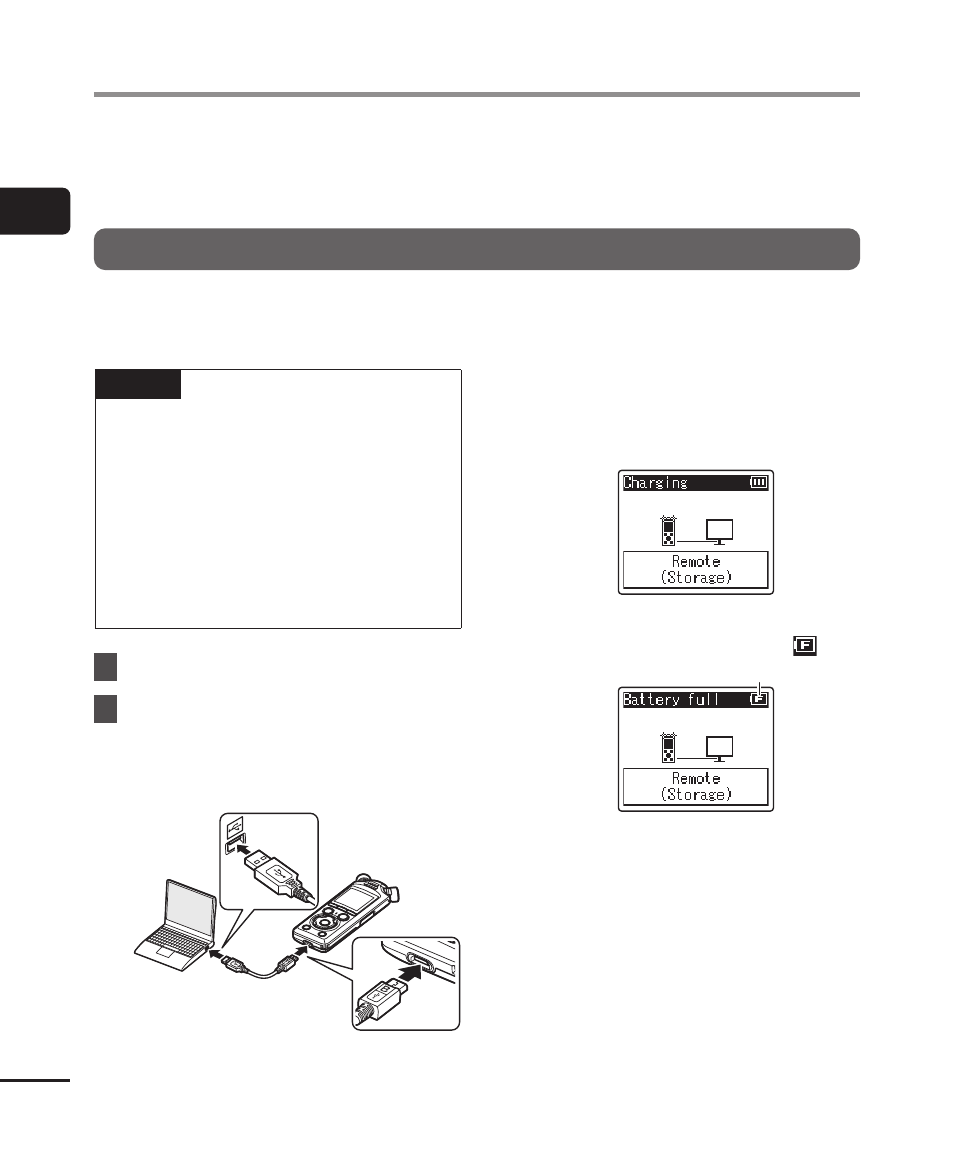
After confirming that the
recorder is stopped or off,
connect it to the computer
using the USB cable.
•
The recorder will display a
[
Charging
] dialog and start charging
the batteries. The LED indicator light
will turn on.
•
Charging has finished when the
battery indicator changes to [
].
Battery indicator
Charging time: About 3 hours*
* Approximate time needed to fully
charge completely flat batteries at
room temperature. Battery charging
time will depend on the amount of
remaining power and the state of
the batteries.