Inserting/removing a microsd card, Inserting a microsd card – Olympus LS-P5 Linear PCM Recorder User Manual
Page 22
22
EN
1
Getting started
The voice recorder has its own internal memory, and also supports standard microSD
cards (microSD, microSDHC, microSDXC) sold separately.
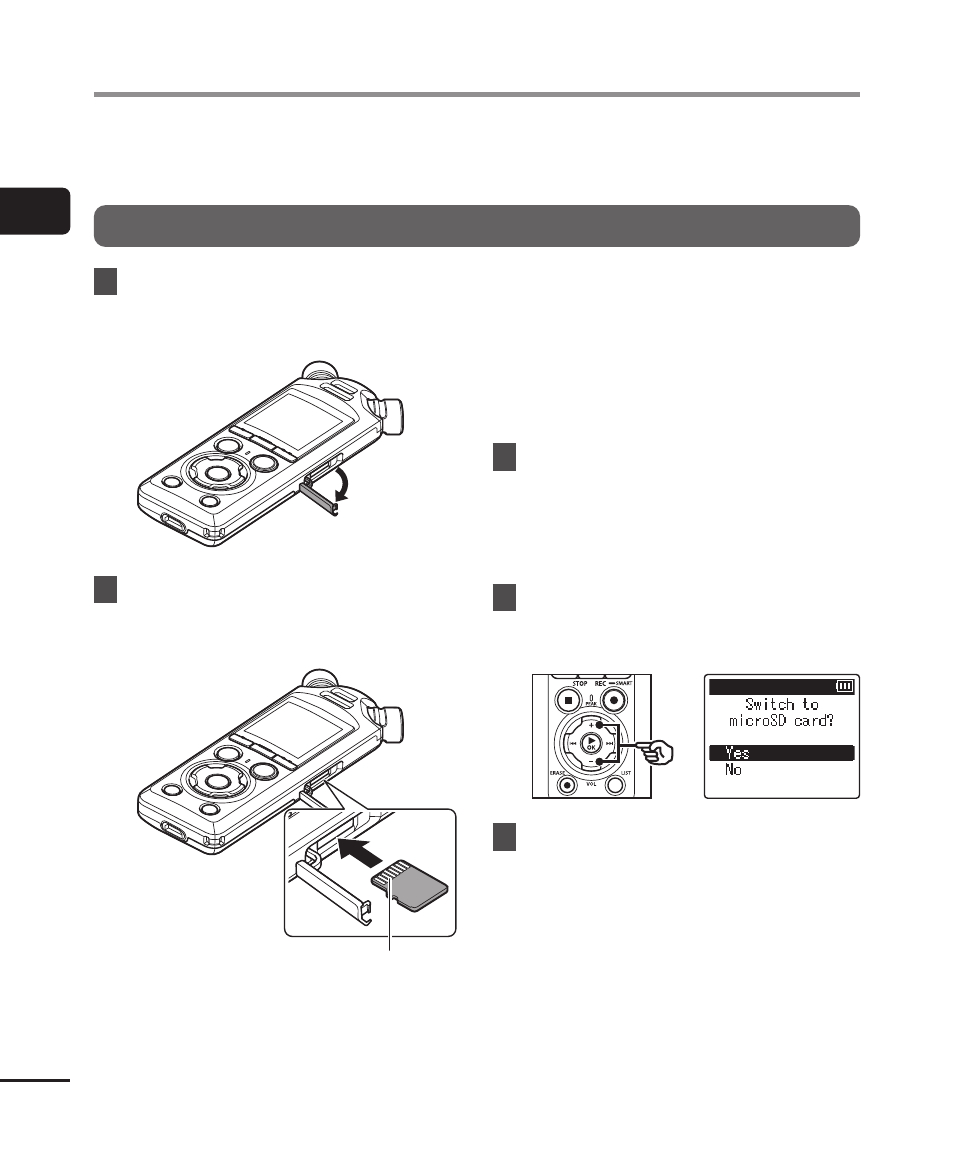
Inserting a microSD card
1
While the voice recorder is in
stop mode, open the microSD
card slot cover.
2
Insert a microSD card, making
sure it is placed correctly as
shown.
Connectors
•
Insert the microSD card straight,
avoiding crooked insertion.
•
Inserting a microSD card the wrong
way or crookedly could damage its
contact surface or cause it to jam in
the slot.
•
A microSD card not inserted fully
(until it clicks into place) might not
record data.
3
Close the microSD card slot
cover.
•
The recording media selection
screen appears after a microSD
card has been inserted.
4
To record onto the microSD
card, press the
+
or
−
button
and select [Yes].
5
Press the
`
OK
button to
finalize the setting.
•
The [
Home
] screen (
☞
be displayed.
Inserting/removing a microSD card