Preventing accidental operation, Setting hold mode, Releasing hold mode – Olympus LS-P5 Linear PCM Recorder User Manual
Page 27
27
EN
1
Getting started
Setting the voice recorder to HOLD mode maintains the current operation and disables
button operations. HOLD mode is a handy feature for preventing unintentional operation
from accidental button presses when the voice recorder is carried in a bag or pocket. It is
also useful for preventing the voice recorder being accidentally stopped during recording.
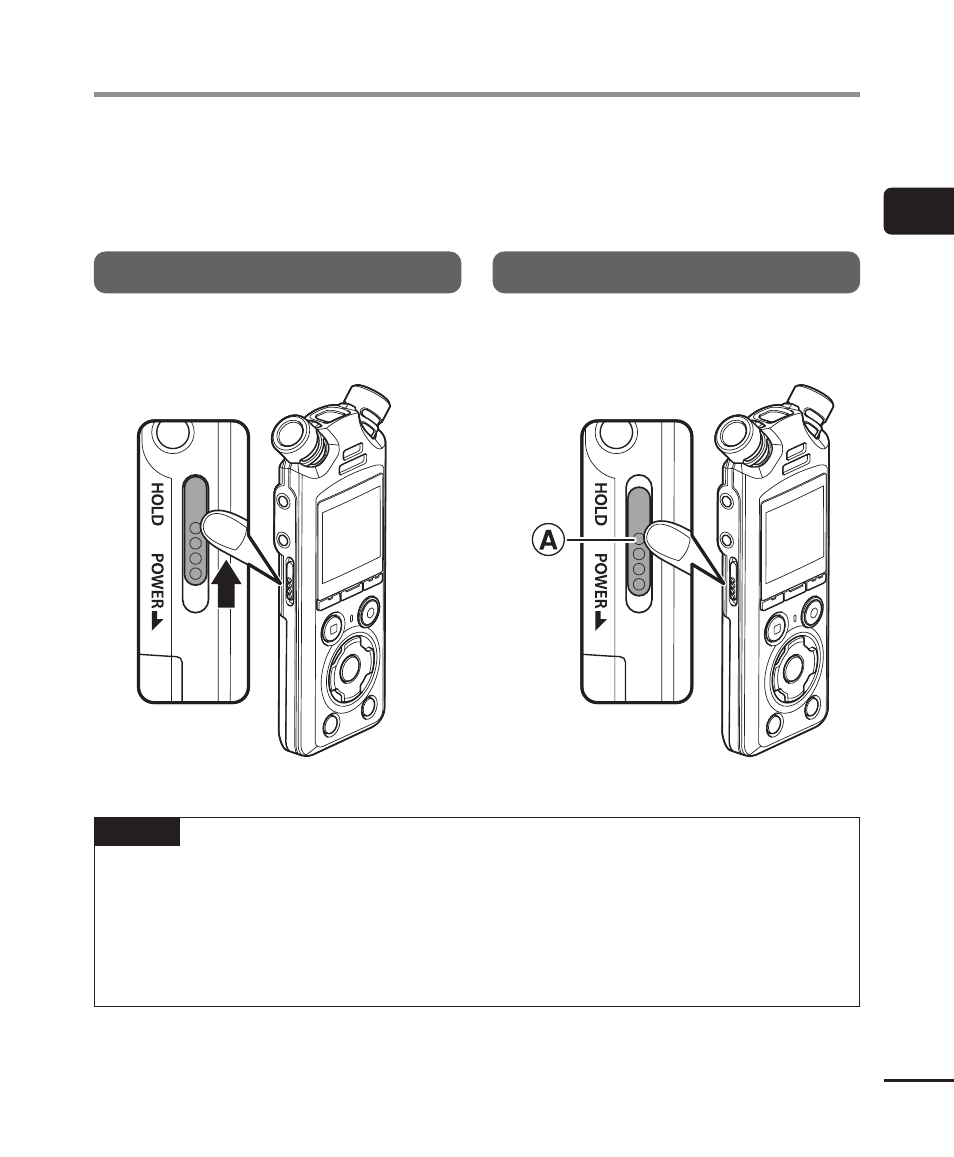
Setting HOLD mode
To select HOLD mode, slide the
POWER/
HOLD
switch to
HOLD
and confirm that
[
Hold
] appears in the display.
Releasing HOLD mode
To exit HOLD mode, slide the
POWER/
HOLD
switch to
A
.
NOTE
•
When any button is pressed during HOLD mode, [
Hold
] appears in the display for
2 seconds. No other operation is performed.
•
Setting HOLD mode during voice recorder playback (or recording) continues the
playback (or recording) operation and prevents any other operation from being
performed. (The voice recorder stops when playback ends or when recording ends
because, for example, there is no remaining memory space.)
Preventing accidental operation