Home] screen operations, Selecting the mode – Olympus LS-P5 Linear PCM Recorder User Manual
Page 28
28
EN
1
Getting started
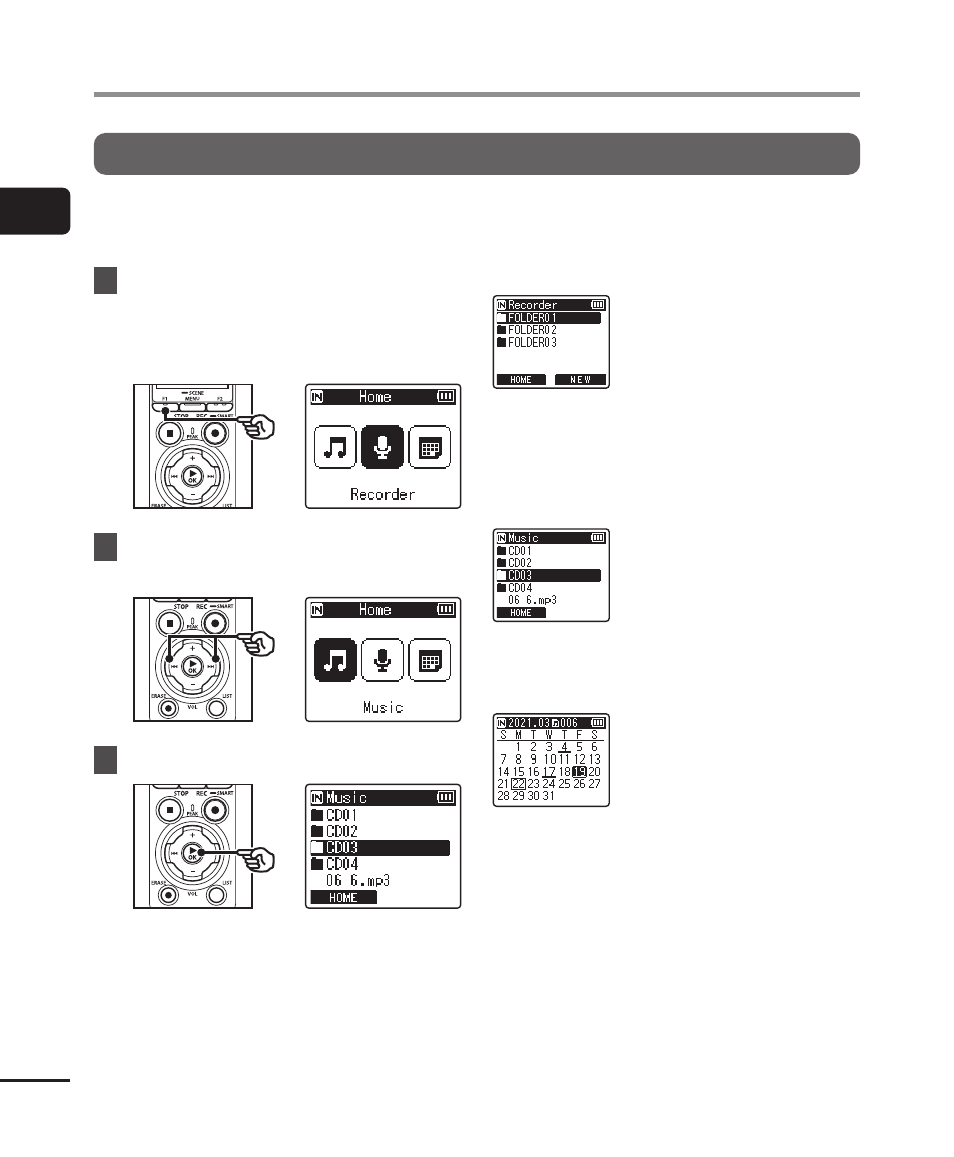
Selecting the mode
In addition to its recording function, the voice recorder also provides music player
functions. Choose the application you want by selecting one of the voice recorder’s
modes.
1
While the voice recorder is
in stop mode, press the
F1
(HOME) button to display the
[Home] screen.
2
Press the
9
or
0
button
to select the desired mode.
3
Press the
`
OK
button.
When [Recorder] is selected:
The voice recorder enters
[
Recorder
] mode. Audio
can be recorded with the
built-in microphone.
Files recorded with the
built-in microphone can
also be played back
(
☞
When [Music] is selected:
The voice recorder
enters [
Music
] mode. In
this mode you can play
music files transferred
to the voice recorder
(
☞
When [Calendar Search] is selected:
The voice recorder enters
[
Calendar Search
]
mode. In this mode you
can search for files by
specifying the recording
date (
☞
[Home] screen operations