Folders – Olympus LS-P5 Linear PCM Recorder User Manual
Page 30
Advertising
30
EN
1
Getting started
Folders
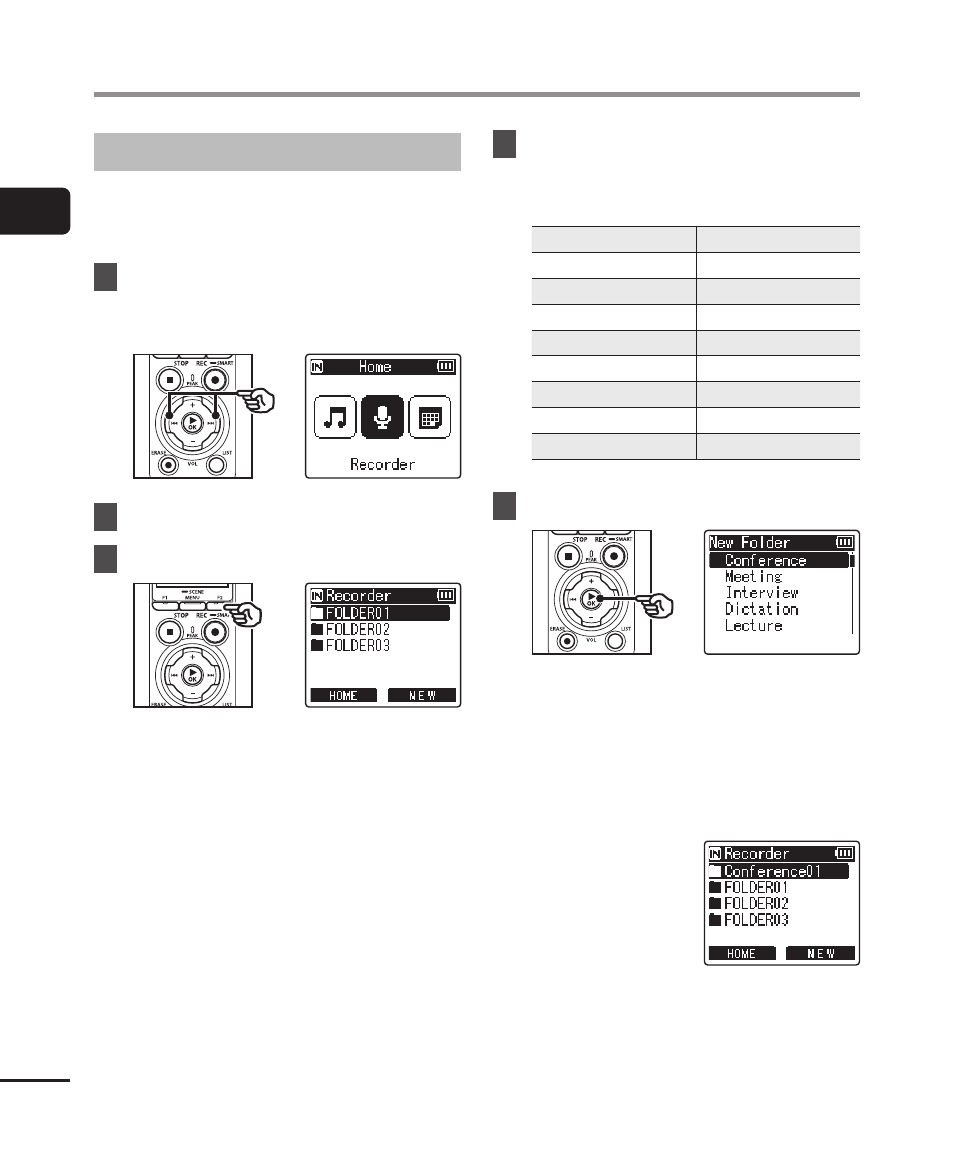
Creating Folders
Create folders directly under the
[
Recorder
] folder. Folders can be named
according to the type of audio recorded.
1
Press the
9
or
0
button
in the [Home] screen and
select [Recorder] (
☞
2
Press the
`
OK
button.
3
Press the
F2
(NEW) button.
4
Press the
+
or
−
button to
select the desired folder prefix.
Folder prefixes
Conference
Podcast
Meeting
Recital
Interview
Concert
Dictation
Outdoors
Lecture
Schedule
Class
To Do
Language Study
Notes
Music
FOLDER
Video
5
Press the
`
OK
button.
•
[
Please wait
] will flash in the
display. [
Folder created
] will be
displayed when the operation is
complete.
•
Folders are named using the
chosen prefix followed by a two-digit
folder number.
Advertising