Adjusting recording levels automatically before, Recording ([smart] mode), Recording – Olympus LS-P5 Linear PCM Recorder User Manual
Page 38
38
EN
2
Recording
Recording
Adjusting Recording Levels Automatically Before Recording
([SMART] Mode)
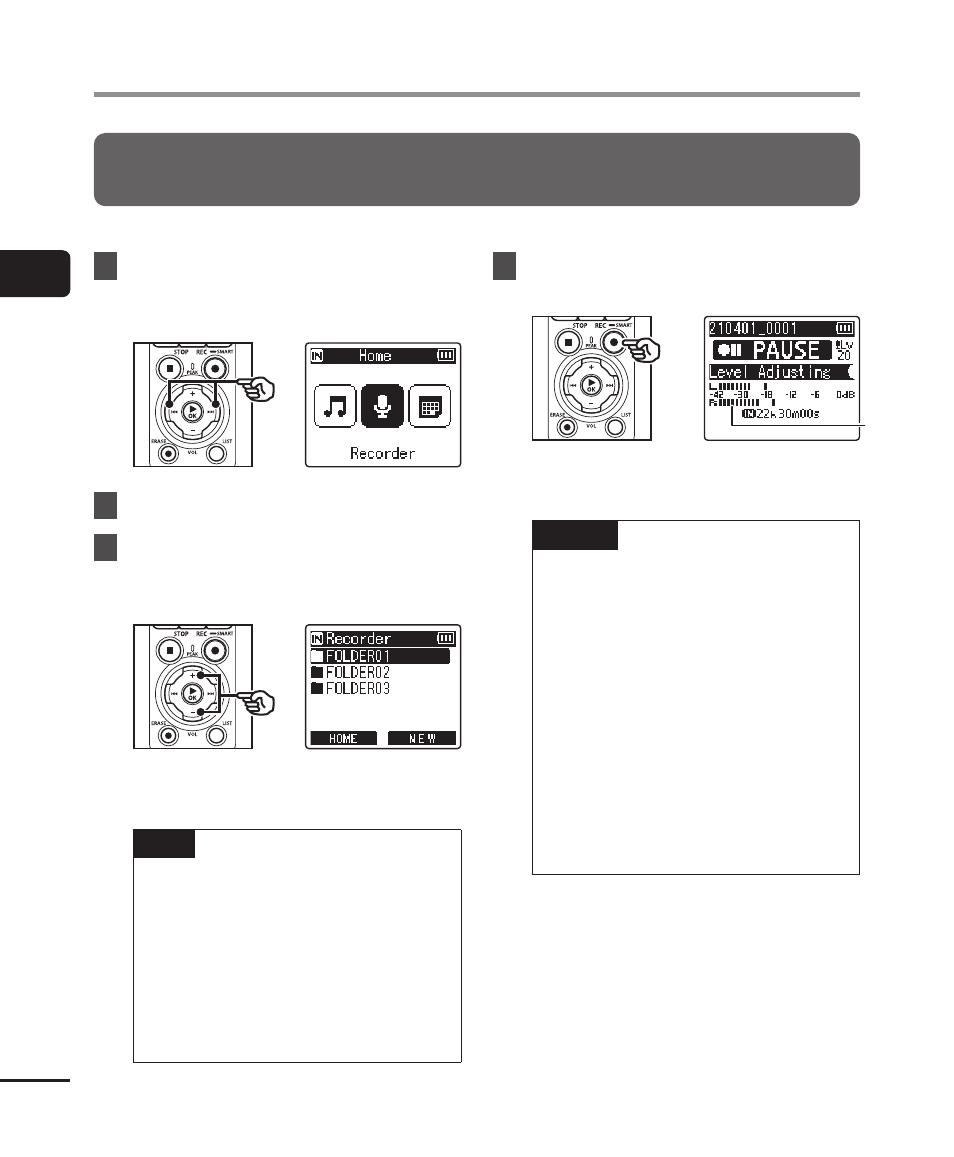
Start recording after automatically adjusting the recording level to suit the input volume.
1
Press the
9
or
0
button
in the [Home] screen and
select [Recorder] (
☞
2
Press the
`
OK
button.
3
Press the
+
or
−
button to
select the folder to save the
recording in.
•
Each new voice recording file is
saved in the selected folder.
TIP
•
To start automatic recording
level adjustment even when
[
Recorder
] mode is not
selected, press and hold the
REC
(
s
) button. The recordings
are stored in the first sub-folder
(the top sub-folder in the folder
list) under the [
Recorder
] folder.
4
Press and hold the
REC
(
s
)
button.
a
a
a
Level meter (changes in response
to recording level and mode)
NOTE
•
[
Manual
] is selected for [
Rec
Level
] > [
Internal Mic
] or
[
External Mic
] (
☞
•
[
Rec Scene
] cannot be used
(
☞
•
If the recording level meter goes
off the scale during recording,
the
PEAK
indicator light will turn
on and distortion may be audible
in the sound recorded. Enabling
[
Limiter
] can prevent sound
distortion from input in excess of
peak levels (
☞