Adjusting recording levels manually before, Recording – Olympus LS-P5 Linear PCM Recorder User Manual
Page 41
41
EN
2
Recording
Recording
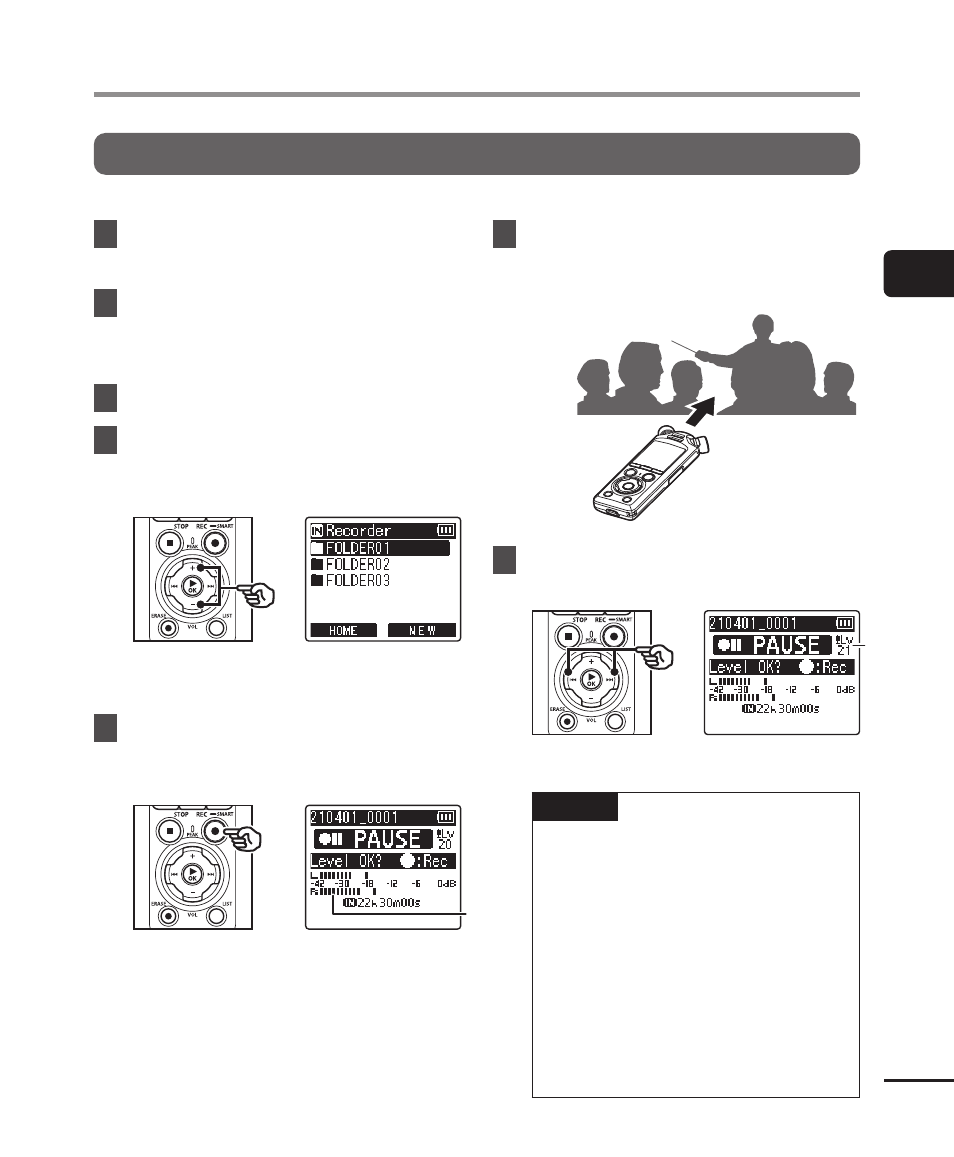
Adjusting Recording Levels Manually Before Recording
Start recording after manually adjusting the recording level to suit the input volume.
1
Select [On] for [Rec Standby]
(
☞
2
Press the
9
or
0
button
in the [Home] screen and
select [Recorder] (
☞
3
Press the
`
OK
button.
4
Press the
+
or
−
button to
select the folder to save the
recording in.
•
Each new voice recording file is
saved in the selected folder.
5
Press the
REC
(
s
) button
to enable recording standby
mode.
a
a
a
Level meter (changes in response
to recording level and mode)
•
The recording indicator light will
turn on.
6
Point the built-in microphone
in the direction of the sound to
record.
7
Press the
9
or
0
button
to adjust the recording level.
b
b
b
Recording level
NOTE
•
If the recording level meter goes
off the scale, the
PEAK
indicator
light will turn on and distortion
may be audible in the sound
recorded. Adjust the recording
level so that the meter does not
go off the scale.
•
If you wish to adjust the
recording level, you must first
select [
Manual
] for [
Rec Level
]
(
☞