Creating custom recording scenes, Recording scenes, see, P.51) – Olympus LS-P5 Linear PCM Recorder User Manual
Page 51
51
EN
2
Recording
Selecting the automatic recording setting [Rec Scene]
Creating Custom Recording Scenes
Save [
Rec Level
] (
☞
P.84), [
Rec Mode
] (
☞
P.85), [
Zoom Mic
] (
☞
P.86), [
Low
Cut Filter
] (
☞
P.87), and [
External Input
] (
☞
P.53) settings to custom recording-
scene banks.
NOTE
•
Custom recording-scene banks
cannot be created when an option
other than [
Off
] is selected for [
Rec
Scene
]. Select [
Off
] for [
Rec Scene
].
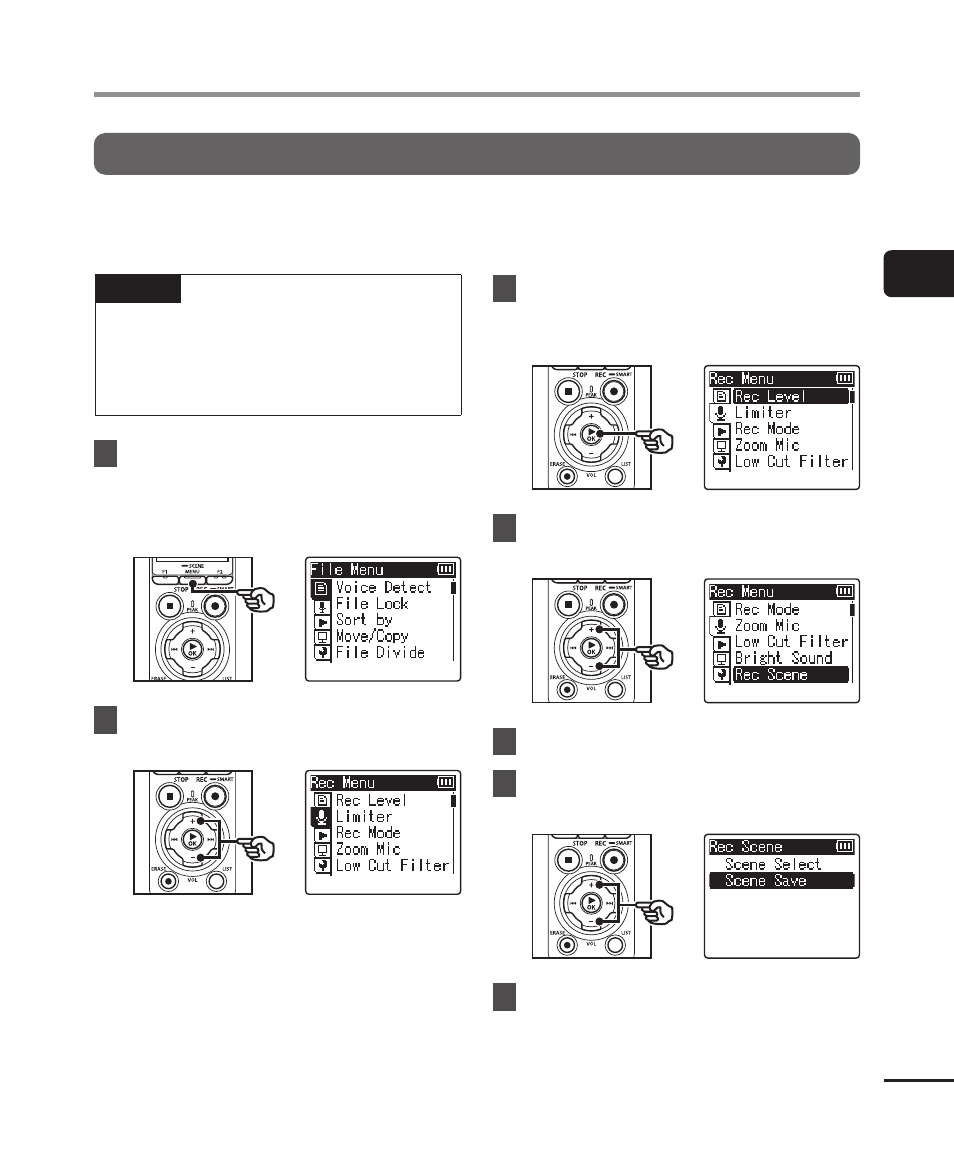
1
During recording or while the
voice recorder is in stop mode,
press the
MENU/SCENE
button.
2
Press the
+
or
−
button to
select the [Rec Menu] tab.
3
Press the
`
OK
button to
move the cursor into the list of
setting items.
4
Press the
+
or
−
button to
select [Rec Scene].
5
Press the
`
OK
button.
6
Press the
+
or
−
button to
select [Scene Save].
7
Press the
`
OK
button.