Playback, Basic playback procedure – Olympus LS-P5 Linear PCM Recorder User Manual
Page 58
58
EN
3
Playback
Playback
In addition to files recorded by the voice recorder, you can also play WAV, FLAC or MP3
format files transferred from a computer.
Basic playback procedure
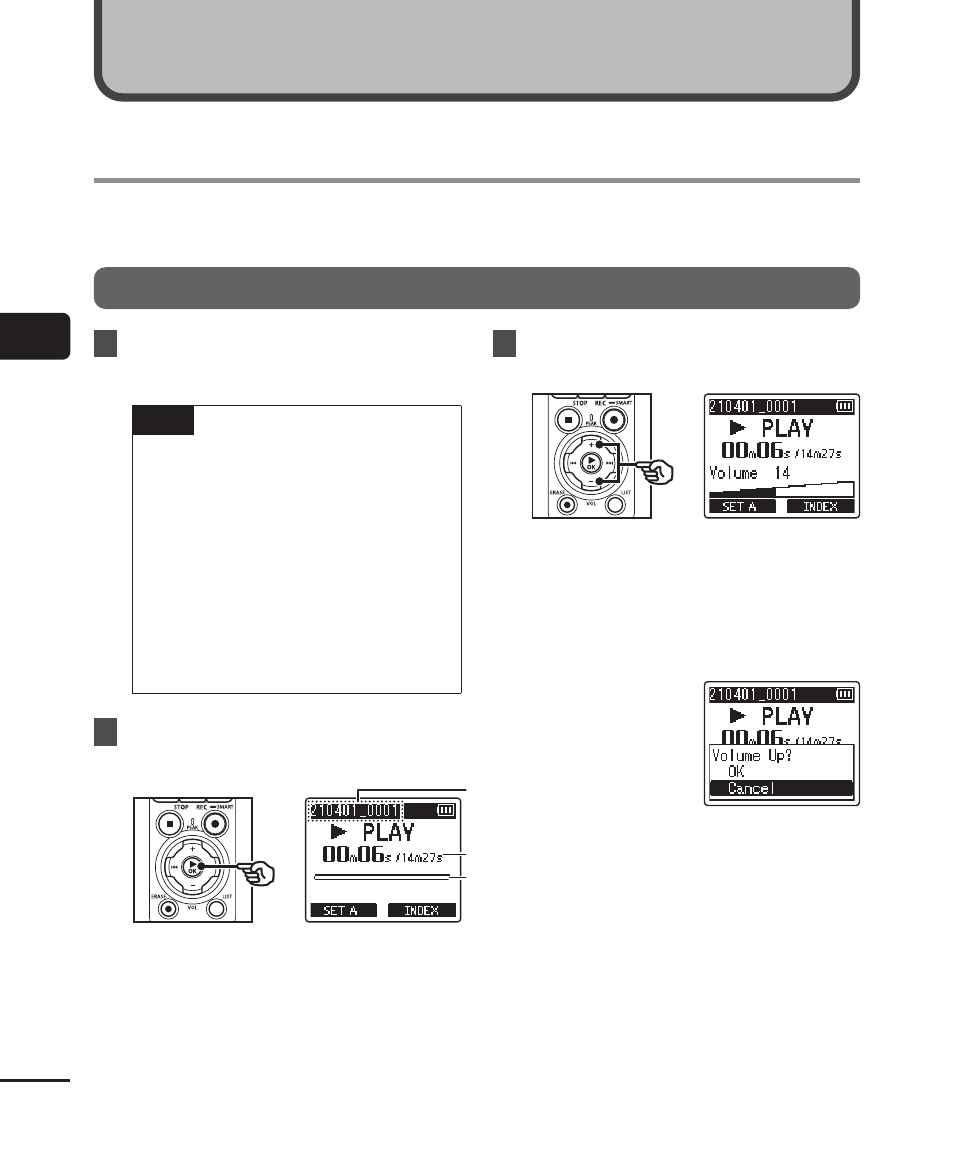
1
Select the file to play from the
folder containing it (
☞
TIP
•
Files are saved in the locations
below.
Files recorded with the built-in
microphone:
Stored in folders directly under
the [
Recorder
] folder (
☞
Music files transferred from a
computer:
Stored in folders directly under
the [
Music
] folder (
☞
2
Press the
`
OK
button to start
playback.
b
b
c
c
a
a
a
File name
b
Elapsed playback time /
File length
c
Playback position bar indicator
•
Audio plays back over the recorder’s
built-in speaker (
☞
3
Press the
+
or
−
button to adjust
the volume to the desired level.
•
The volume can be adjusted to a
setting between [
00
] to [
30
]. The
higher the number, the louder the
volume.
•
If the volume is set too loud, a
warning screen may appear.
Playback