Changing the playback speed – Olympus LS-P5 Linear PCM Recorder User Manual
Page 66
66
EN
3
Playback
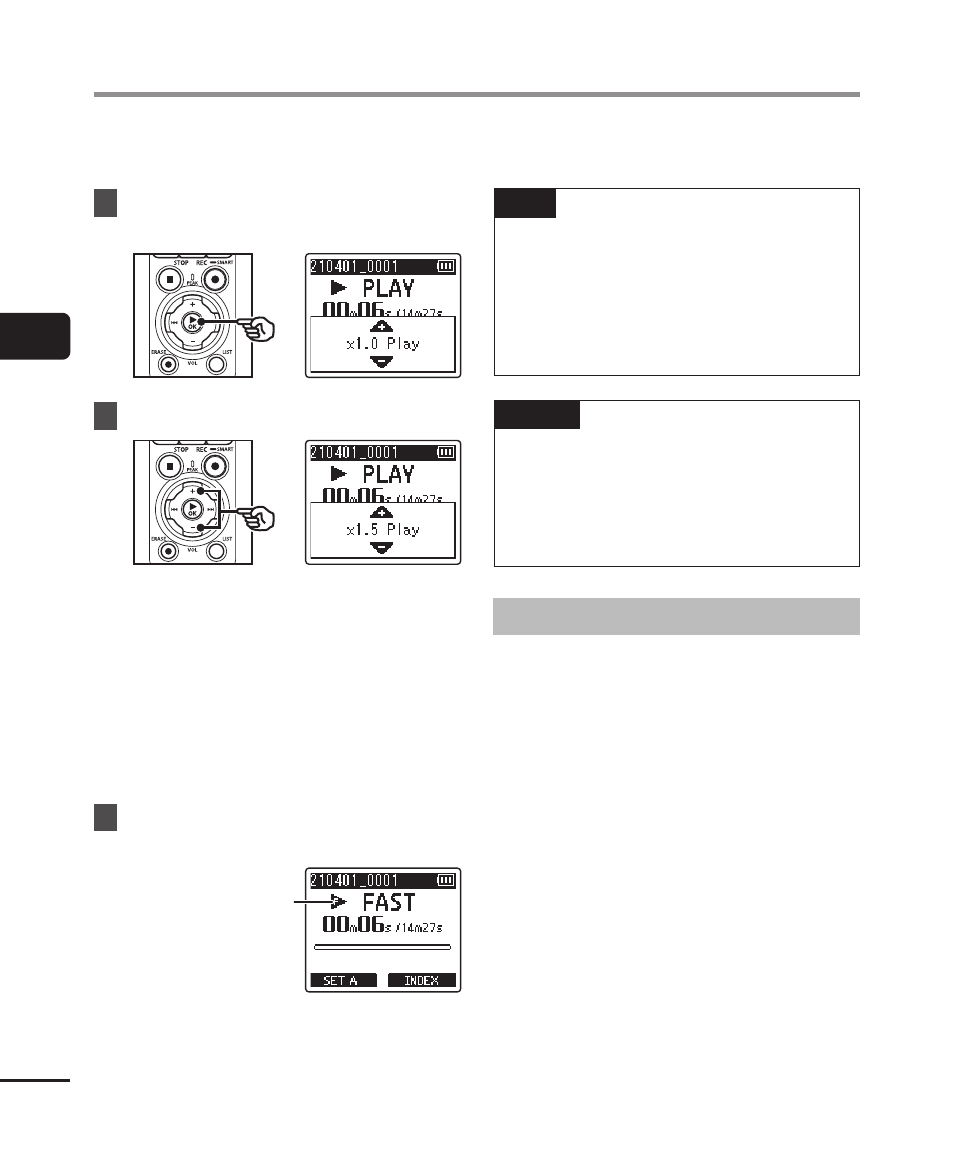
Changing the playback speed is handy for speeding up conference presentations, or for
slowing down parts difficult to discern when learning a language.
1
Press the
`
OK
button during
playback.
2
Press the
+
or
−
button.
•
The playback speed can be
adjusted between [
x0.5 Play
] and
[
x3.5 Play
] in 0.1 increments.
•
The playback speed increases
when the
+
button is pressed, and
decreases when the
−
button is
pressed.
•
To return to the normal playback
speed, set the setting to [
x1.0 Play
].
3
Press the
`
OK
button to
finalize the setting.
Playback speed
indicator
TIP
•
When changing the playback
speed, playback operations such as
stopping playback, skipping to the
beginning of a file, and writing index
marks/temp marks are the same as
during standard playback.
NOTE
•
Altered playback speed settings are
retained even after power OFF.
•
Changing the playback speed will
make the batteries deplete more
quickly.
Fast playback restrictions
Depending on their sampling frequency
and bit rate, some files may not play
normally. In this case, you will need to
reduce the playback speed.
Changing the playback speed