Abc repeat playback – Olympus LS-P5 Linear PCM Recorder User Manual
Page 67
67
EN
3
Playback
The voice recorder has a function with which you can repeat the playback of a portion
(segment) of the file being played. In addition to the A-B repeat function available from
previous models, the segment to repeat can be changed during repeat playback.
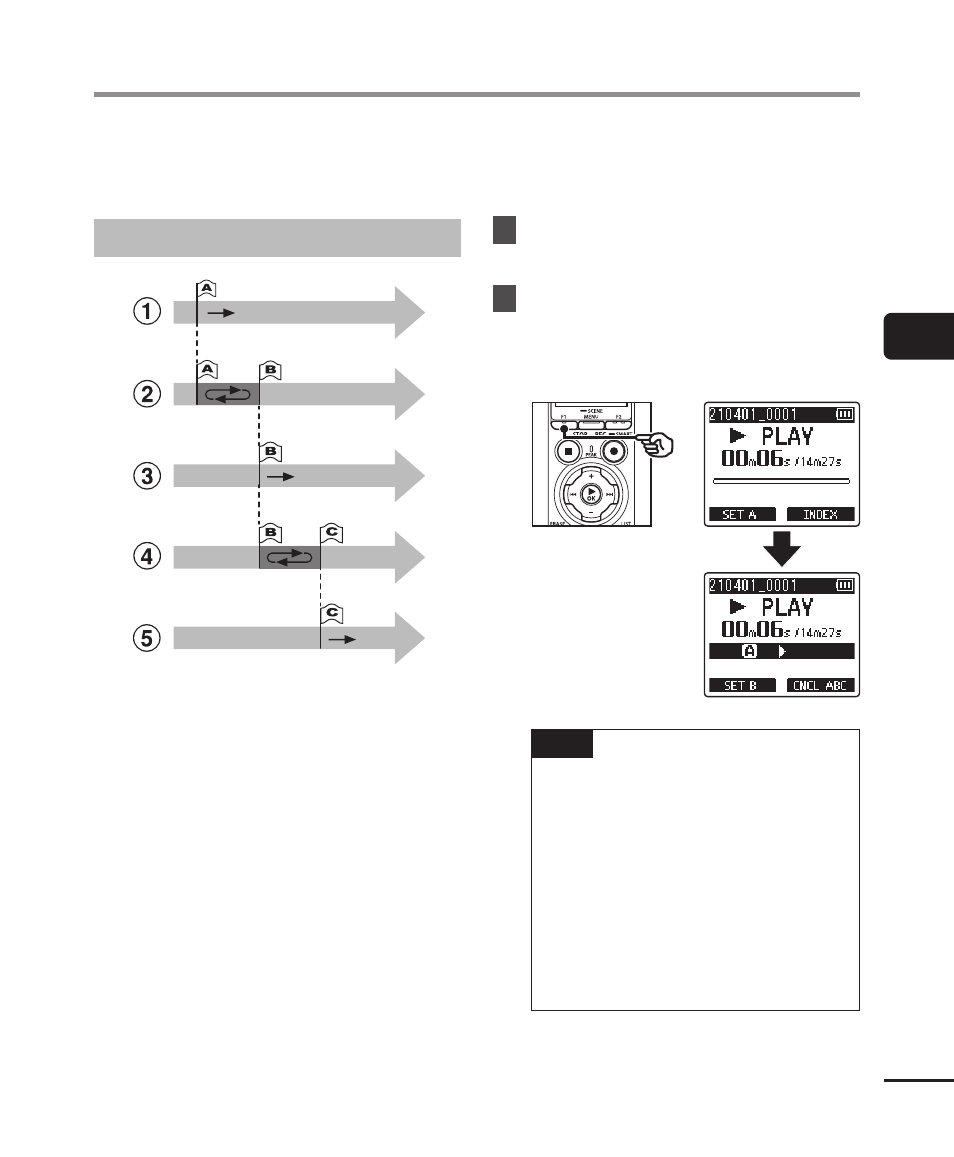
ABC repeat playback
1
Select the starting point for repeat
playback (A) during playback.
2
When the ending point (B) is selected,
repeat playback starts.
3
When the starting point for repeat
playback (A) is canceled during repeat
playback, the ending point of the
segment (B) becomes the new starting
point and playback continues.
4
When the ending point (C) is selected,
repeat playback starts again.
5
These steps can be repeated to
re-specify a new segment to be played
back repeatedly up to the end of the
file.
1
Select a file for ABC repeat
playback, and start playback.
2
Press the
F1
(SET A) button
when playback reaches the
desired start position for ABC
repeat playback.
TIP
•
You can change the playback
speed (
☞
forward/rewind (
☞
the [
B
] indicator is blinking.
•
If playback reaches the end of
the file when the [
B
] indicator
is blinking, the end of the file
is treated as the segment end
position, and repeat playback
starts.
ABC repeat playback