Erasing an index mark/temp mark – Olympus LS-P5 Linear PCM Recorder User Manual
Page 71
71
EN
3
Playback
Index marks/temp marks
Erasing an index mark/temp mark
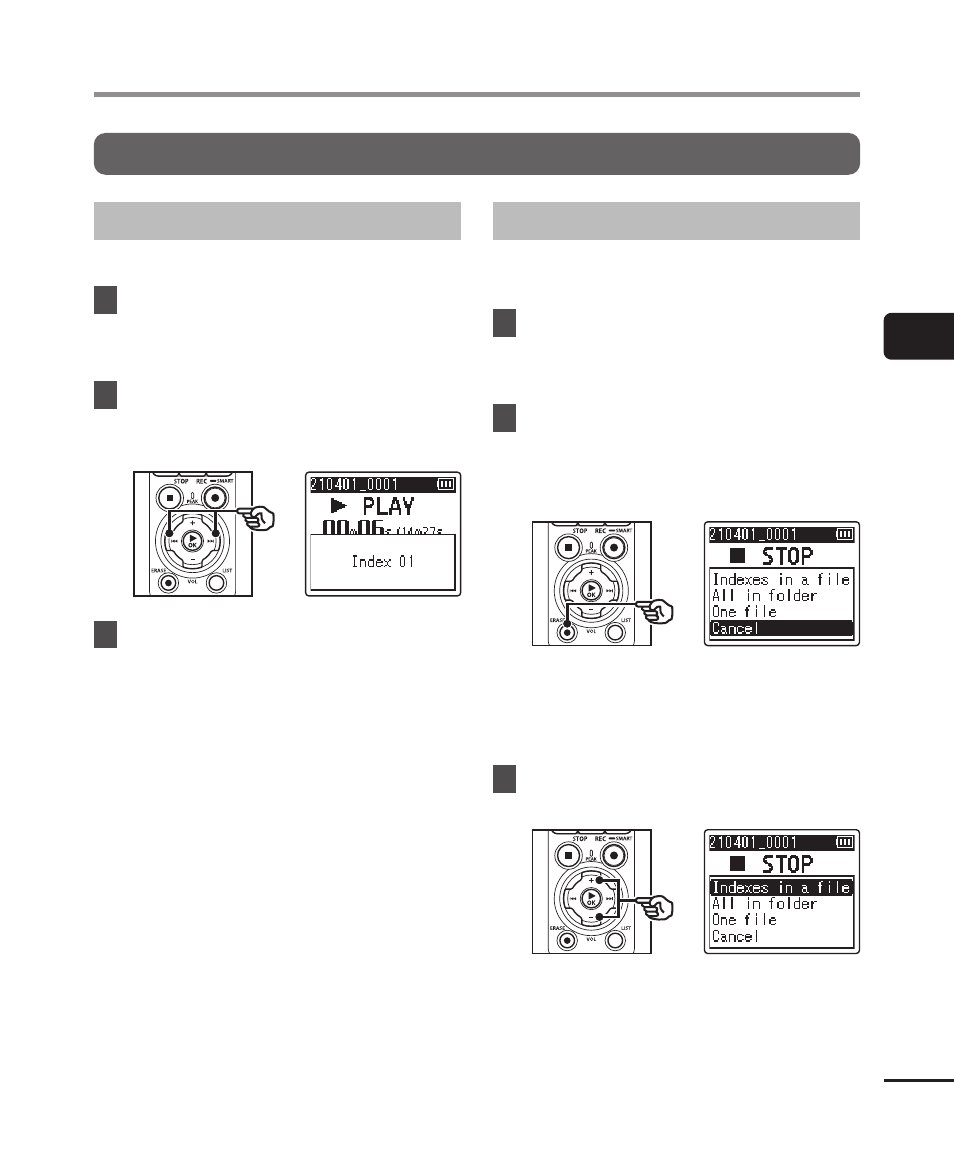
Deleting selected index/temp marks
Delete selected index/temp marks.
1
Select a file that contains index
mark/temp mark you want to
erase and start playback.
2
Use the
9
or
0
button
to select the index mark/temp
mark you want to erase.
3
When the number of the index
mark/temp mark to erase
is being shown (for about
2 seconds) in the display,
press the
ERASE
button.
•
Any subsequent index marks/temp
marks in the file are automatically
renumbered.
Erasing all index marks at once
You can erase all index marks in a file at
once.
1
Select a file that contains
index/temp marks you want to
erase (
☞
P.33).
2
When the file display screen
appears, press the
ERASE
button while the voice recorder
is in stop mode.
•
The recorder will return to stop
mode when the
0
button is
pressed or if no operations are
performed for 8 seconds.
3
Press the
+
or
−
button to
select [Indexes in a file].