Calendar search function, P.73) – Olympus LS-P5 Linear PCM Recorder User Manual
Page 73
73
EN
3
Playback
You can search for voice files by specifying a recording date. If you have forgotten in
which folder a file has been saved, with this feature you can access it quickly by entering
its recording date.
•
You can only search for files saved in [
Recorder
] folder.
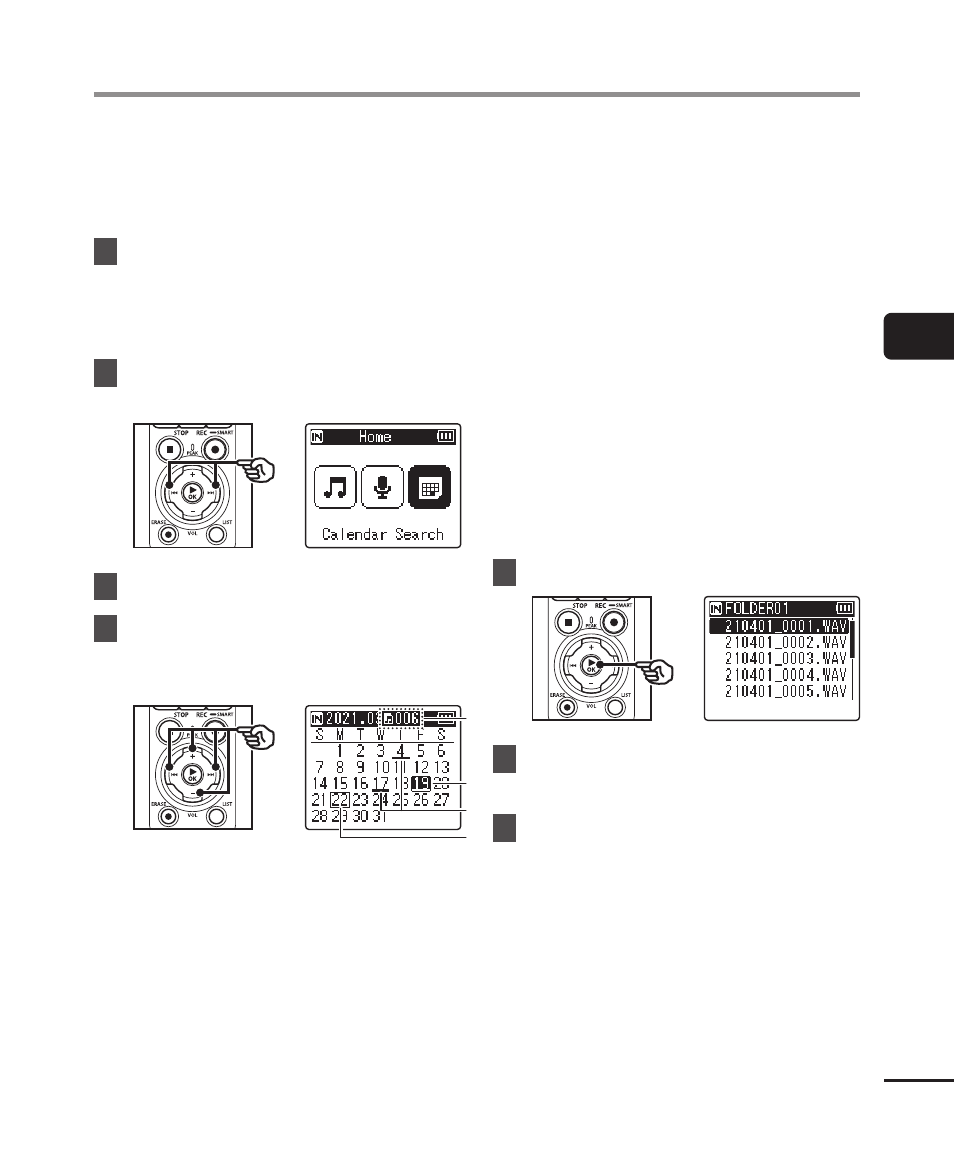
1
While the voice recorder is
in stop mode, press the
F1
(HOME) button to display the
[Home] screen.
2
Press the
9
or
0
button
to select [Calendar Search].
3
Press the
`
OK
button.
4
Press the
+
,
−
,
9
or
0
button to select the desired
date.
b
b
a
a
c
c
d
d
a
Number of files saved (recorded)
on selected date
b
Selected date
c
Date file was recorded
d
Today’s date
•
Dates on which files were saved are
underlined.
9
/
0
button:
Move to the next/previous date.
Press and hold to skip to the next
date on which a file was recorded.
+
/
−
button:
Move to the previous/next week.
F1
/
F2
button:
Move to the previous/next month.
•
Press the
STOP
(
4
) button to
cancel the setting and return to the
[
Home
] screen.
5
Press the
`
OK
button.
6
Press the
+
or
−
button to
select the desired file.
7
Press the
`
OK
button to start
playback.
Calendar Search function