Menu, Setting menu items, Basic operation – Olympus LS-P5 Linear PCM Recorder User Manual
Page 77
77
EN
4
Menu
Setting menu items
Basic operation
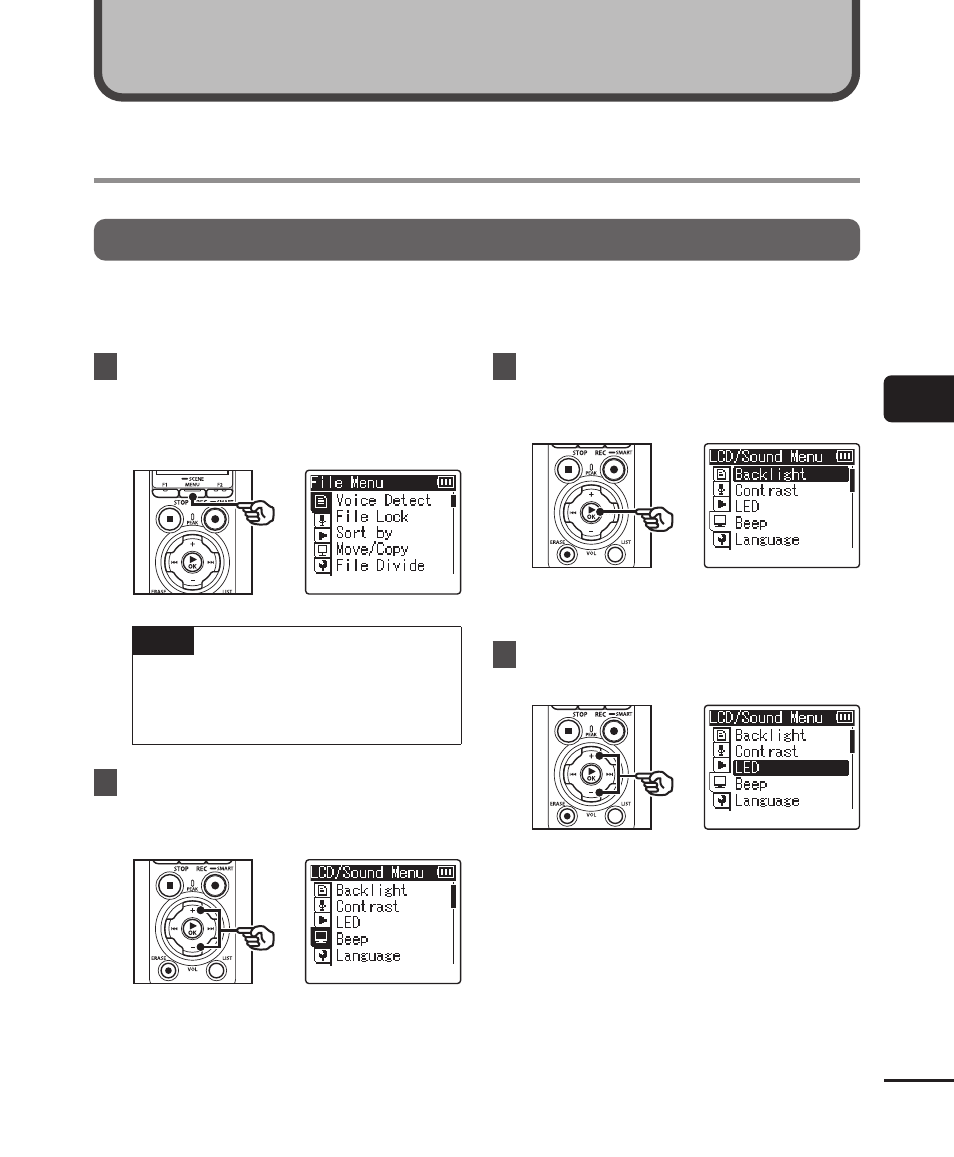
Menu items are arranged by tabs, with which you can quickly set desired items by
selecting a tab and then moving to the desired item within the tab. Follow the steps below
to set a menu item.
1
During recording/playback or
while the voice recorder is in
stop mode, press the
MENU/
SCENE
button.
TIP
•
Some menus contain items that
can be set during recording/
playback (
☞
2
Press the
+
or
−
button to
select the tab containing the
item you want to set.
•
Moving the cursor from one tab
to another switches the displayed
menu screen.
3
Press the
`
OK
button to
move the cursor to the desired
setting item.
•
You can also use the
9
button to
perform this operation.
4
Press the
+
or
−
button to
select the desired setting item.
Menu