Setting menu items – Olympus LS-P5 Linear PCM Recorder User Manual
Page 78
78
EN
4
Menu
Setting menu items
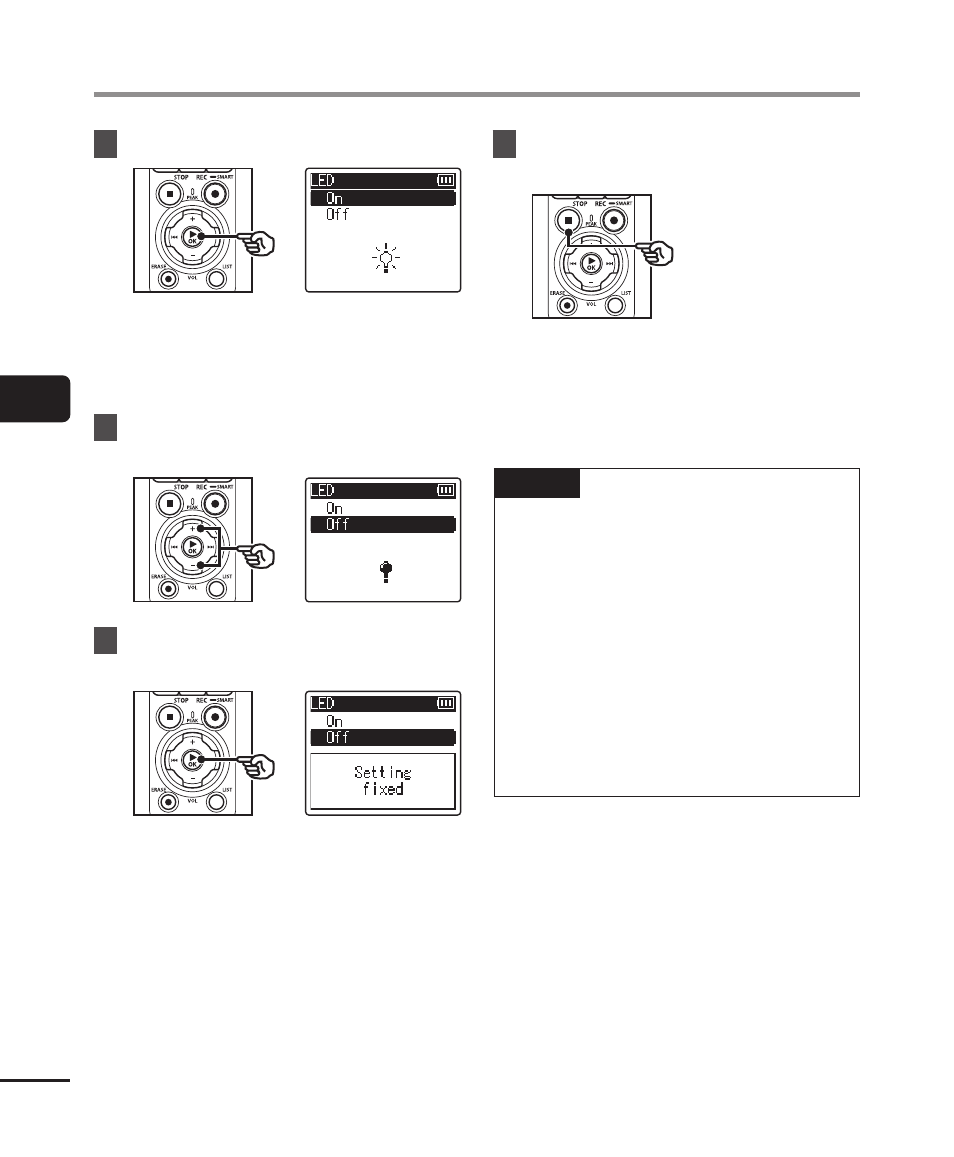
5
Press the
`
OK
button.
•
The setting of the selected item is
displayed.
•
You can also use the
9
button to
perform this operation.
6
Press the
+
or
−
button to
change the setting.
7
Press the
`
OK
button to
finalize the setting.
•
A message indicating the setting
has been entered appears.
•
You can cancel the setting and
return to the previous screen by
pressing the
0
button instead of
the
`
OK
button.
8
Press the
STOP
(
4
) button to
exit the menu screen.
•
When the menu screen is displayed
during recording or playback, press
the
MENU/SCENE
button to return
to the previous screen without
ending recording/playback.
NOTE
•
For menu settings done while the
voice recorder is in stop mode, the
voice recorder exits the menu and
returns to the stopped mode if no
operation is performed for 3 minutes.
The selected setting item is not
changed in this case.
•
For menu settings done during
recording/playback, the voice
recorder exits the menu if no
operation is performed for
8 seconds.