Selecting microphone directivity [zoom mic, P.86), Recording menu [rec menu – Olympus LS-P5 Linear PCM Recorder User Manual
Page 86
86
EN
4
Menu
Recording menu [Rec Menu]
TIP
•
Sound quality increases as the
recording rate value increases.
•
Setting a higher recording rate
increases file size. Check that you
have enough remaining memory
before recording.
•
To record conferences and
presentations clearly, it is
recommended to set [
Rec Mode
] to
other than [
mono
].
NOTE
•
When [
Rec Mode
] is set to stereo,
recording with a connected mono
microphone records on the left
channel only.
•
Adjusting [
Rec Mode
] settings
selects [
Off
] for [
Rec Scene
] and [
Fn
Rec
] > [
Over Dubbing
].
•
Selecting [
PCM
] or [
FLAC
] selects
[
Off
] for [
Voice Detect
] > [
While
Recording
] and [
Fn Rec
] > [
Pre-
Recording
].
•
Seconds of the remaining recordable
time is not displayed when [
FLAC
]
is set.
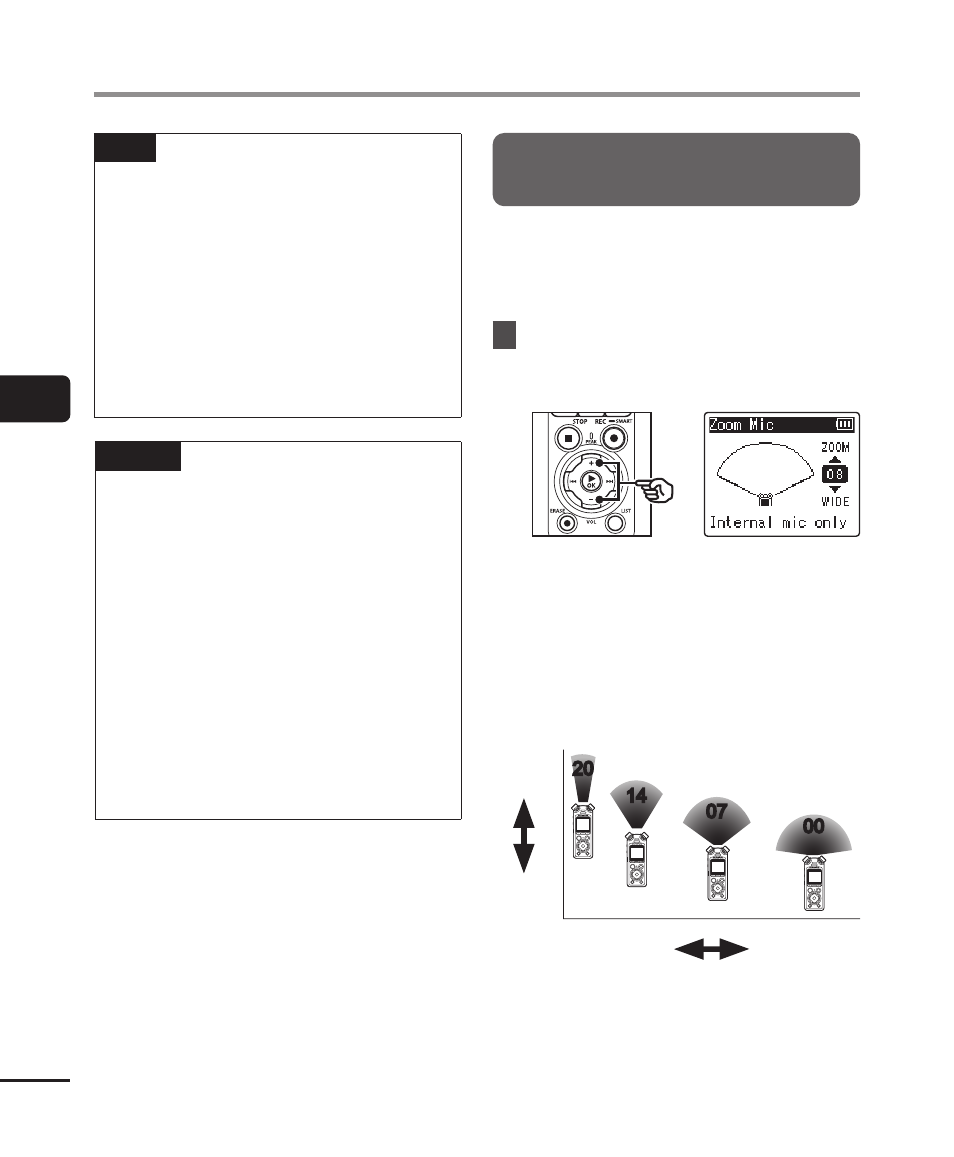
Selecting microphone
directivity [Zoom Mic]
The voice recorder’s built-in stereo
microphone provides directivity ranging
from broad-coverage stereo recording to
highly directional recording.
1
Press the
+
or
−
button to
adjust the built-in stereo
microphone’s directivity.
•
The setting can be adjusted to
between [
00
] and [
20
].
•
The
+
button increases directivity.
•
The
−
button enables recordings
with broader-coverage stereo.
•
Reducing directivity and broadening
the sound pickup range gives
recordings more of a stereo effect.
00
07
14
20
Broad sound
pickup range
High
directivity
Low
directivity
Narrow sound
pickup range