Recording menu [rec menu – Olympus LS-P5 Linear PCM Recorder User Manual
Page 90
90
EN
4
Menu
Recording menu [Rec Menu]
4
Adjusting the voice sync level for
voice sync recording
1
Press the
F2
(SYNC) button to
prepare for recording.
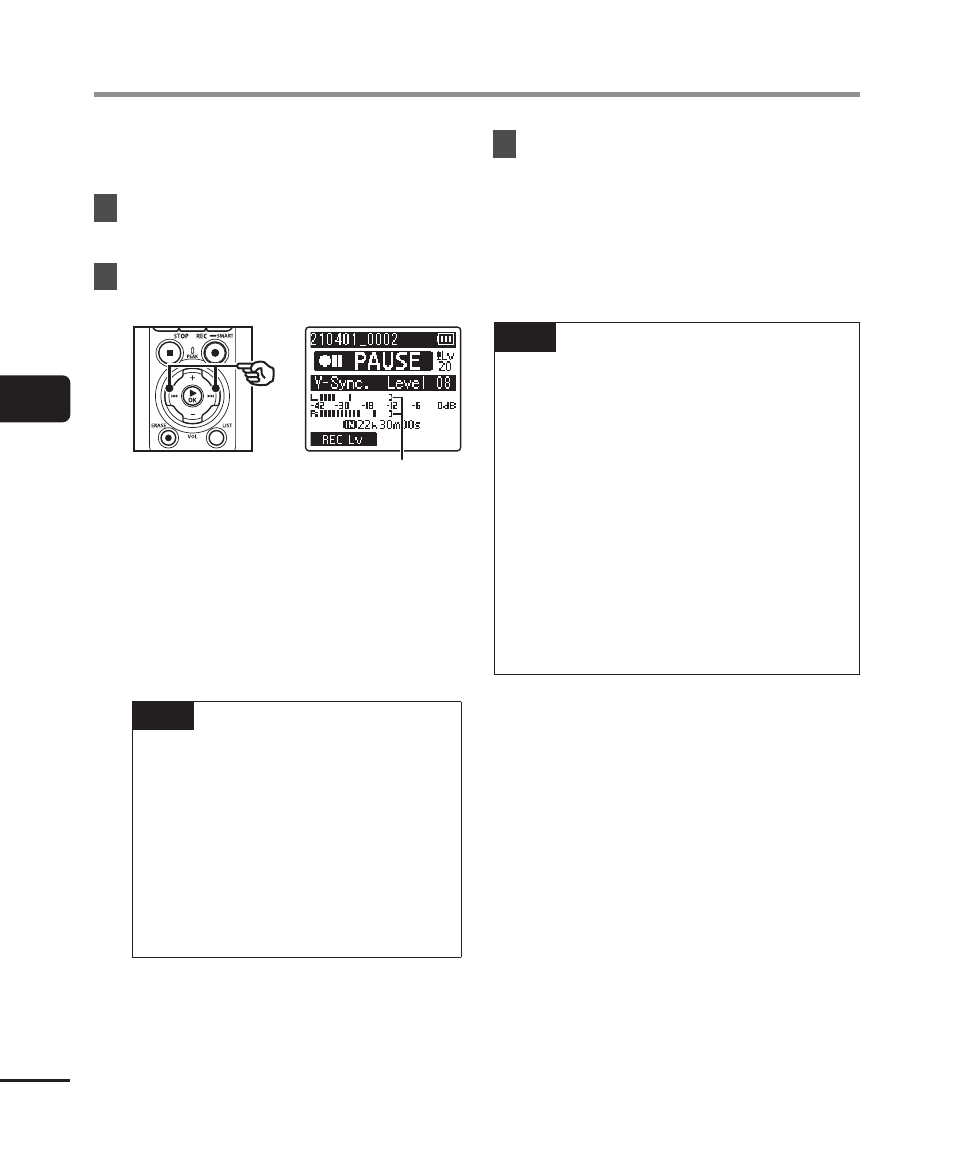
2
Press the
9
or
0
button to
adjust the voice sync level.
Voice sync level (moves left/right
to match set level)
•
The voice synch level can be
adjusted to a setting between [
01
]
and [
20
].
•
Increasing the setting number
increases the activation sensitivity,
enabling quieter sounds to activate
the start of recording.
TIP
•
To change the recording level
(
☞
P.84) during voice sync
level adjustment in [
Manual
],
press the
F1
button. The voice
recorder changes to recording
level adjustment mode. Press
the
F1
button again to return
to voice sync level adjustment
mode.
3
Press the
REC
(
s
) button.
•
The blinking message [
Standby
]
appears in the display, and the
recording indicator light blinks.
•
Recording starts automatically if the
input is louder than the voice sync
level.
TIP
•
The voice recorder automatically
ends recording and returns to
recording standby mode if the
input sound remains below the
voice sync level for longer than the
time selected for [
V-Sync. Time
]
(
☞
recorder enters standby mode, the
current file is closed. Recording
continues in a new file the next time
sound is detected.
•
Press the
STOP
(
4
) button to end a
voice sync recording session.