Recording menu [rec menu – Olympus LS-P5 Linear PCM Recorder User Manual
Page 92
92
EN
4
Menu
Recording menu [Rec Menu]
2
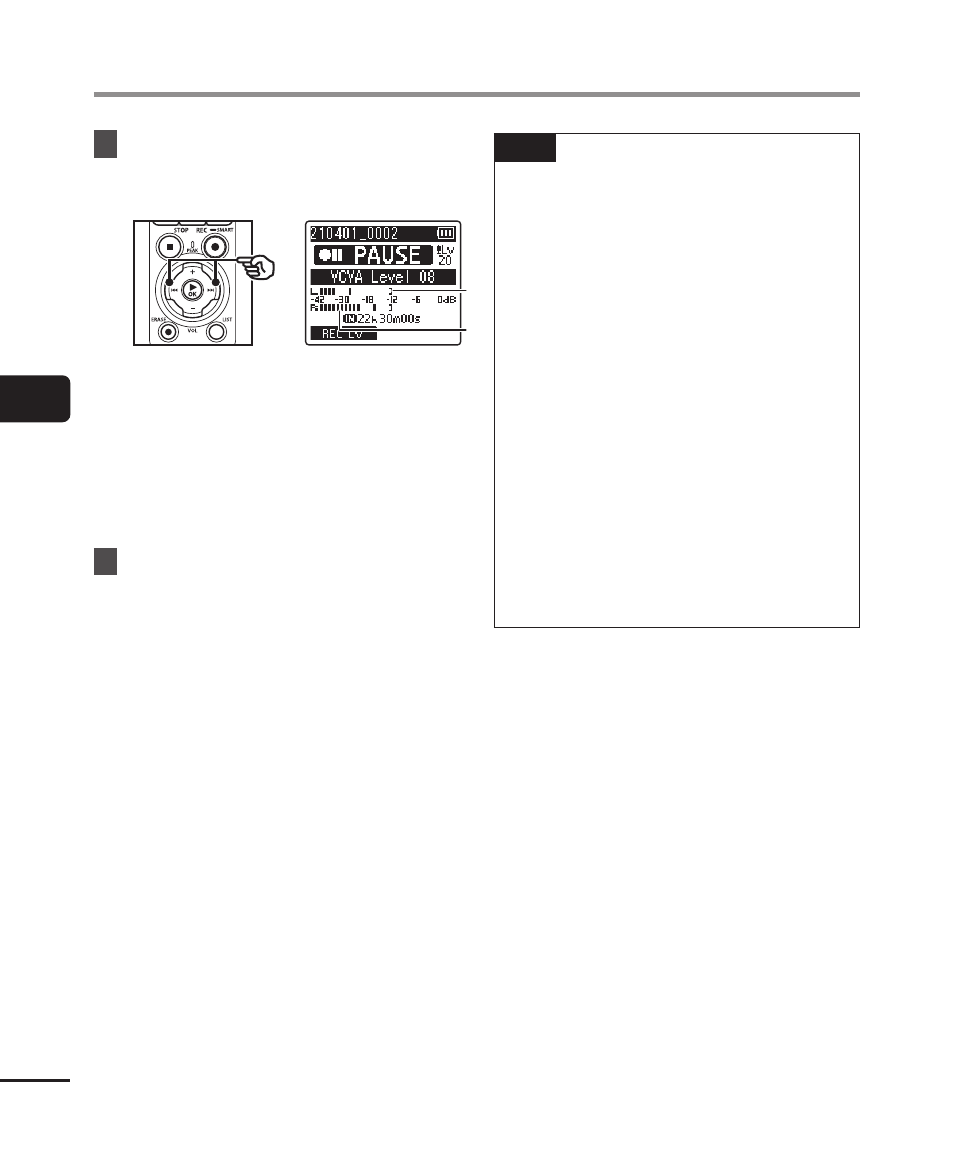
Press the
9
or
0
button
to adjust the voice activation
level.
a
a
b
b
a
Voice activation level (moves left/
right to match set level)
b
Level meter (changes in
proportion to recording sound
volume)
•
The setting can be adjusted to
between [
01
] and [
20
].
3
Press the
REC
(
s
) button to
start recording.
•
Recording pauses automatically
about 1 second after the input
sound becomes quieter than the set
activation sensitivity.
The blinking message [
Standby
]
appears in the display. The
recording indicator light becomes
lit when recording is activated and
flashes when recording is paused.
TIP
•
Increasing the setting number
increases the VCVA activation
sensitivity, enabling quieter sounds
to activate the start of recording.
•
Adjust the VCVA voice activation
level to suit the recording conditions
(to cope with high levels of
surrounding noise or the like).
•
To avoid recording mistake, it’s
recommended to perform a test
recording beforehand to adjust the
voice activation level.
•
To change the recording level
(
☞
P.84) during VCVA recording in
[
Manual
], press the
F1
button. The
voice recorder changes to recording
level adjustment mode. Press the
F1
button again to return to voice
activation level adjustment mode.