Front panel – Onkyo TX-NR6100 7.2-Channel Network A/V Receiver User Manual
Page 11
Advertising
11
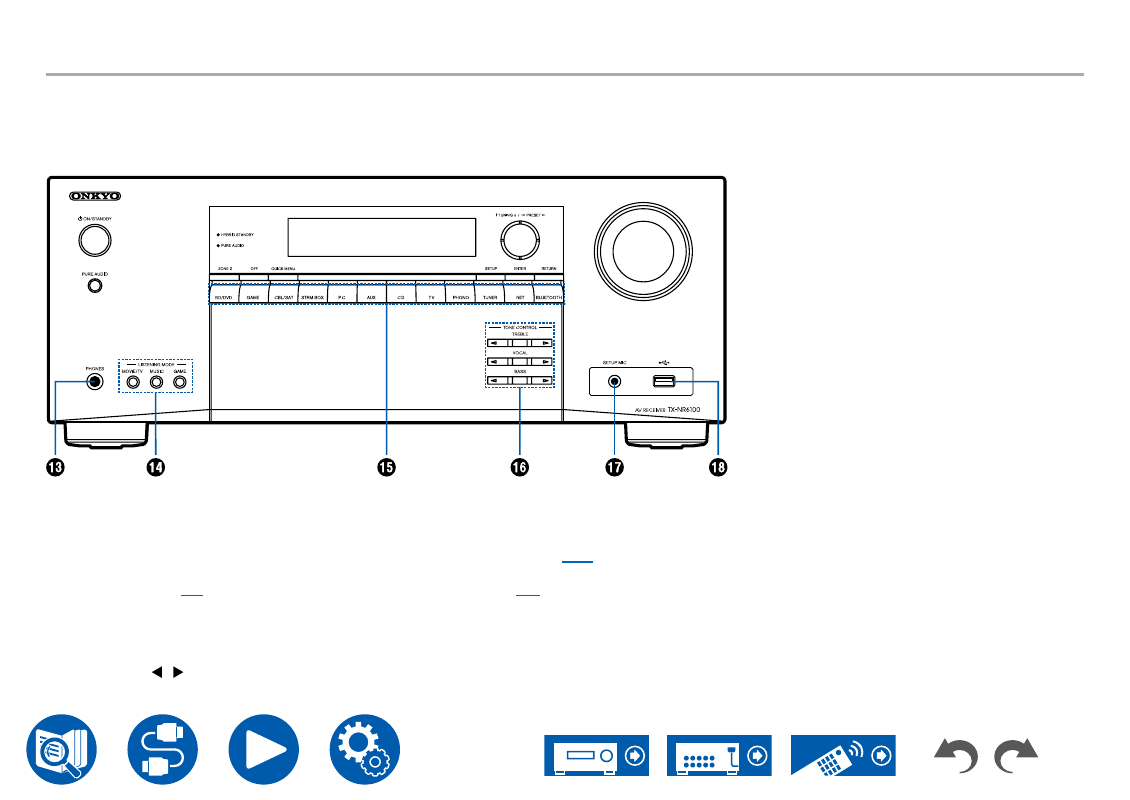
Front Panel
13.
PHONES jack
: Connect headphones with a
standard plug (ø1/4″/6.3 mm).
14.
LISTENING MODE buttons
: Switches the
listening mode (
) by pressing "MOVIE/
TV", "MUSIC" and "GAME" repeatedly.
15.
Input selector buttons
: Switches the input to be
played.
16.
TONE CONTROL buttons
: Adjusts the sound
quality. Press / of "TREBLE", "VOCAL" or
"BASS" respectively.
17.
SETUP MIC jack
: Connect the supplied speaker
setup microphone. (
18.
USB port
: Connect a USB storage device to play
music files. (
Advertising
See also other documents in the category Onkyo Receivers and Amplifiers:
- TX-SR606 (104 pages)
- TX-SR804E (96 pages)
- TX-SR8450 (80 pages)
- TX-SR505 (2 pages)
- TX-SR8250 (60 pages)
- TX-NR905 (4 pages)
- TX-SR804 (96 pages)
- A-9555 (20 pages)
- SKB-960 (112 pages)
- TX-SR701E (88 pages)
- TX-SR8550 (72 pages)
- T-4211 (8 pages)
- TX-NR708 (96 pages)
- HT-R490 (36 pages)
- RDA-7.1 (16 pages)
- TX-DS494 (2 pages)
- TX-NR1008 (104 pages)
- TX-SR508 (64 pages)
- TX-SR304E (60 pages)
- HT-R640 (80 pages)
- TX-NR900 (2 pages)
- TX-SR503E (14 pages)
- 7.2 Channel Network A/V Receiver TX-NR809 (100 pages)
- TX-SR603/603E (92 pages)
- TX SR805 (120 pages)
- TX-8522 (2 pages)
- FR-N3X (72 pages)
- TX-L5 (40 pages)
- SKR-3600 (20 pages)
- HT-RC440 (120 pages)
- HT-r540 (80 pages)
- TX-SR313 (68 pages)
- A-5VL (20 pages)
- TX-NR709 (96 pages)
- HT-SR600 (2 pages)
- TX-SR8370 (96 pages)
- Network A/V Receiver HT-R690 (84 pages)
- Network A/V Receiver TX-NR1010 (164 pages)
- A-933 (24 pages)
- pmn (28 pages)
- Liverpool AV-3600 (8 pages)
- TX-NR609 (88 pages)
- AV RECEIVER HT-RC330 (56 pages)
- TX-SR875 (120 pages)
- TX-NR414 (128 pages)