Rear panel – Onkyo TX-NR6100 7.2-Channel Network A/V Receiver User Manual
Page 13
13
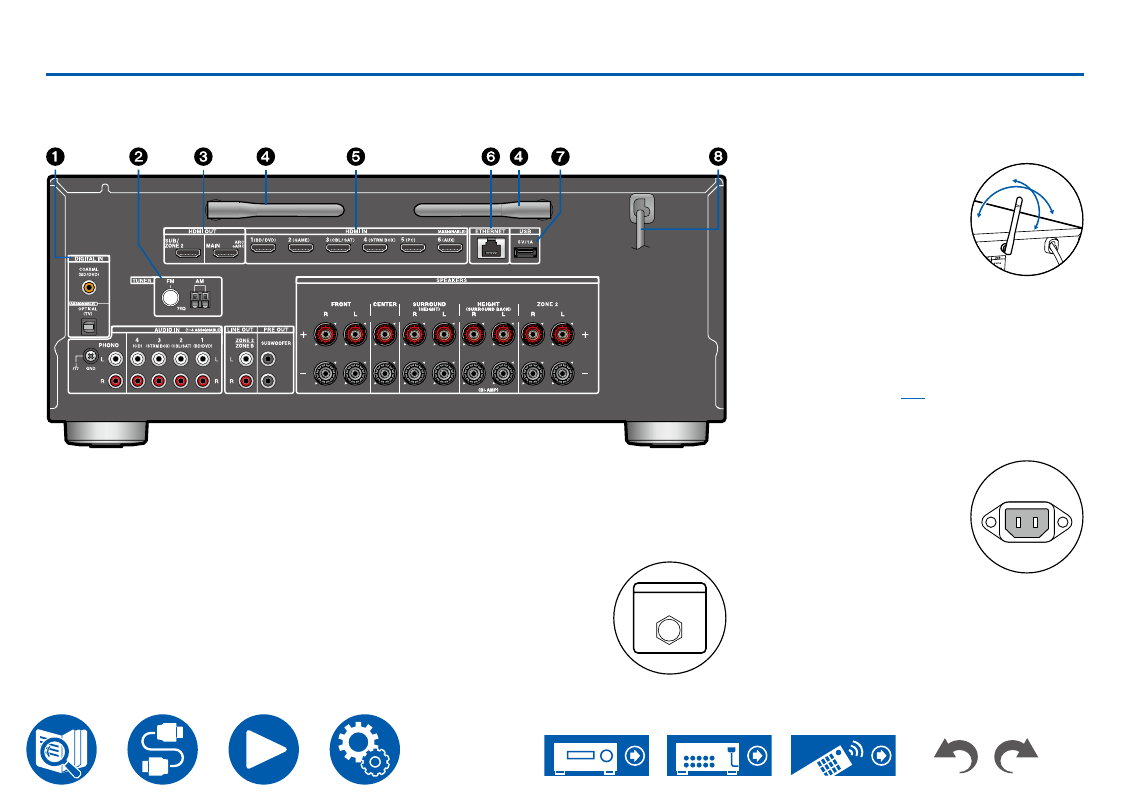
Rear Panel
1.
DIGITAL IN OPTICAL/COAXIAL jacks
: Input
TV or AV component digital audio signals with a
digital optical cable or digital coaxial cable.
2.
TUNER AM/FM terminal
(North American,
Australian, Taiwanese and Asian models):
Connect the supplied antennas.
TUNER DAB/FM terminal
(European models):
Connect the supplied antennas.
3.
HDMI OUT jacks
: Transmit video signals and
audio signals with an HDMI cable connected to a
monitor such as a TV or projector.
4.
Wireless antenna
: Used for WI-Fi connection or
when using a BLUETOOTH
enabled device. Adjust the
angles according to the
connection status.
5.
HDMI IN jacks
: Transmit video signals and audio
signals with an HDMI cable connected to an AV
component.
6.
ETHERNET port
: Connect to the network with
an Ethernet cable.
7.
USB port
: Connect a USB storage device to
play music files. (
) You can also supply
power (5 V/1 A) to USB devices with a USB
cable.
8.
Power cord
(North American models)
AC INLET
(European,
Australian, Taiwanese and
Asian models): Connect the
supplied power cord.
DAB /
FM
TUNER
180°
90°
AC INLET