Connecting the sub monitor, Sub monitor, Connections – Onkyo TX-NR6100 7.2-Channel Network A/V Receiver User Manual
Page 52
Advertising
52
Connections
a
SUB Monitor
Be sure to insert the HDMI
cable all the way in.
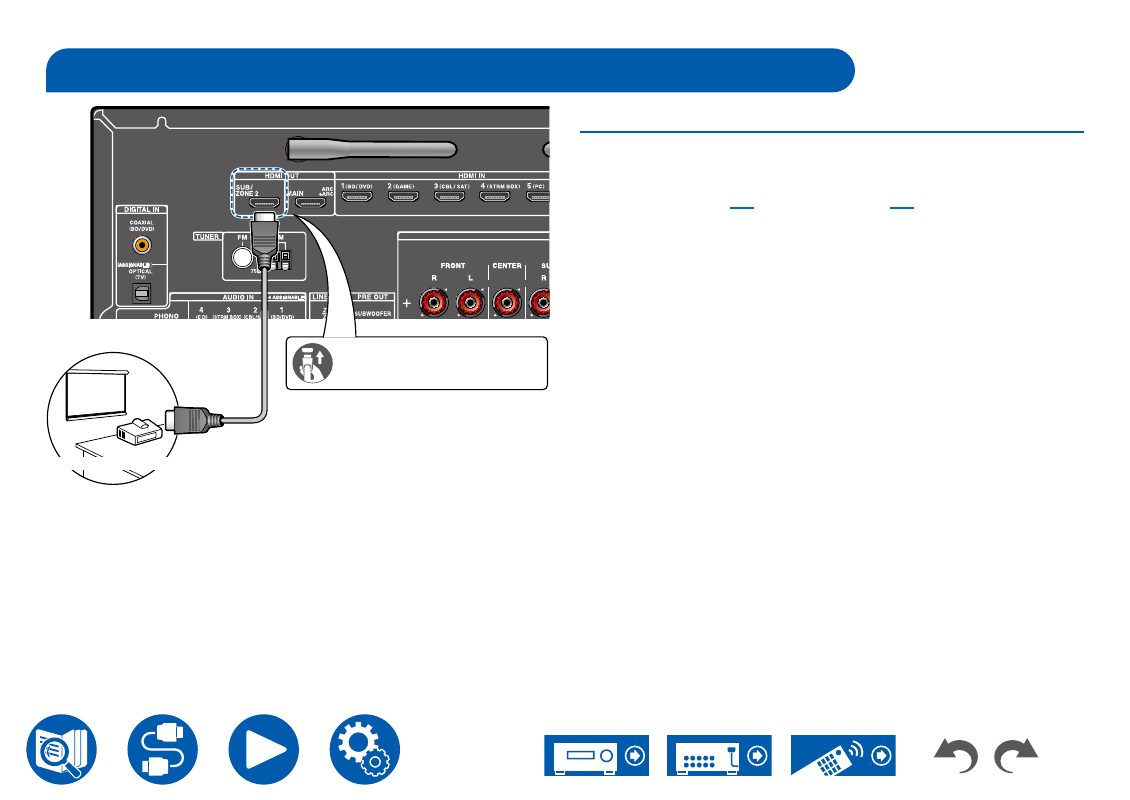
SUB Monitor
This unit has multiple HDMI OUT jacks, and another TV or projector can be
connected to the HDMI OUT SUB jack.
• Switch between MAIN and SUB using the HDMI MAIN/SUB button on the
remote controller (
). Note that this jack
is not ARC-compatible.
• If devices with different resolutions are connected to HDMI OUT MAIN jack
and SUB jack, images are output with the lower resolution.
Connecting the SUB Monitor
a
HDMI cable
Advertising
See also other documents in the category Onkyo Receivers and Amplifiers:
- TX-SR606 (104 pages)
- TX-SR804E (96 pages)
- TX-SR8450 (80 pages)
- TX-SR505 (2 pages)
- TX-SR8250 (60 pages)
- TX-NR905 (4 pages)
- TX-SR804 (96 pages)
- A-9555 (20 pages)
- SKB-960 (112 pages)
- TX-SR701E (88 pages)
- TX-SR8550 (72 pages)
- T-4211 (8 pages)
- TX-NR708 (96 pages)
- HT-R490 (36 pages)
- RDA-7.1 (16 pages)
- TX-DS494 (2 pages)
- TX-NR1008 (104 pages)
- TX-SR508 (64 pages)
- TX-SR304E (60 pages)
- HT-R640 (80 pages)
- TX-NR900 (2 pages)
- TX-SR503E (14 pages)
- 7.2 Channel Network A/V Receiver TX-NR809 (100 pages)
- TX-SR603/603E (92 pages)
- TX SR805 (120 pages)
- TX-8522 (2 pages)
- FR-N3X (72 pages)
- TX-L5 (40 pages)
- SKR-3600 (20 pages)
- HT-RC440 (120 pages)
- HT-r540 (80 pages)
- TX-SR313 (68 pages)
- A-5VL (20 pages)
- TX-NR709 (96 pages)
- HT-SR600 (2 pages)
- TX-SR8370 (96 pages)
- Network A/V Receiver HT-R690 (84 pages)
- Network A/V Receiver TX-NR1010 (164 pages)
- A-933 (24 pages)
- pmn (28 pages)
- Liverpool AV-3600 (8 pages)
- TX-NR609 (88 pages)
- AV RECEIVER HT-RC330 (56 pages)
- TX-SR875 (120 pages)
- TX-NR414 (128 pages)