Atlona AT HD30SR User Manual
Page 2
Advertising
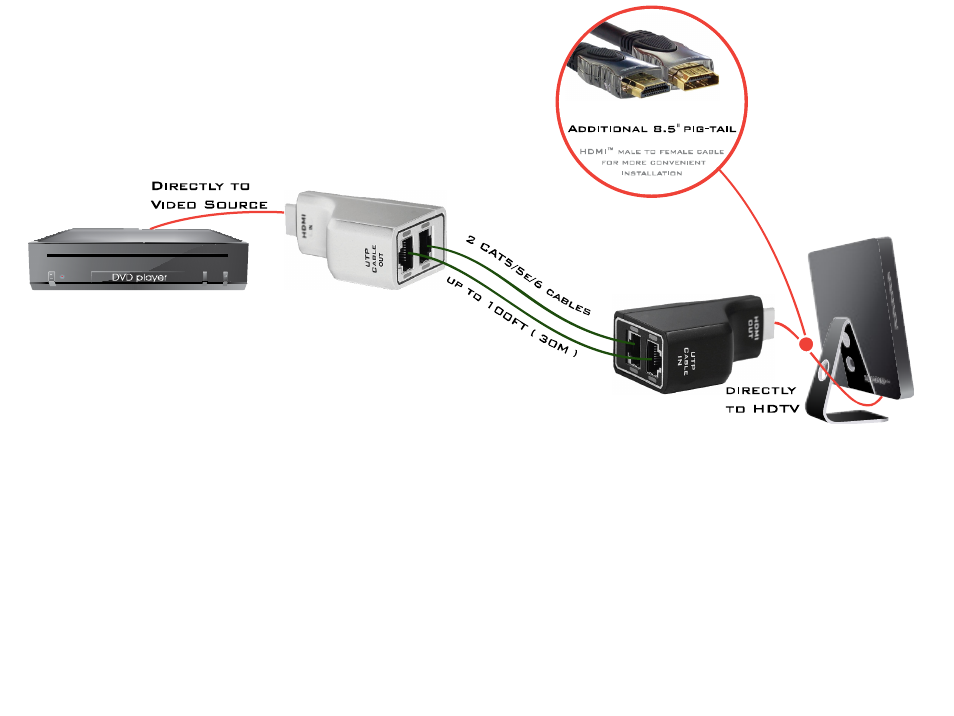
Installation Instructions:
1. Cut and terminate two CAT5e/6 to desired length, or use pre-terminated cables.
2. Connect one end of each CAT5E/6 cable to the Sender unit labeled “HDMI IN”
Note: keep track of which cable is inserted into each CAT5E/6 port as they will need to match on the Receiver side
3. Connect the remaining ends of CAT5E/6 cables to the Receiver unit labeled “HDMI OUT”
4. Connect the Sender unit to your source (i.e. BluRay Player)
5. Connect the Reciever unit to your Display (i.e. HDTV)
6. Video from your source should be visible immediately on your display.
2
Advertising
See also other documents in the category Atlona Routers:
- RGB45SR (9 pages)
- PRO2HDREC (8 pages)
- USB 202 (26 pages)
- CP 268 (9 pages)
- Fiber (13 pages)
- Lc2 (12 pages)
- CDM 660 (8 pages)
- ATSDI10SR LC (8 pages)
- ATRS232SRS (8 pages)
- AT PROHD44M SR (13 pages)
- ATPRO2HD1616M RX (8 pages)
- HDMI (9 pages)
- ATP 14029 (7 pages)
- ATPROHD1616M SR (16 pages)
- ATP 14009 (7 pages)
- AT HDSync V2 (11 pages)
- ATHD580 (9 pages)
- ATHD V42M (12 pages)
- AT DVI100SR (10 pages)
- AT80HDMI 2 (6 pages)
- AT80HDMI 1 (6 pages)
- AT80COMP7 (6 pages)
- AT80COMP6 (6 pages)
- AT80COMP5 (6 pages)
- AT80COMP3 (6 pages)
- AT80CHD 1 (6 pages)
- AT22080 (6 pages)
- AT3GSDI 14 (9 pages)
- AT22060 (6 pages)
- AT WHD200 (10 pages)
- AT VID81 (8 pages)
- AT VID18 (8 pages)
- AT VID18 BNC (8 pages)
- AT VGA180ASR (7 pages)
- AT VGA88M SR (13 pages)
- AT VIDEO MATRIX (33 pages)
- AT VGA18 (8 pages)
- AT VGA14 (8 pages)
- AT VGA12A 14A 18A (8 pages)
- AT VGA11S (7 pages)
- AT VGA116 (8 pages)
- AT VGA10SS (9 pages)
- AT VGA100 WPVGA (10 pages)
- AT VGA SR (8 pages)
- AT VGA0505 (15 pages)