Paxar Monarch 9850 User Manual
Page 46
Example
{
I,G,1,50,10 p }
Enables backfeed and sets the dispense position to 0.25 inches
(50/203) and the backfeed distance to 0.05 inches (10/203).
S p e c i a l C o n s i d e r a t i o n s W h e n U s i n g B a c k f e e d
Make a note of the following items:
◆
Be careful when tearing supplies, because the adhesive can
adhere to the printhead or platen roller.
◆
Backfeed affects each label in the on-demand mode or the
first and last label of the batch in continuous mode.
◆
When backfeed is enabled and multiple batches are sent, the
printer may not backfeed between each batch.
◆
Backfeed should only be used when you need to advance
labels to the desired dispense point.
◆
Backfeed does not interfere with the supply, print, or margin
positions you have set.
◆
If the supply inter-label gap is not between .07 inch to .15 inch
(14 to 30 dots), you must adjust the dispense position and
backfeed distance accordingly.
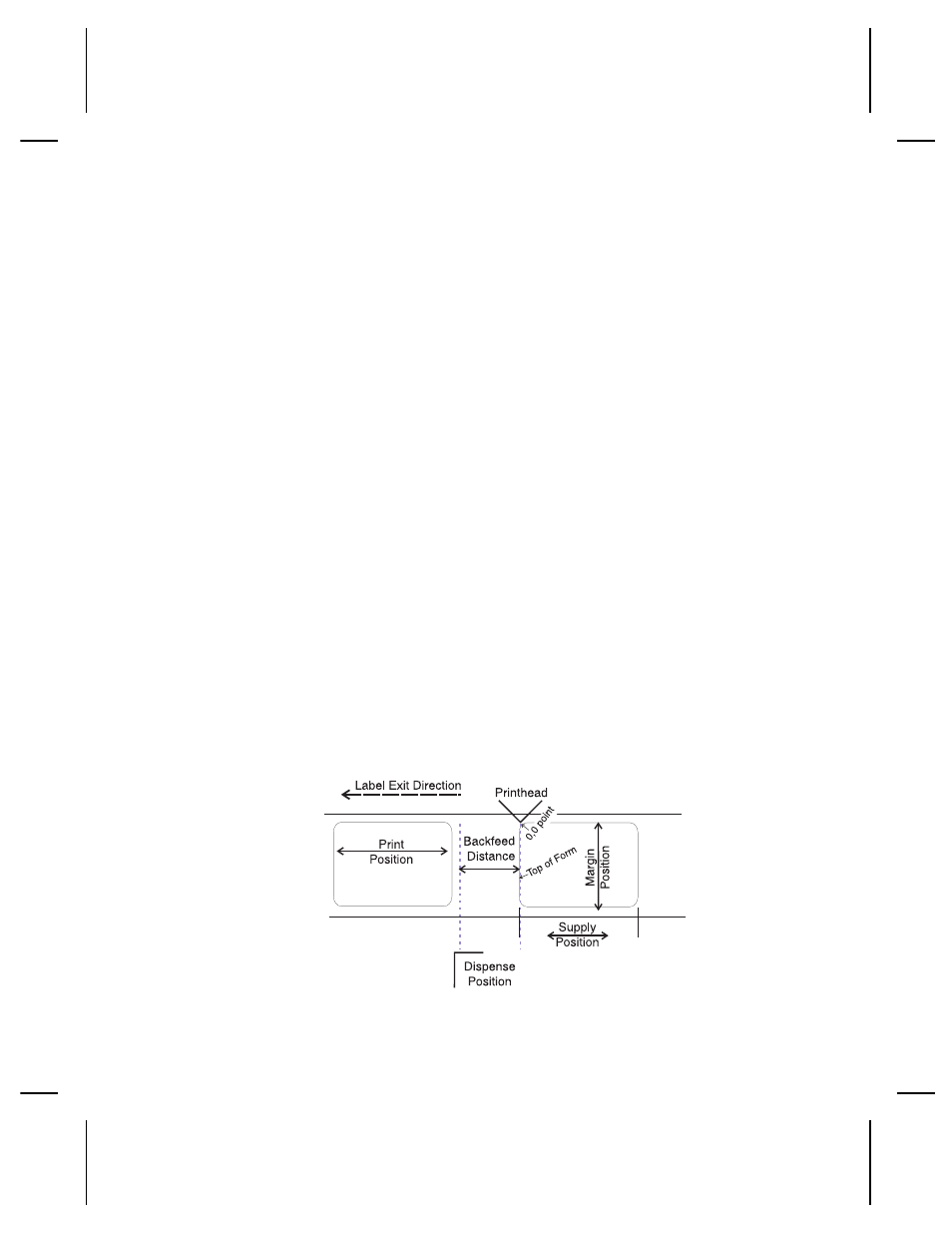
See the following graphic for a representation of the following
adjustments: dispense position, backfeed distance, supply
position, print position, and margin position.
2-24 Configuring the Printer