BAFO BF-2043 User Manual
Page 7
Advertising
USB 2.0 to IDE 2.5” hard disk Enclosure User’s Manual 6
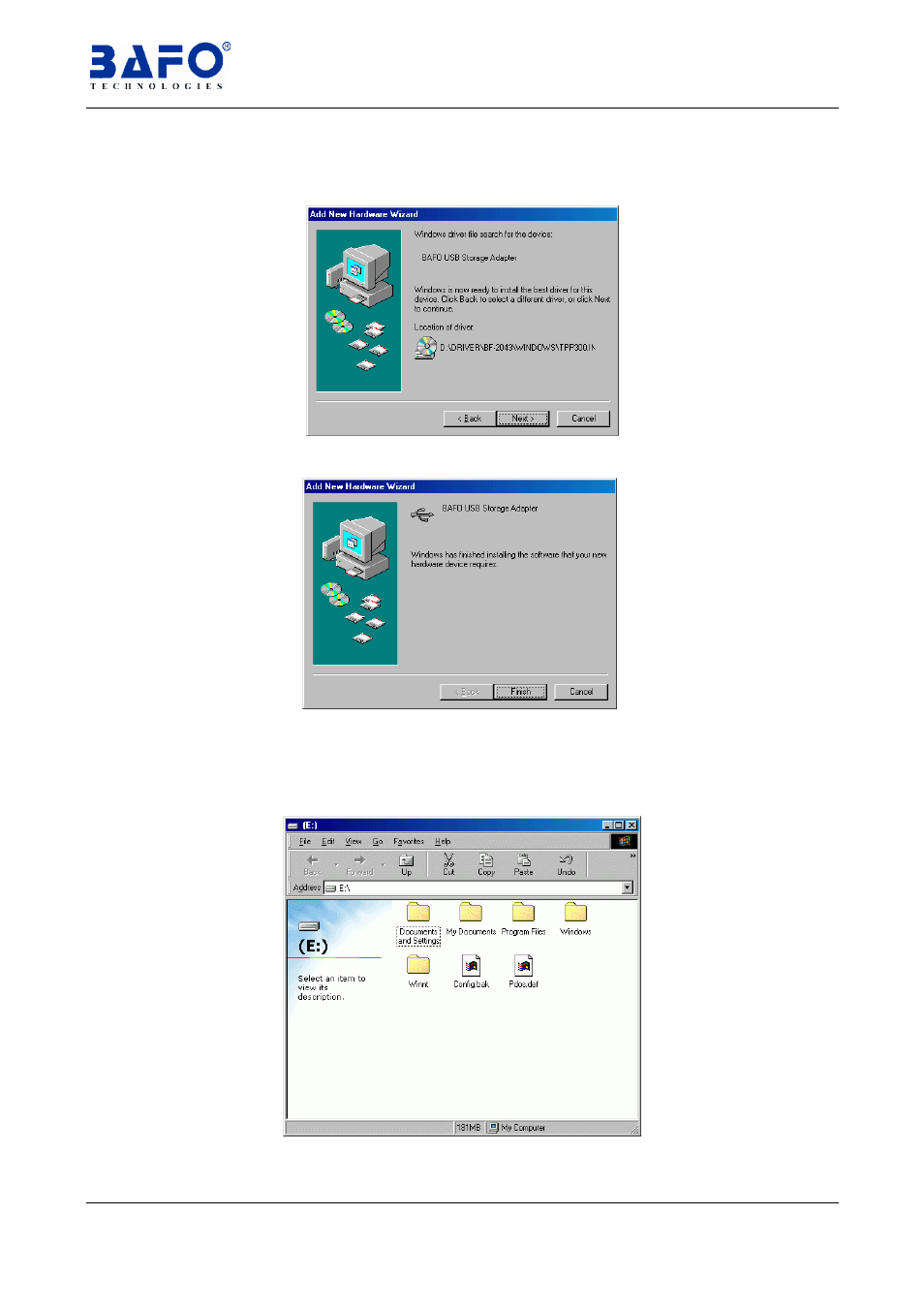
7.1.5 Windows will search the driver for this device. Make sure the driver that
Windows found is “
D:\DRIVER\BF-2043\WINDOWS\TPP300.INF
” then
click “
Next
”.
7.1.6 Click “
Finish
” to complete the installation procedure of “
BAFO USB
Storage Adapter
”
7.1.7 Connect the USB port of
USB2.0 to IDE 2.5” hard disk enclosure
to PC
with USB cable. System will auto detect the device and load the driver
then create a new device and name of “
(E:)
” at desktop as shown below.
Advertising
See also other documents in the category BAFO Accessories communication:
- MCB v1.0 (1 page)
- BF-7900 (28 pages)
- BF-7100 (58 pages)
- BF-7510 (40 pages)
- BF-7360 USB2.0 SM (2 pages)
- BF-8000 (97 pages)
- BF-7360 USB2.0 SD (2 pages)
- BF-7360 USB2.0 MS (2 pages)
- BF-7360 USB2.0 CF (2 pages)
- BF-7360 USB2.0 7in 1 (4 pages)
- BF-7352 (2 pages)
- BF-7353 (5 pages)
- BF-7312 (17 pages)
- BF-7351 Internal Multi Slot (18 pages)
- BF-7351 External Single Slot (21 pages)
- BF-7351 External Multi Slot (21 pages)
- BF-7311 (29 pages)
- BF-630 (30 pages)
- BF-7300 (45 pages)
- BF-6250 (16 pages)
- BF-5320 (6 pages)
- BF-5319 (2 pages)
- BF-6200 (16 pages)
- BF-5312 (1 page)
- BF-5231 (6 pages)
- BF-5211 (6 pages)
- BF-4710 (6 pages)
- BF-4700 (4 pages)
- BF-4302 (7 pages)
- BF-4000 (8 pages)
- BF-3000 (10 pages)
- BF-2003 (20 pages)
- BF-1284 (8 pages)
- BF-2001 (32 pages)
- BF-800 (7 pages)
- BF-2000 (31 pages)
- BF-471 (6 pages)
- BF-1100 (28 pages)
- BF-400 (10 pages)
- BF-321 (12 pages)
- BF-320 (10 pages)
- BF-310 (7 pages)
- BF-200C (3 pages)
- BF-25XX (13 pages)