Chapter2touchscreen, 1panelinstruction, 2systemconfiguration – CREATOR CR-LAN15 User Manual
Page 10: Chapter 2 touch screen, 1 panel instruction, 2 system configuration
CREATOR CHINA
2011-09 WWW.CREATOR1997.COM
5
User’s Manual of LAN G15 Programmable Touch Screen
Chapter 2 Touch Screen
2.1 Panel Instruction
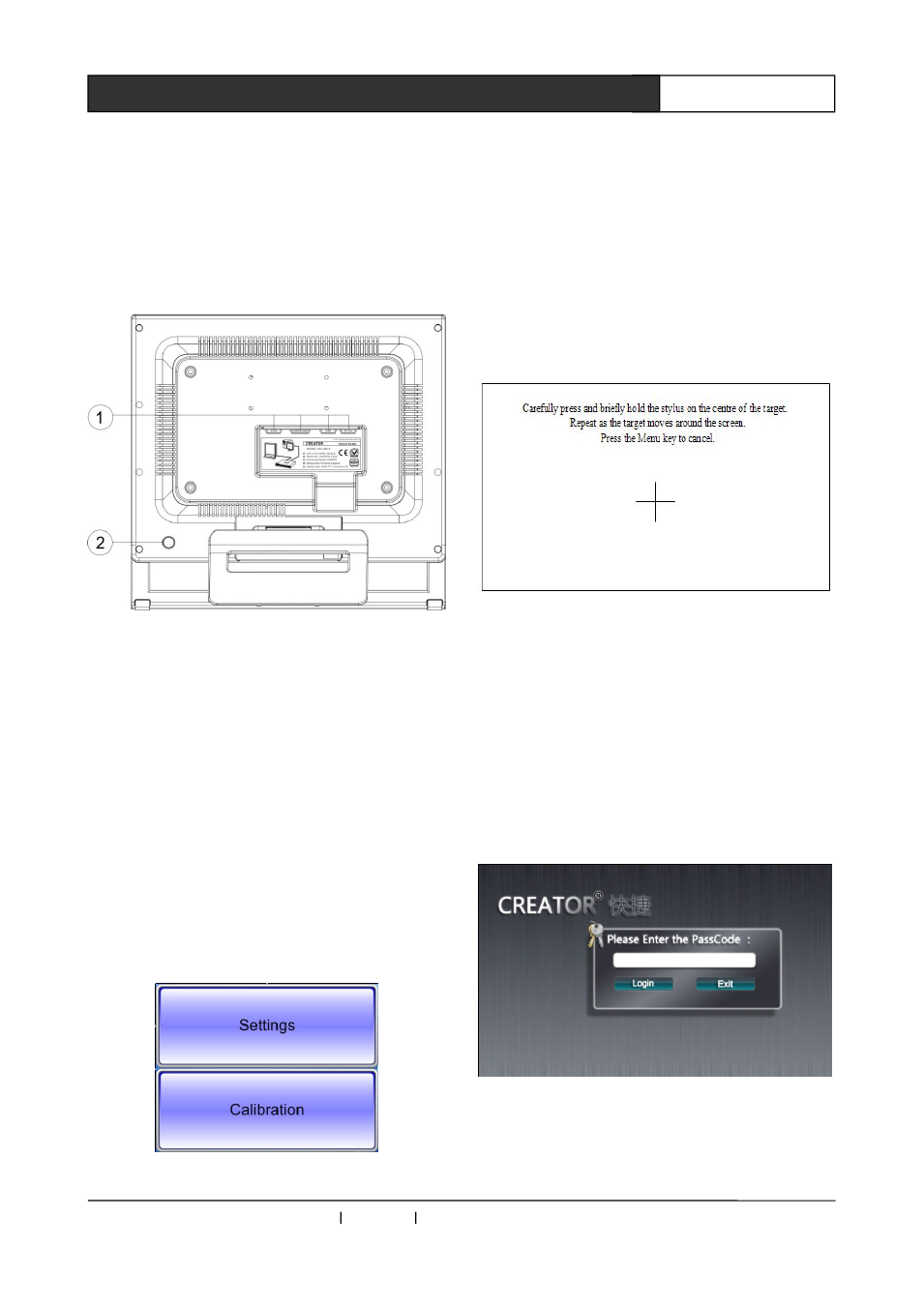
Rear Panel:
①
RJ45:Network port,for connecting to PC or
central host.
DOWNLOAD : Download key, for system
upgrade
USB:USB port
DC 12V:Power input port, support DC 12V
input of power supply to touch
screen.
②
System reset key.
2.2 System Configuration
Press and hold the control interface of main program
until the following picture is displayed:
Picture 2-1
1. Select Calibration key to have system
calibration, as seen in the picture. And calibrate it
as per the instructions.
Picture 2-2
2. Select settings to access to background
program, for detailed operation, please refer to
2.2.1
2.2.1 Login Page
1. Access to setting programs, you will see an
interface as picture 2-3 when Pass code is
needed:
Picture 2-3
2. Click on pass code input box to see a pop-up
keyboard, as picture 2-4: