Pplication, Diagram – Grandstream GXW42xx Quick Installation Guide User Manual
Page 5
~7~
~8~
•
IP address, subnet mask and gateway IP if using
static IP.
•
Each SIP server and/or Outbound Proxy FQDN or
IP address for one Profile (4 in total).
•
User subscriber information: User ID, Authentica-
tion ID, Password under FXS port label.
•
Please contact your ITSP for additional settings
that may be necessary to configure the device.
You will need the following information to configure
the GXW42XX series via the web browser:
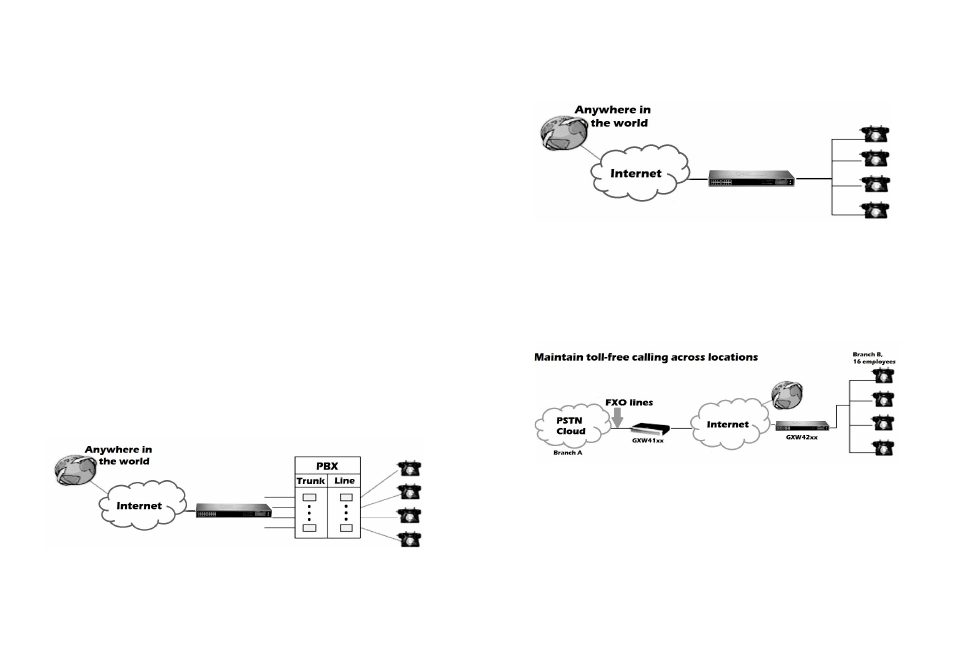
A
PPLICATION
DIAGRAM
There are three scenarios where the GXW42XX series
can be effectively used to enable any business to le-
verage the benefits of VoIP and the Internet.
Please download the user manual and FAQ for
more detailed configuration instructions:
http://www.grandstream.com/products
Configure GXW42XX with PBX on VoIP
Configure GXW42XX without PBX on VoIP
Configure GXW42XX with FXO gateway