Features of your vehicle – Hyundai 2012 Accent User Manual
Page 192
Features of your vehicle
114
4
• Connecting a phone
When the Bluetooth
®
system is enabled,
the phone previously used is automati-
cally selected and re-connected. If you
want to select different phone previously
paired, the phone can be selected
through “Select Phone” menu.
Only a selected phone can be used with
the hands-free system at a time.
➀
Press
button to enter SETUP
mode.
➁
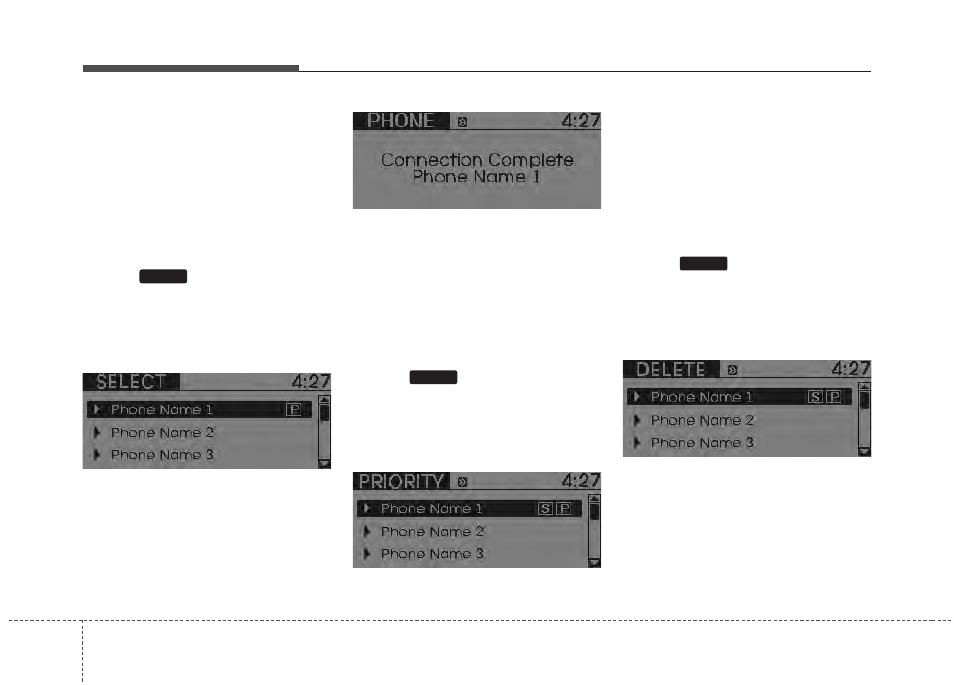
Select “Phone”, then “Select” in PHONE
menu.
➂
Select desired phone name from the list
shown.
➃
The Bluetooth
®
icon appears on the
upper side of audio display when a
phone is connected.
• Changing Priority
If several phones are paired with the
audio system, the system attempts to
connect following order when the
Bluetooth
®
system is enabled:
1) “Priority” checked phone.
2) Previously connected phone
3) Gives up auto connection.
➀
Press
button to enter SETUP
mode.
➁
Select “Phone”, then “Priority” in PHONE
menu.
➂
Select desired phone name from the
list shown.
• Deleting a Phone
The paired phone can be deleted.
- When the phone is deleted, all the infor-
mation associated with that phone is
also deleted (including phonebook).
- If you want to use the deleted phone with
the audio system again, pairing proce-
dure must be completed once more.
➀
Press
button to enter SETUP
mode.
➁
Select “Phone”, then “Delete” in PHONE
menu.
➂
Select desired phone name from the list
shown.
SETUP
SETUP
SETUP