Seiko 7D46 User Manual
Page 12
English
English
12
13
2. Turn the crown to set the time.
✽ Remember to check the 24-hour indicator to correctly set AM/PM.
✽ To set the time accurately, advance the minute hand 4 to 5 minutes ahead of the correct time,
and then turn it back to the exact time.
3. Push the crown back into the original position. The watch immediately starts
ticking.
✽ To set the second hand exactly, push the crown back into the original position in accordance
with a time signal.
CAUTION
● Avoid setting the time or calendar at a time between 23:00 and 1:00.
✽ If you adjust the time or calendar at a time between 23:00 and 1:00, and the date is
incorrectly advanced or delayed one day, readjust the watch avoiding the above period
of time.
● While the watch runs in normal operation, the date changes during the time
between 23:30 and 0:30.
HOW TO SET THE TIME AND CALENDAR
● If there is any time difference between the factory default time settings and
the local time in your area, reset the time and calendar before initially using
the watch after purchase.
● In a case that the watch is completely stopped due to a shortage of stored
electrical energy, recharge the watch until the second hand resumes the
normal one-second interval movement, and then reset the time and calen-
dar. (Refer to “IF THE SECOND HAND STARTS MOVING AT TWO-SECOND
INTERVALS” on page 18.)
■ HOW TO SET THE TIME
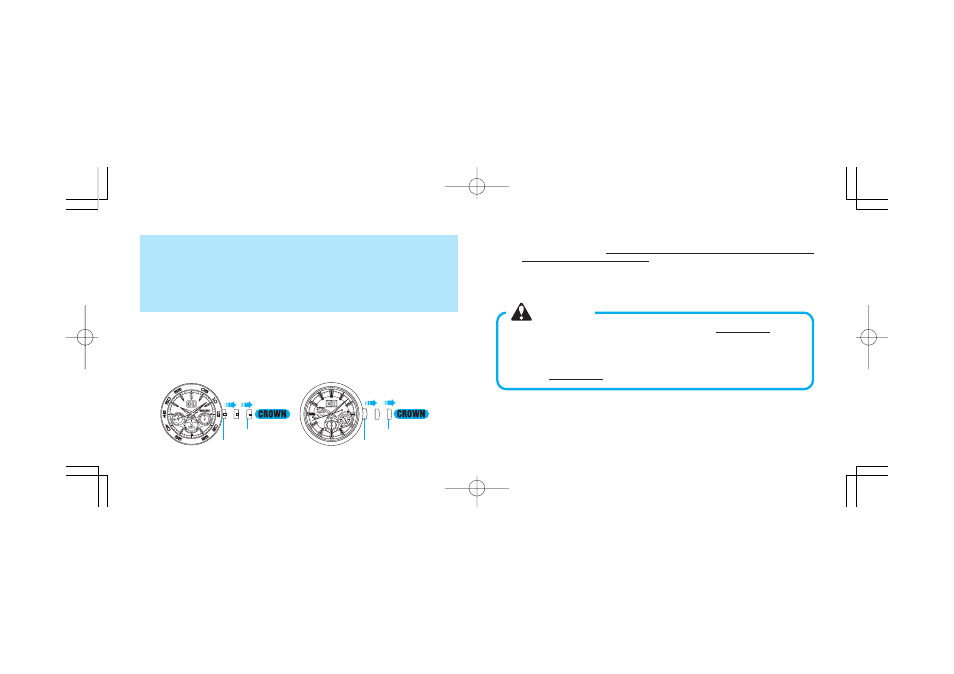
1. Pull out the crown to the second click. The second hand will be stopping on the spot.
✽ If your watch has a screw lock type crown, unscrew the crown first, and then pull it out to
the second click.
✽ To set the second hand exactly, pull out the crown to the second click at a moment the
second hand is pointing to the 12 o’clock (“ 0 ” second) position.
Original position
Second click position
Original position
Second click position
[Cal. 7D46]
[Cal. 7D48]