Seiko DH33 User Manual
Page 7
12
English
13
English
Notes:
1. For 10 minutes after a dive, FO
2
setting cannot be made.
2. If the watch is left untouched in the FO
2
SETTING display, the
display will automatically return to the FO
2
in 1 to 2 minutes.
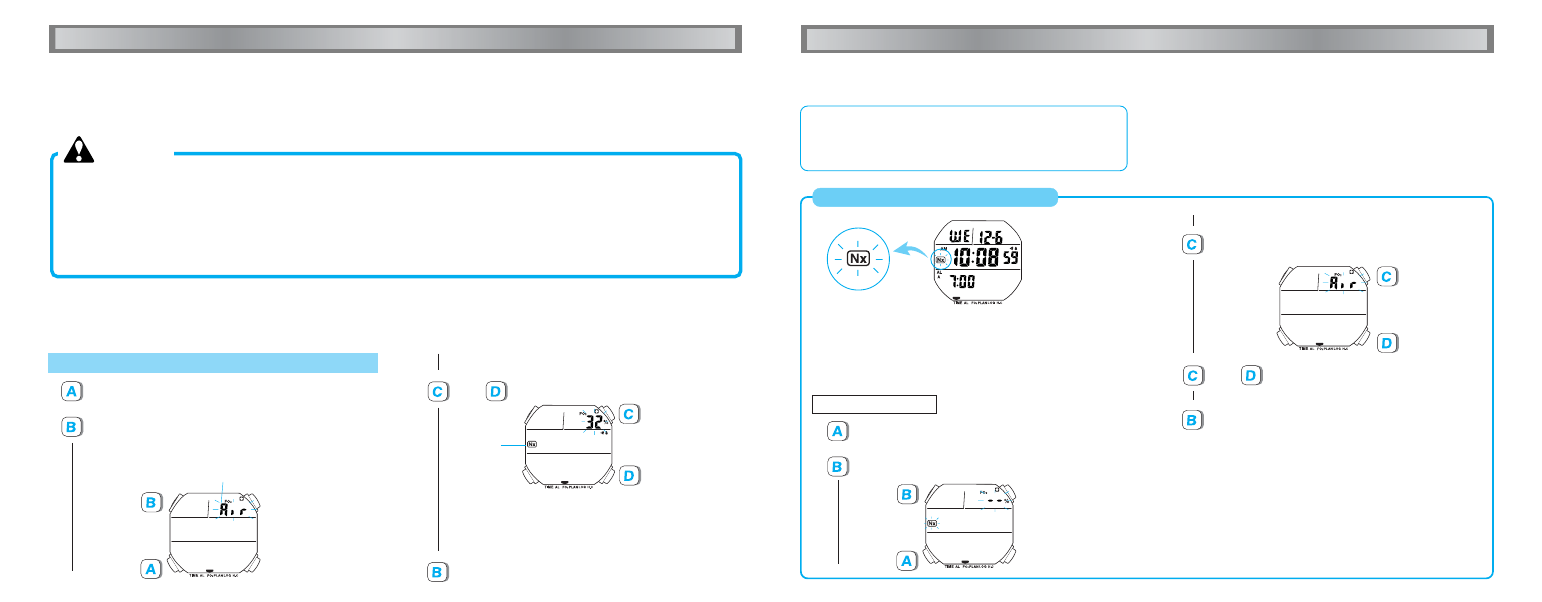
When the nitrox mark “Nx” is flashing:
Nitrox mark
●
If FO
2
was set for nitrox diving the previous day and the date
has changed to the next, a flashing “Nx” is shown on the
display. In that case, be sure to set FO
2
newly before the
next dive according to the gas mixture of your scuba tanks.
●
How to re-set FO
2
Press to show FO
2
display.
Press to show FO
2
SETTING display.
Press once to show “Air” for diving with ordinary
air.
or
Press to set FO
2
if you wish to dive
with nitrox.
• “Nx”
disappears.
Press to return to FO
2
display.
▼
▼
▼
▼
▼
HOW TO SET FO
2
Press to show FO
2
display.
Press to show FO
2
SETTING display.
* For diving with ordinary air, set “Air” for FO
2
.
Percentage of oxygen
“Air”: 21% for diving with ordinary air
Press to return to FO
2
display.
or
Press to set FO
2
.
* With each press of buttons C and D, the percentage is increased
and decreased in increments of 1%, respectively. The digits
move quickly by keeping the respective buttons pressed.
* If a value between 22% and 50% is set for FO
2
, the nitrox
mark “Nx” appears on the display.
Nitrox mark
• “+” and “–”
appear near
buttons C and
D, respectively.
▼
▼
▼
▼
HOW TO USE DIVE COMPUTER FUNCTIONS
■ NITROX DIVING FUNCTION
HOW TO USE DIVE COMPUTER FUNCTIONS
●
The percentage of oxygen in the air used for ordinary diving is 21%. The higher percentage of oxygen in the gas mixture means a lower
percentage of nitrogen than ordinary air, reducing the risk of decompression sickness.
WARNING
● This function should be used only when you dive with
a gas mixture of oxygen and nitrogen other than
ordinary air. When diving with air, be sure to set the
percentage of oxygen (FO
2
) to “Air”.
● Never use the watch for diving with any value other
than the actual percentage of oxygen in your tank set
for FO
2
.
● If you have set FO
2
for nitrox diving, be sure to re-check
the FO
2
setting before a dive. On the day following the
day you made a nitrox dive, “– –” is displayed in place
of the FO
2
setting, “Nx” flashes, and the watch cannot
be used for diving. In that case, set FO
2
again.
●
By setting “Air” for FO
2
, the percentage of oxygen is set to 21% as in the ordinary air. FO
2
can be set from 22% to 50% according to
the gas mixture of your scuba tank.
●
When a value between 22 and 50 is set for FO
2
, the nitrox mark “Nx” appears on the display, and the watch is shifted for nitrox diving.
●
The watch calculates the no-decompression limit, residual nitrogen and other data according to the FO
2
you have set.