Introduction, Features – Smart Avi SDX-Plus User Manual
Page 2
Introduction
Using HDBaseT technology, the SDX-Plus DVI extender
is capable of sending a DVI-D signal up to 400 feet over
a single conventional and inexpensive CAT5 UTP cable.
HDBaseT technology is superior to older DVI extenders
that require special CAT6 shielded cable to go a short
distance. The SDX-Plus also has USB keyboard and
mouse, RS232 and IR extension, giving you the ability to
control your displays or devices remotely.
Features
•
Extends DVI-D up to 400 feet (120m) from
the source
•
Data recovery for digital video
•
Supports up to 1920x1200 digital video
resolution
•
Automatic DDC Learning
•
USB Keyboard and Mouse
•
Uncompressed Video HDBaseT
•
IR and RS232 extension allows for remote
control of displays
•
External power adapter for transmitter and
receiver unit
•
Plug and play
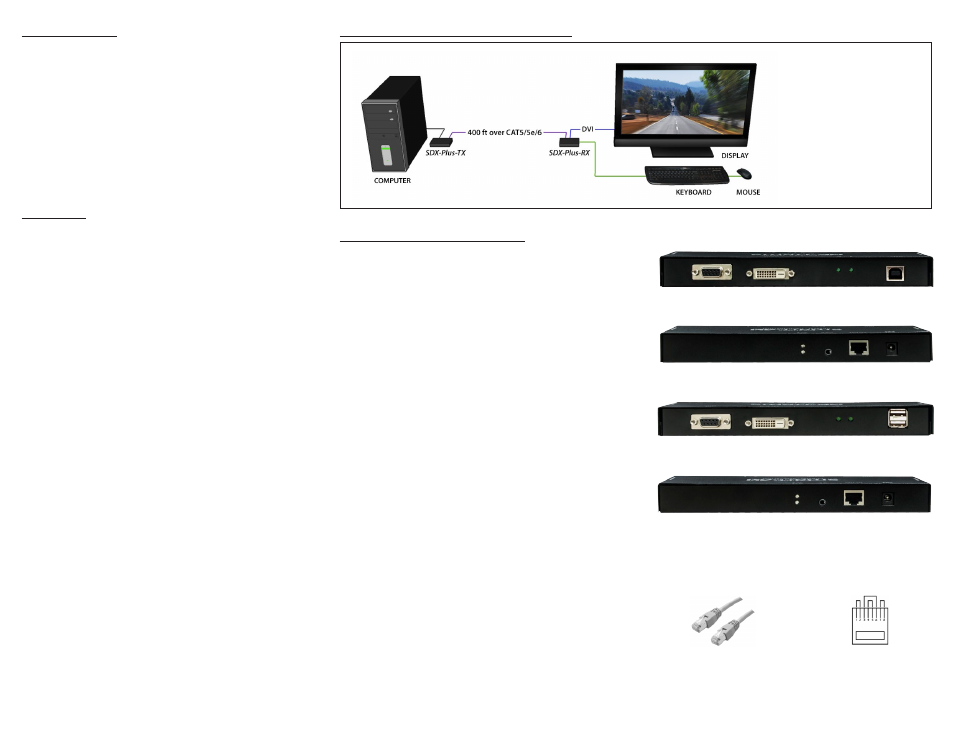
Product - Installation Diagram
Connecting the SDX-Plus
1. Power off all devices.
2. Connect a DVI-D source (computer) to the DVI-D
port on the SDX-Plus-TX.
3. Connect a USB source (computer) to the USB port
on the SDX-Plus-TX.
4. Optionally connect RS232 and IR for control
functions.
5. Connect the SDX-Plus-TX to the the SDX-Plus-RX
with one CAT5 UTP (Unshielded Twisted Pair)
cable.
6. Connect a DVI-D compatible display to the DVI-D
port on the rear of the SDX-Plus-RX.
7. Connect USB keyboard and mouse to the USB
ports on the SDX-Plus-RX.
8. Optionally connect RS232 and IR for control
functions.
9. Connect the power to the SDX-Plus-RX and the
SDX-Plus-TX.
10. Power on the display and then the computer.
The DDC of your display will be learned
automatically.
The following is the wiring standard for terminating UTP/STP
cable using RJ-45 connector:
Connectors: RJ-45
Capacitance:
14 pf/ft (46.2 pf/m)
Conductor Gauge:
24 AWG
Impedance:
100 +/- 15 ohms
Pair 1
Pins 1 & 2
Pair 2
Pins 3 & 6
Pair 3
Pins 4 & 5
Pair 4
Pins 7 & 8
SDX-TX Front
SDX-RX Front
SDX-TX Rear
SDX-RX Rear
APPLICATIONS
• Security
• PC Networking
• Conference Center Systems
• Point of Sale
• Camera Surveillance
• Video Phone
• Control Room Systems
• Recording Studio
• PC KVM Extension
To reach maximum distances with HDBaseT technology,
it is recommended to use the best possible quality
cable available. CAT5e/6 shielded cabling is ideal for
best performance.