Key operations / quick chart – Alinco DJ-A10 User Manual
Page 26
Professional
FM Transceiver
08
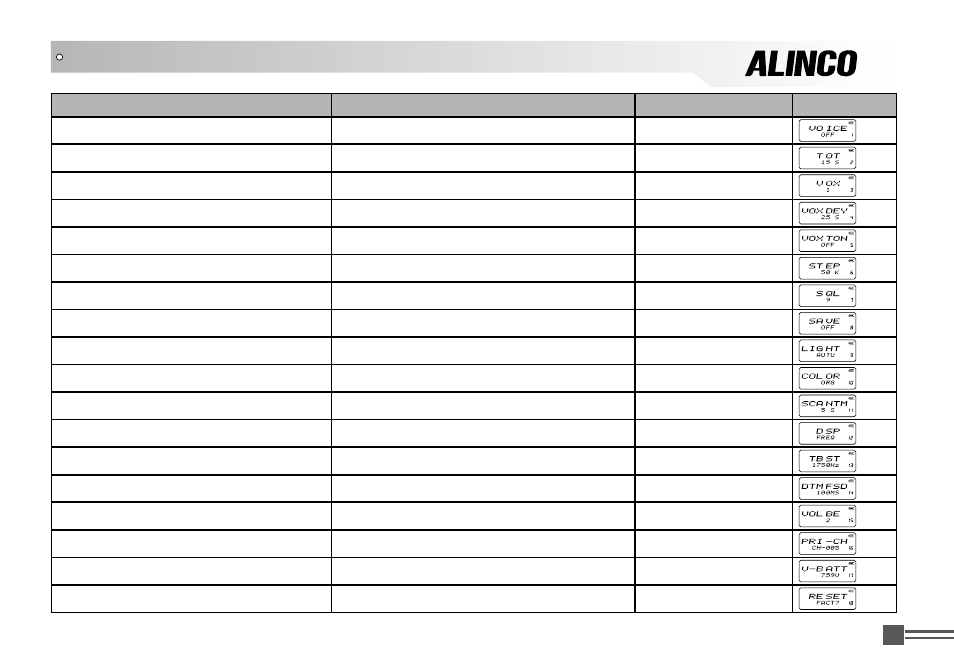
Function
Menu Entry
Function Option Display
Voice Prompting Selection
Press PF2 and hold this key for 3 seconds
【
B
】
/
【
C
】
Time-Out Timer (TOT)
Press PF2 and hold this key for 3 seconds
【
B
】
/
【
C
】
Voice Operated Transmission (VOX) Setup
Press PF2 and hold this key for 3 seconds
【
B
】
/
【
C
】
Voice Operated Transmission (VOX) Delay
Press PF2 and hold this key for 3 seconds
【
B
】
/
【
C
】
Voice Operated Transmission (VOX) Beep
Press PF2 and hold this key for 3 seconds
【
B
】
/
【
C
】
Frequency Step Setup
Press PF2 and hold this key for 3 seconds
【
B
】
/
【
C
】
Squelch level Setup
Press PF2 and hold this key for 3 seconds
【
B
】
/
【
C
】
Battery Save Setup
Press PF2 and hold this key for 3 seconds
【
B
】
/
【
C
】
LCD Backlight Setup
Press PF2 and hold this key for 3 seconds
【
B
】
/
【
C
】
LCD Backlight Color
Press PF2 and hold this key for 3 seconds
【
B
】
/
【
C
】
Scan Dwell Time Setup
Press PF2 and hold this key for 3 seconds
【
B
】
/
【
C
】
Display Mode Setup
Press PF2 and hold this key for 3 seconds
【
B
】
/
【
C
】
Tone Pulse Frequency Setup
Press PF2 and hold this key for 3 seconds
【
B
】
/
【
C
】
DTMF Transmitting Time Setup
Press PF2 and hold this key for 3 seconds
【
B
】
/
【
C
】
Beep Volume Control
Press PF2 and hold this key for 3 seconds
【
B
】
/
【
C
】
Priority Channel Setup
Press PF2 and hold this key for 3 seconds
【
B
】
/
【
C
】
Current Battery Voltage Enquiry
Press PF2 and hold this key for 3 seconds
【
B
】
/
【
C
】
Resume Factory Default
Press PF2 and hold this key for 3 seconds
【
B
】
/
【
C
】
KEY OPERATIONS / QUICK CHART