Cameraman ports and jacks – Grass Valley 3-CCD ANALOG CameraMan Rev.B User Manual
Page 8
Page 5
Meet Your 3-CCD Camera System
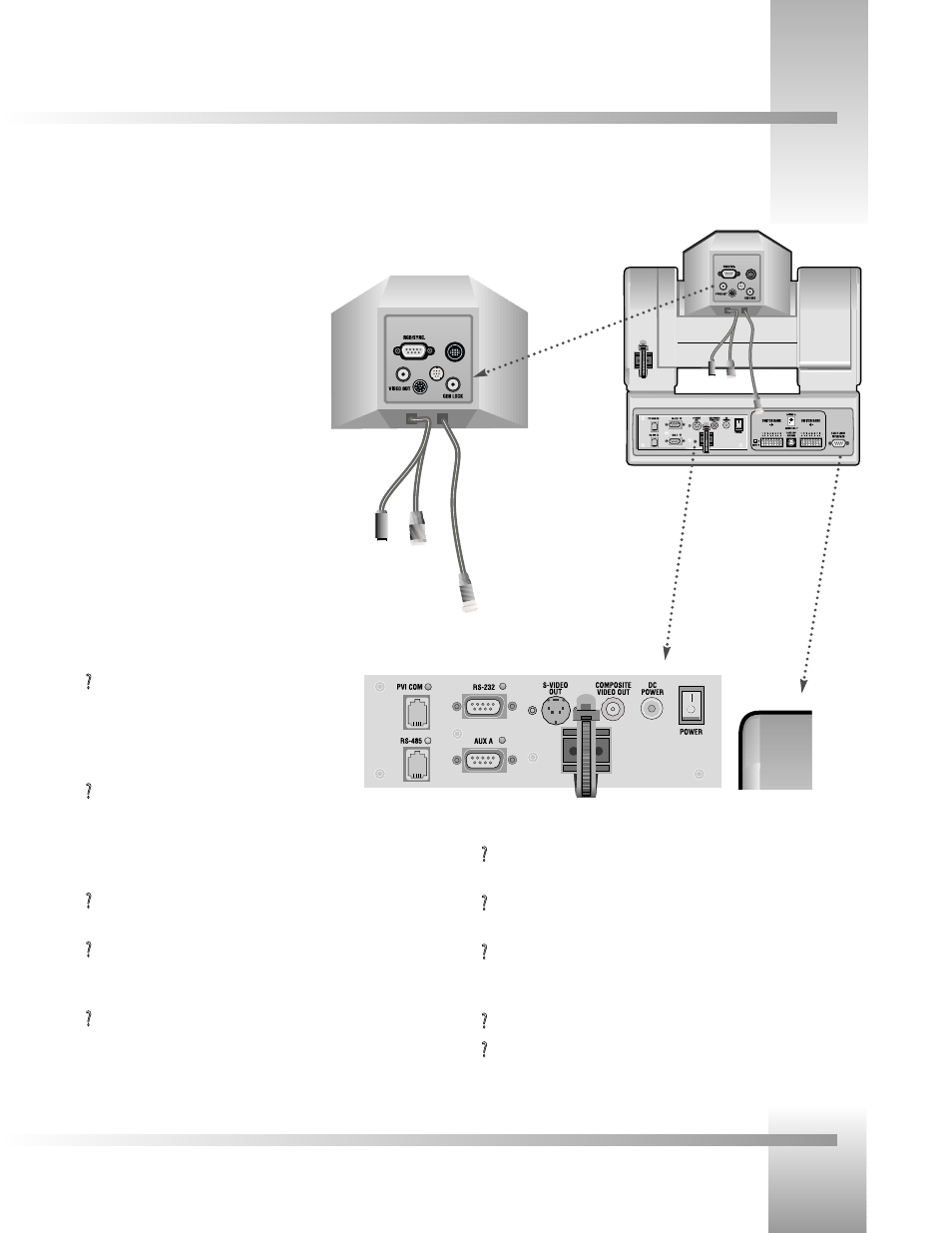
The back of your new CameraMan has a variety of ports and jacks used to connect your camera to other video, audio, and camera
control components in your system.
CameraMan Ports and Jacks
?
Cable Restrainer– Helps keep cables from becoming disconnected, or
hindering the pan and tilt capabilities of the camera.
?
Composite Video Jack– Provides direct composite video output. Connector
is a standard BNC-type jack. Video cable is not provided.
?
DC Power Jack– Power input for the CameraMan Camera. Plug only the
provided power supply into this jack. No other types of power
supplies should be used.
?
Power– Used to power on/off the CameraMan Camera.
?
Tally Light Port- Provides output and external control for CameraMan Tally
Light.
?
PVI COM Jack– Used by certain
devices as a communication interface to the
camera system. (For example, a hard-wired keypad
would attach here). This is a standard 6-conductor
RJ-11 jack.
?
RS-485 Jack–- Used for RS-485 communications
between the camera system and other devices.
This jack can be used to network multiple cameras or to connect
appropriate, approved peripherals using a Grass Valley T-
connector. This is a standard 4-position modular handset jack.
?
Auxiliary Communication Port– Provides communications to select
Grass Valley peripherals and provides capability for future expansion.
?
RS-232 Port–Provides RS-232 communications to external devices such as
PC's or other vendor control systems. This connector is a standard DB-9
(female) connector.
?
S-Video Jack–- Provides direct S-VIDEO video output. Connector is a
standard mini DIN jack. S-Video cable is not provided.
▼
▼
RGB/Sync. Port– DB-9 connection that provides
RGB/Sync, component, Y/C, and composite video
signal output.
▼
▼
Video Out Jack– Aux BNC connection for
composite video output.
▼
▼
Gen Lock Jack– BNC connection used to
synchronize the camera to an outside sync
source.
▼
▼
Camera Control Cables and Jacks– The three
cables connect to the 12, 8 and 20-pin jacks to
control the camera’s lens, power and video signals.
Back of 3-CCD
CameraMan with
connector box attached
and configuration plate
removed
Back of Camera
Shroud
Ports and Jacks
Tally Light Port