Operating the appliance, Grilling and baking – Silvercrest SGBR 1500 A1 User Manual
Page 12
9
SGBR 1500 A1
GB
Operating the appliance
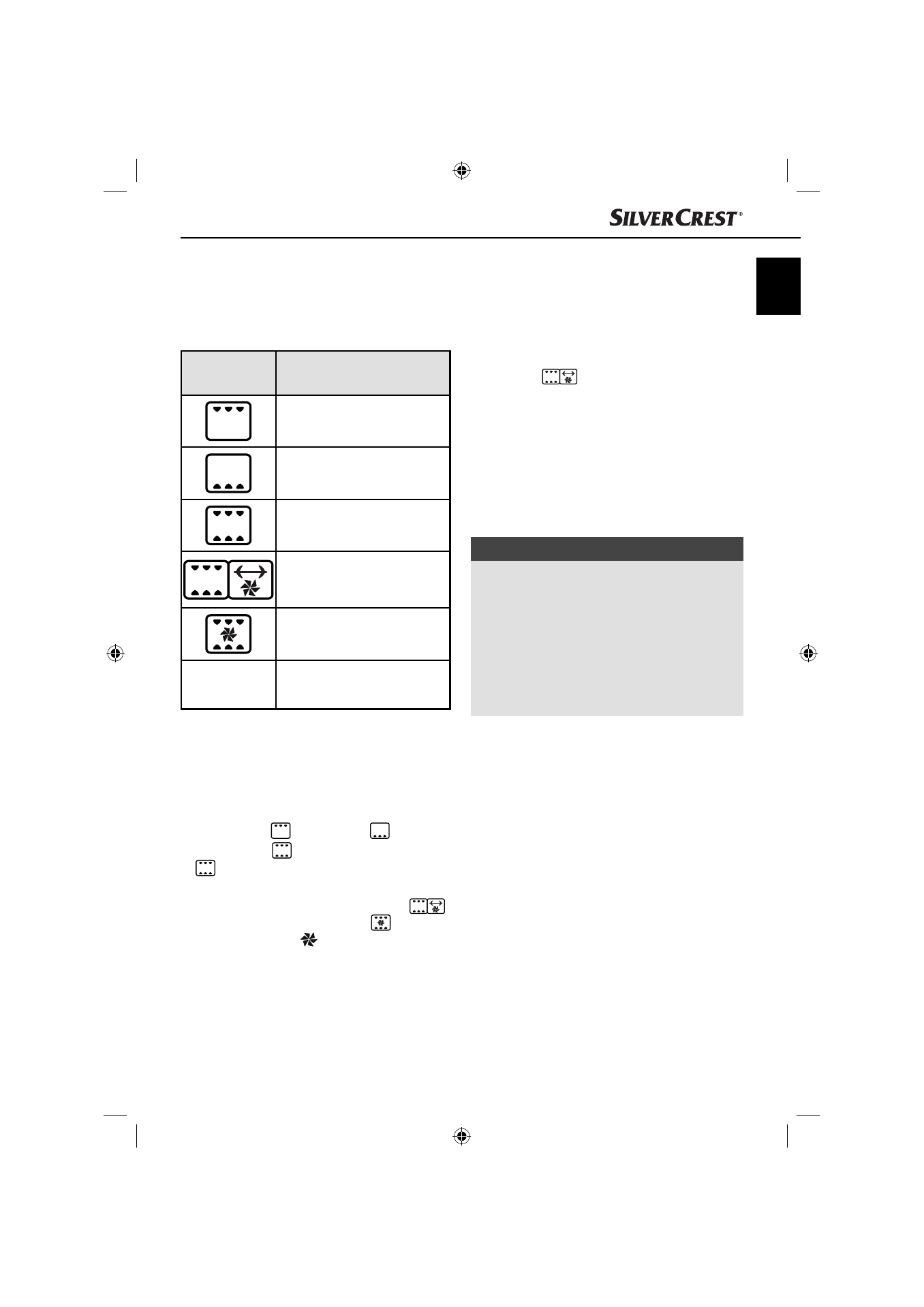
Function switch
You can switch on the appliance with the function
switch 3, and also set 5 diff erent functions:
Symbol
Meaning
"Upper heat"
e.g. to gratinate
"Lower heat"
e.g. for baking
"Upper & lower heat"
e.g. for baking a pizza
"Upper & lower heat/hot air/
rotisserie"
e.g. to roast poultry
"Upper & lower heat/hot air"
e.g. to reheat rolls
OFF
"OFF" the appliance is
switched off .
Temperature control
Use the temperature control 2 to set the desired
temperature.
■
If you set the temperature for the functions
“Upper heat”
, “Lower heat”
or “Upper
& lower heat”
use the scale marked with “
”.
■
If you set the temperature for the functions
“Upper & lower heat/hot air/rotisserie”
or “Upper & lower heat/hot air”
use the
scale marked with “
”.
Timer
User the timer 4 to set the cooking time.
■
Set the timer 4 to the desired cooking time.
After expiry of the set time a signal tone sounds
and the appliance stops heating.
If the function “Upper & lower heat/hot air/
rotisserie”
is selected, the rotisserie z
will also stop turning.
Grilling and baking
1) Put the crumb tray 7 into the appliance.
2) Remove the rack e and baking tray q from
the appliance. If required, cover these with
baking paper or lightly grease the baking tray q
with suitable baking fat.
NOTE
►
Depending on the meal, the oven must be
preheated. Refer to the guidelines in the
respective recipe. Preheating is useful for:
–
very short baking times,
–
crisp crusts,
–
sensitive meals that require a constant
temperature, such as souffl és.
►
If no preheating is required, skip step 3).
3) Allow the appliance to heat up for approx.
10 minutes (depending on the temperature
setting) to the required temperature:
–
Select the required temperature using the
temperature control 2. Ensure that you use
the correct scale (see chapter “Temperature
control”).
–
Select the required function with the function
switch 3.
IB_102464_SGBR1500A1_LB4.indb 9
IB_102464_SGBR1500A1_LB4.indb 9
30.06.14 11:51
30.06.14 11:51