Setting up and connecting, Before the initial use – Silvercrest KH 2431 User Manual
Page 73
70
Setting up and connecting
KH 2431
GB
MT
Before the initial use
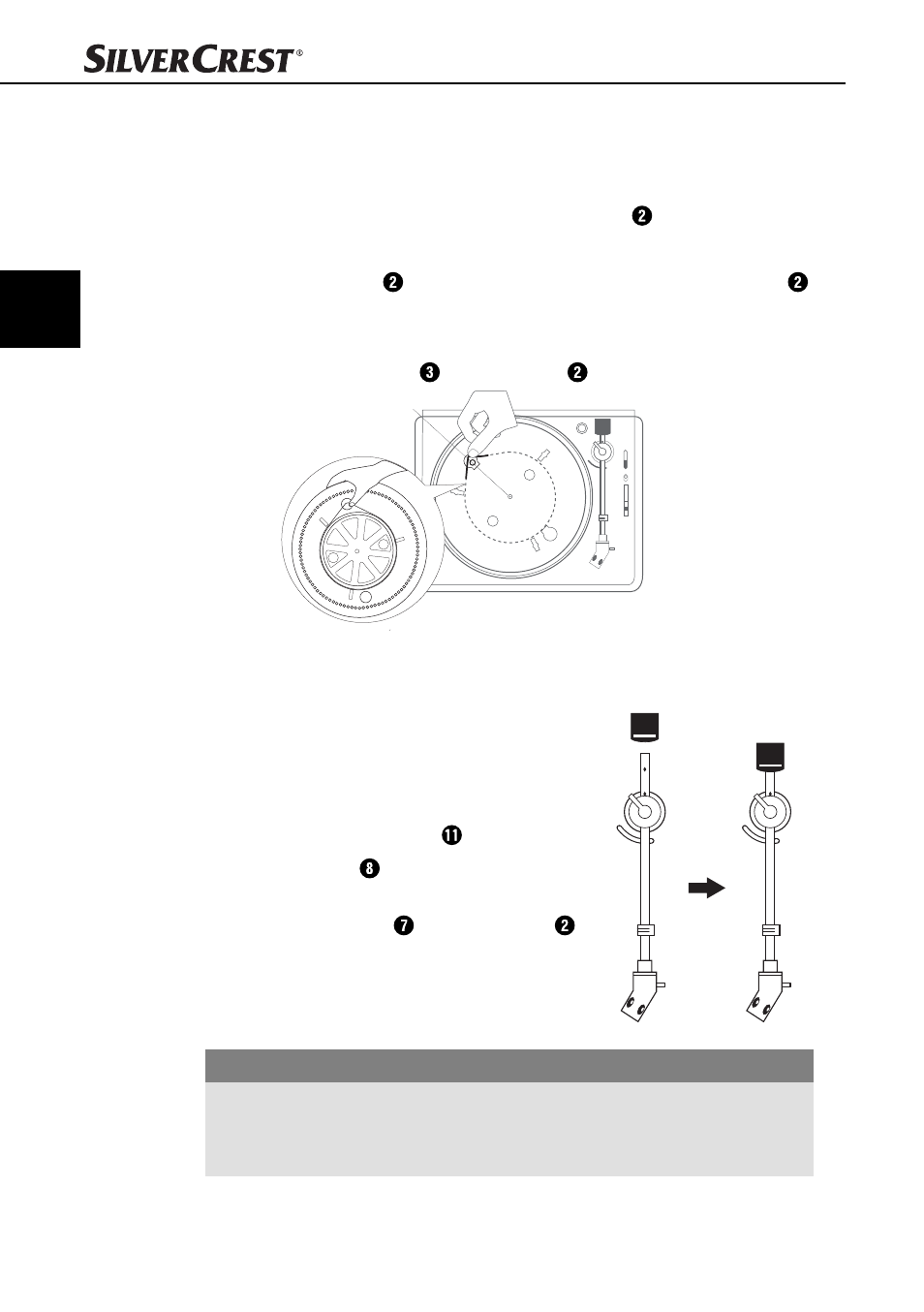
Fitting the turntable
♦
Place the belt around the underside of the turntable .
♦
Pull the belt outwards.
♦
Place the turntable on the motor shaft so that the recess in the turntable
lies over the belt pulley. Thereby, hold the belt tensioned.
♦
Place the belt around the belt pulley of the drive motor.
♦
Place the turntable mat on the turntable .
Setting the tracking pressure
♦
Insert the counterweight onto the tone arm until
it clicks into place. Thereby, the adjustment
ring should face forwards.
♦
Remove the protective cover from the stylus.
♦
Release the securing lever of the tone arm.
♦
Move the lever to the front position to raise
the tone arm.
♦
Swing the tone arm over the turntable .
IMPORTANT
Potential stylus damage.
The stylus can be damaged.
►
Hold the tone arm fi rmly so that the stylus does not touch the turntable.
Buch_53140_LB5.indb 70
05.04.12 13:59