Controls, Fitting the support feet, Installation site requirements – Silvercrest SLB 1.2 B2 User Manual
Page 57
GB
54
SLB 1.2 B2
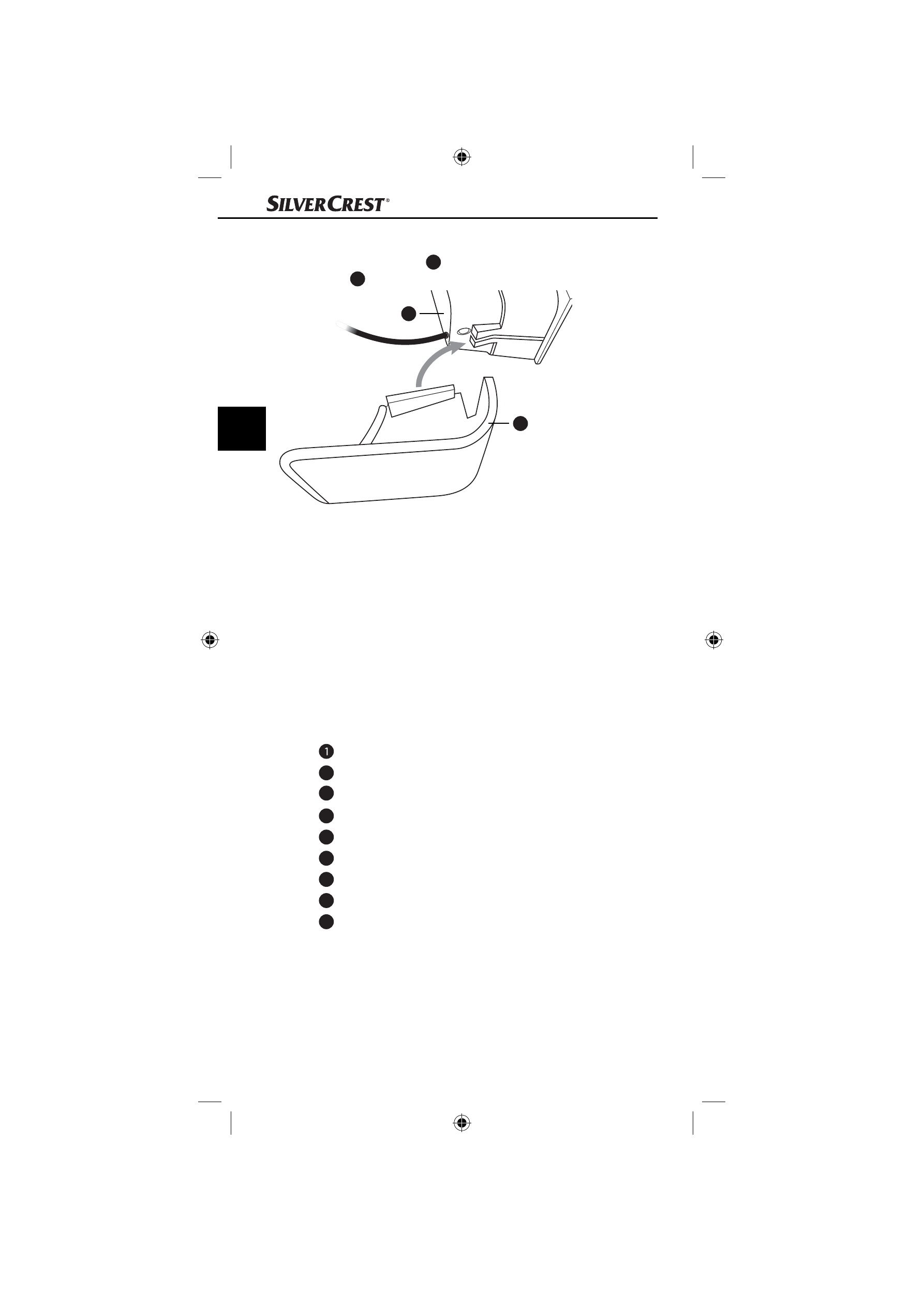
Fitting the support feet
♦
Slide the support feet
7
onto the loudspeaker guide rails from
behind
6
(see fi g. 1).
Fig. 1
Installation site requirements
For safe and trouble-free operation of the device, the installation site
must fulfi l the following requirements:
■
The device must be placed on a fi rm, fl at and level surface.
■
Do not place the device in a hot, wet or extremely moist environ-
ment or in the vicinity of fl ammable materials.
■
Place the device so that it is not exposed to direct sunlight, strong
artifi cial light or heated air.
Controls
LIGHT switch (ON / OFF)
2
TREBLE switch (ON / OFF)
3
BASS switch (ON / OFF)
4
Rotary switch (on/off and volume control)
5
Headphone socket (3.5 mm jack plug)
6
Loudspeaker
7
Support
foot
8
Loudspeaker cable with 3.5 mm jack plug
9
Power supply cable with USB plug
6
7
IB_89655_SLB1.2B2_LB1.indb 54
IB_89655_SLB1.2B2_LB1.indb 54
16.05.13 11:02
16.05.13 11:02