2 configuring the network setting – PLANET VGW-400FO User Manual
Page 21
Advertising
4-Port SIP Internet Telephony Gateway
VGW-400 Series
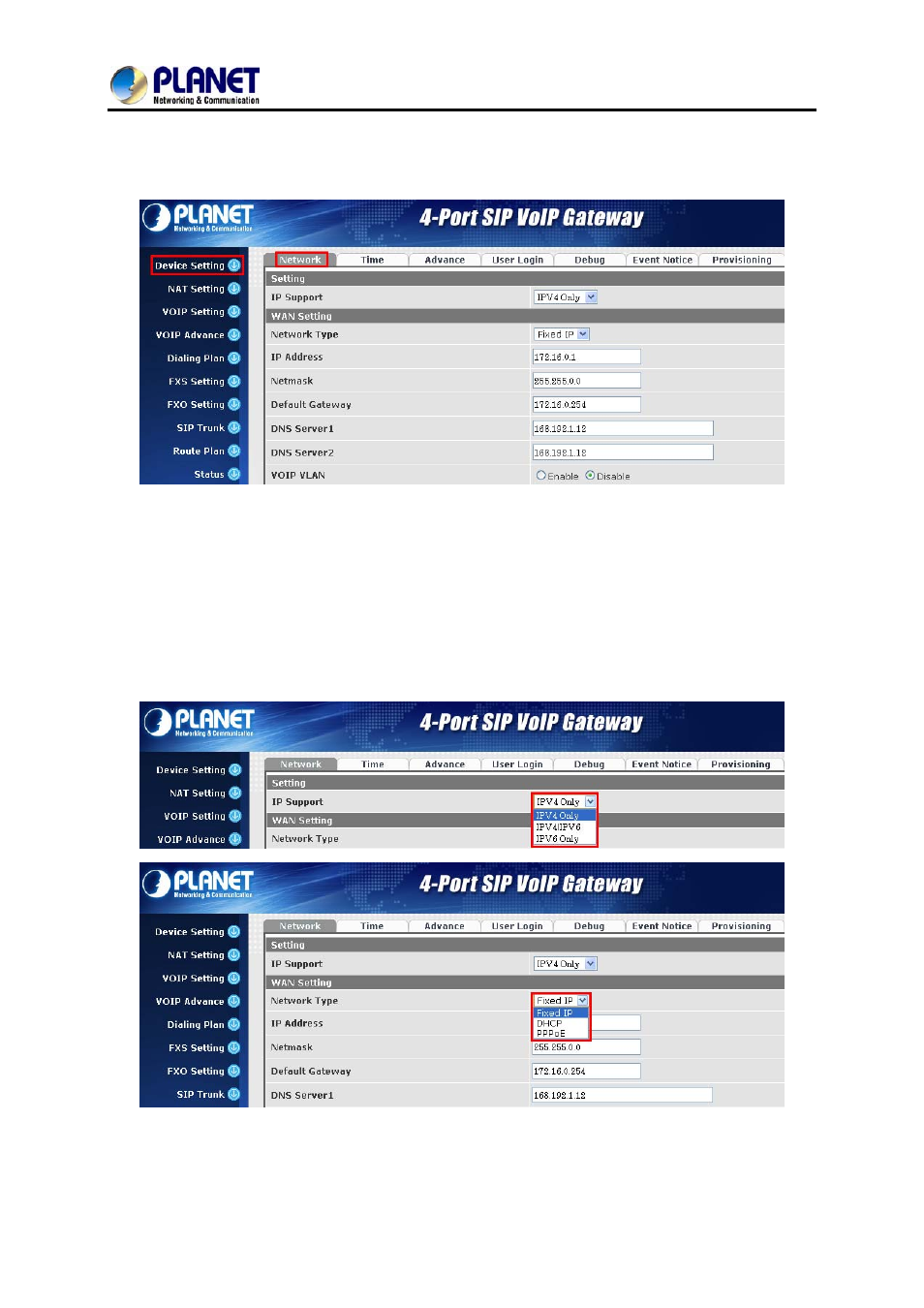
2.2 Configuring the Network Setting
Step 1. Go to Device Setting → Network
Network setting page
Step 2. Edit your WAN port IP information.
There are three types of IP Support -- IPV4 Only, IPV4 / IPV6, IPV6 Only. There are also three types of
WAN port connection -- Static IP, PPPoE (Point-to-Point Protocol over Ethernet) and DHCP. You can
find detailed setting process in the user manual.
Selection of IP Support / Network Connection Type
21
Advertising
See also other documents in the category PLANET Phones:
- VIP-156 (68 pages)
- VIP-156 (75 pages)
- VIP-156 (76 pages)
- VIP-156 (68 pages)
- ATA-150 (36 pages)
- ATA-150 (51 pages)
- FRT-420SN (80 pages)
- FRT-420SN (2 pages)
- ICF-1600 (34 pages)
- ICF-1600 (63 pages)
- ICF-1800 (2 pages)
- ICF-1601 (42 pages)
- ICF-1700 (32 pages)
- ICF-1700 (115 pages)
- IPX-1900 (14 pages)
- IPX-1900 (84 pages)
- IPX-2000 (51 pages)
- IPX-1980 (12 pages)
- IPX-1980 (89 pages)
- IPX-1500 (85 pages)
- IPX-2000 (14 pages)
- IPX-2100 (12 pages)
- IPX-330 (20 pages)
- IPX-330 (102 pages)
- IPX-330 (16 pages)
- IPX-300 (82 pages)
- IPX-300 (20 pages)
- IPX-300 (96 pages)
- MCU-1900 (2 pages)
- MCU-1900 (27 pages)
- SIP-50 (27 pages)
- UP-120 (15 pages)
- UP-121 (11 pages)
- VGW-400FO (12 pages)
- VIP-400FO (130 pages)
- VIP-101T (34 pages)
- VIP-880 (93 pages)
- VIP-193 (2 pages)
- VIP-193 (83 pages)
- VIP-192 (74 pages)
- VIP-251T (2 pages)
- VIP-251T (57 pages)
- VIP-254NT (2 pages)
- VIP-254NT (57 pages)